
Welcome to ProjeQtOr new Forum. We migrated old forum to the new website.
You will find all your posts here, with your usual account.
Just one point : you’ll have to reinitialize your password. Use “Lost password” feature.

Hi,
We need to hide some projects / activities in our planning's screen. But we doesn't want give the possibility to add times on each activities to all ressource.
How can we do that ?
- We try to use this checkbox on projet configuration :
But, it doesn't work.
- we try administrative project type. But all our ressource can add time on each activities of project.
Thanks for your help,

HI
Please explain more precisely both of them.
It is not possible to hid a project on gantt chart if the ressource is always allocuted on this project and have so on right to access this gantt view.
we can not hid any activity neither by activity on Gant view as soons as the project is visible
Regards,
Hi,
Thanks for your answer.
So what is the objectif of this checkbox (you can show on the attachement) ?
Actually, we want to give access of our direction to show our planning, but we don't want to show Administrative project of them. But activities of administrative project need to be invisible of ressources with no need to affect time.
Thanks,

Following the conception of projeqtor, a project typed "Administrative" does not appear on Gantt because it only recalls the absences.
I think you are talking about task ( activity) with admintrative work planned onto ?
Anyways, it is not possible to hid one or severals activities on Gantt.
What is the aim of the checkbok (on my last message) ?

Thios checkbox will hide this project (and its data) on the "Global Planning" view, where you can see planable items and some non planable items (tickets, decisions, ...)
It has no effect on main "Planning" view.
Ok, I have a project with this flag to true but I see it on the "Planning Global" view. Is it normal to view Activity and meeting ?
Show my screen shot
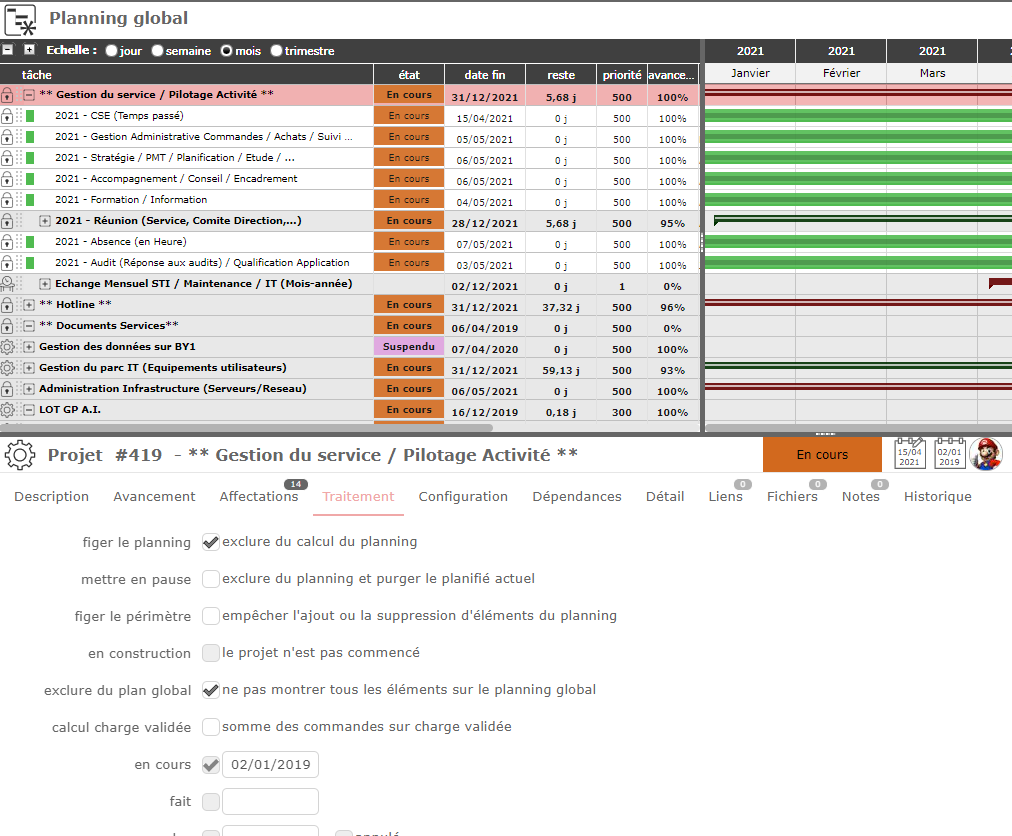
My mistake.
As correctly describe on toolbox that appears when you move over the ckeckbox, this option will not hide the project, but only the non-plannable items of the project o, the global planning.