
Welcome to ProjeQtOr new Forum. We migrated old forum to the new website.
You will find all your posts here, with your usual account.
Just one point : you’ll have to reinitialize your password. Use “Lost password” feature.

Hi Babynus,
first let me thank you for the new improvements - I'm more than happy about.
I didn't test all the new stuff, but I had follwing findings:
Fully configurable Today screen :
* select period of tasks to be displayed (based on due date)
* "due date" and "not set" filter didn't work.
Display any report on today screen
* Include report -> work synthesis: error message "Fatal error: Call to undefined function percentFormatter() in /users/projector/www/projector/report/workPlan.php on line 114". This is only on screen. Printout works well.
Reports:
* Planning - Portfolio Gantt planning: scale for Quarterly not available.
* Planning - gantt : scale for Quarterly not available.
Email improvement
* The new selection for mails on status change should be available as well in indicators
Display issue
If you have all menu items displayed, then it overlaps the "move right button" -> see screenshot
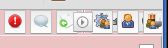
Regards,
Klaus

Fully configurable Today screen :
* select period of tasks to be displayed (based on due date)
* "due date" and "not set" filter didn't work.
Issue is due to table "todayParameter". Should be called "todayparameter" on linux.
Patch is ongoing. Ticket #1080.
Display any report on today screen
* Include report -> work synthesis: error message "Fatal error: Call to undefined function percentFormatter() in /users/projector/www/projector/report/workPlan.php on line 114". This is only on screen. Printout works well.
Ticket #1081 recorded
Reports:
* Planning - Portfolio Gantt planning: scale for Quarterly not available.
* Planning - gantt : scale for Quarterly not available.
ticket #1082 recorded
Email improvement
* The new selection for mails on status change should be available as well in indicators
Evolutive ticket #1083 recorded (planned on V3.4.0)
Display issue
If you have all menu items displayed, then it overlaps the "move right button" -> see screenshot
I do not reprodce this issue, and there was no change on this part.
Did it exists on V3.2 ?
Which browser / version ?
Does it persist if you refresh page with cache refresh (F5) ?
Thanks for testing and reporting these issues.
I do not reprodce this issue, and there was no change on this part.
Did it exists on V3.2 ?
Which browser / version ?
Does it persist if you refresh page with cache refresh (F5) ?
- I discovered it on my V3.3.0 test, but it's on V3.2.2 as well.
- It occurs only, when many icons to be displayed and screen is in reduced display. If I increase to my both screens, then my display is OK.
- Browser is Chrome 26.0.14.
- A refresh didn't bring improvement.
Hi,
I could reproduce with window "reduced".
Ticket #1085 recorded.

hi,
there is a little problem with FireFox compatibility for planning pages (Planning, Portfolio, Planning per ressources)
the dashboard screen is not regular
----
about the "Display issue
If you have all menu items displayed, then it overlaps the "move right button" -> see screenshot"
i've got the same problem with Firefox and ie.
Hi,
I have no issue with planning on FF.
Could you give more detail ?
- Version of FF ?
- Version of OS ?
- print screen ?
Does issue still occur after browser cache refresh ?
hi
it's not occur today (exept for the "move right button")

it's not occur today
So, it was possibly cache issue.
exept for the "move right button"
OK, this issue is recorded.