
Welcome to ProjeQtOr new Forum. We migrated old forum to the new website.
You will find all your posts here, with your usual account.
Just one point : you’ll have to reinitialize your password. Use “Lost password” feature.

HelloV 9.1.2
I'm am in an activity, it says 6 Linked element but there not showing up
Any hint on how to solve the issue ?
Regards
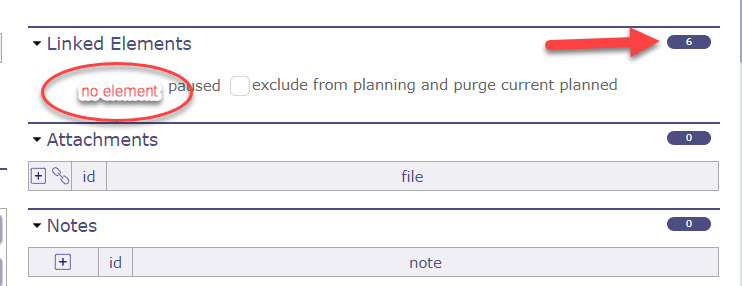

It seems you have unconsistent custom file.
It may happen with customized object with older versions of Screen Customization
Open file projeqtor/model/custom/Activity.php and ensure that fields declaration sets $_sec_Link as almost the last position, just before $_nbColMax (not taking into accouns static fields)
You can refer to projeqtor/model/ActivityMain.php list of fields, that may be the same except for your own customizations.
  public $_sec_ToDoList;
  public $_SubTask;
  public $_sec_Link;
  public $_nbColMax=3;

  public static $_customFields=array(

Hello,
We seem to have the same problem. We only noticed this recently, after updating to V9.1.2. It happened on a ticket. I've checked model/custom/Ticket.php but it seems correct. I also checked the database for any inconsistency in the link refs but there's no problem with that either.
Hi,
Thanks i have modified the file projeqtor/model/custom/Activity.php and everything went back to normal.
Regards

Hello,
I had the same problem with activities --> I applied the modification, it works now
I have the same problem with actions --> the model/custom/Action.php looks like the Activity one ... but the problem still exists 🙁
The very (very very) strange behavior is the following :
- it seems to work (on actions)
- then I set the status of the action to "closed" ... and the display bug is back!
The very (very very) strange behavior is the following :
- it seems to work (on actions)
- then I set the status of the action to "closed" ... and the display bug is back!
Don't you have some customization that hides things depending on status ?
Hello,
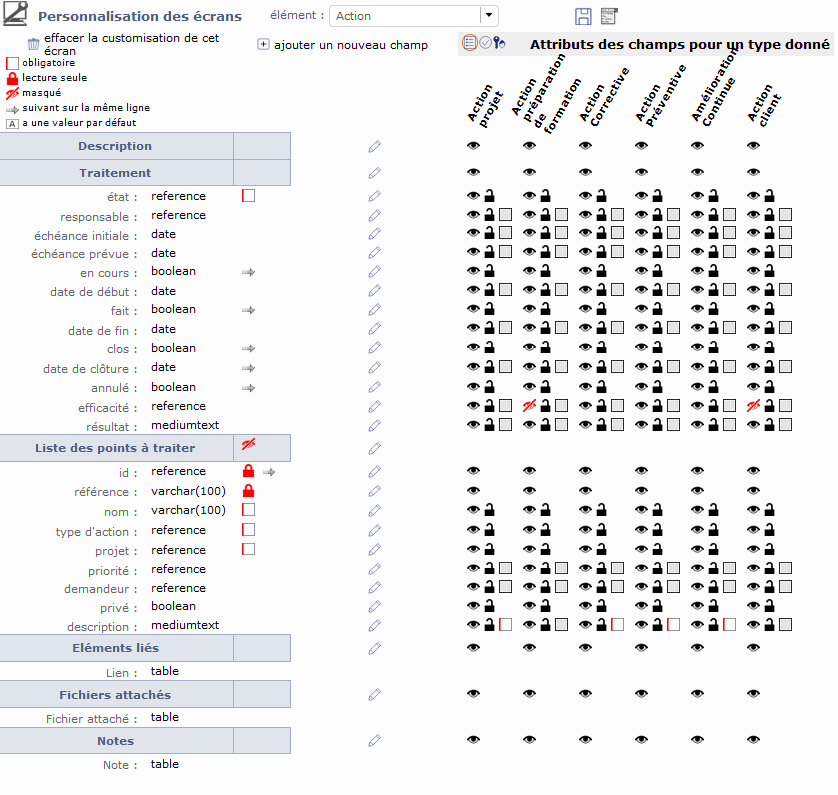
no I hadn’t ... but actually the customization screen is getting mad and out of control ...
(the hidden checkbox of «liste des points à traiter» is actually unchecked and the position of «Traitement» moved when I tried to check/uncheck the «liste des points à traiter» ... and it doesn’t want to go back to its position)
Hi,
It seems you move «liste des points à traiter» (a section) after "description" (section)
Then the tool considered all items that were below "desction" section are new below "liste des points à traiter" section.
I guess you then moved section "liste des points à traiter" after "result"
I got same result as yours this way.
Only way to get things back is to move fields, one by one back under section description
Notice that moving a section may have weids behavior : if you move it before some fields, these fields will move into this section
Exemple : if you have
SECTION A
fld1
fld2
fld3
fld4
SECTION B
fld5
if you move SECTION B after field fld2, you'll get
SECTION A
fld1
fld2
SECTION B
fld5
fld3
fld4