
Welcome to ProjeQtOr new Forum. We migrated old forum to the new website.
You will find all your posts here, with your usual account.
Just one point : you’ll have to reinitialize your password. Use “Lost password” feature.

I found two problems when working on Projeqtor.
1. In lists of objects (p.e. Users), translatable data appears only with internal value ([profileAdministrator]) instead of the translated value ('administrateur').
Not very sexy…
2. When any changes are made in a module for display, there is conflicts between new values or data in the module and recording in 'columnselector' values.
To avoid wrong display, I delete all lines for the concerned entities, so a new recording is done with good data and values (long life to PhpMyAdmin ! 😉
But it seems that something has not been provided for clean structural changes…

1. In lists of objects (p.e. Users), translatable data appears only with internal value ([profileAdministrator]) instead of the translated value ('administrateur').
Not very sexy…
It is because "profileAdministrator" is not included in lang.js file.
2. When any changes are made in a module for display, there is conflicts between new values or data in the module and recording in 'columnselector' values.
To avoid wrong display, I delete all lines for the concerned entities, so a new recording is done with good data and values (long life to PhpMyAdmin ! 😉
But it seems that something has not been provided for clean structural changes…
Yes, there is :woohoo:
In the fields selector list, click the "reset" button.
1. In lists of objects (p.e. Users), translatable data appears only with internal value ([profileAdministrator]) instead of the translated value ('administrateur').
Not very sexy…It is because "profileAdministrator" is not included in lang.js file.
No, all values ARE in lang.js files. They comes right in the detail section when an element is selected.
The problem is only in the objects list (top part of the screen)
2. When any changes are made in a module for display, there is conflicts between new values or data in the module and recording in 'columnselector' values.
To avoid wrong display, I delete all lines for the concerned entities, so a new recording is done with good data and values (long life to PhpMyAdmin ! 😉
But it seems that something has not been provided for clean structural changes…Yes, there is :woohoo:
In the fields selector list, click the "reset" button.
Where is that “fields selector list”? Not found on any screen, nor in the documentation…
The problem is only in the objects list (top part of the screen)
They are translated : exemple, profile in user list is correctly translated.
You muist just correctly define format in $_layout :
${idProfile}
Where is that “fields selector list”? Not found on any screen, nor in the documentation…
Here :
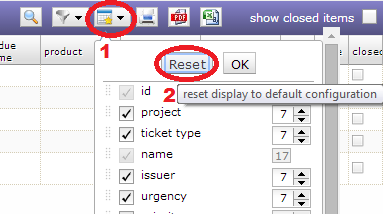
The problem is only in the objects list (top part of the screen)
They are translated : exemple, profile in user list is correctly translated.
You muist just correctly define format in $_layout :${idProfile}
But this has only for effect that "profileAdministrator" is replaced by "[profileAdministrator]", not by the language-translated value.
And what for fields having already a formatting, as colorNameFormatter ?
Where is that “fields selector list”? Not found on any screen, nor in the documentation…
Here :
Ah, O.K. Thanks !
I’ll go to bed less dumb, this evening. 😛
But this has only for effect that "profileAdministrator" is replaced by "[profileAdministrator]", not by the language-translated value.
And what for fields having already a formatting, as colorNameFormatter ?
This is because [profileAdministrator] is not found in lang.js file by the javascript code
So you'll need to clean the browser cache to get the translation. Some times, cleaning the cache is not enough, and you may need to close the browser.
I sometimes had difficulties to retrieve the correct translations on javascript side.
Also concider cleaning "server side" cache.
Sorry, don’t work, whatever I did (emptying cache, exit from Browser, and until shutdown/restart the computer – I work with local server, so all caches are empty).
Display still looks like this :
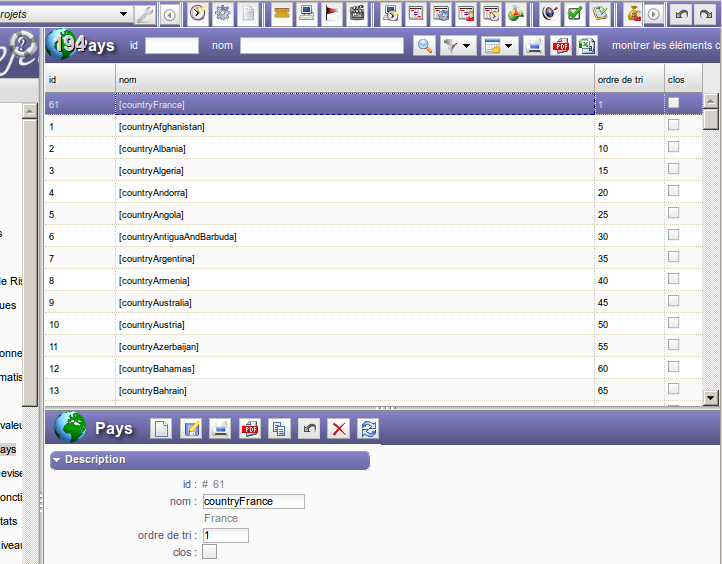
However, what for fields having already a formatting, as colorNameFormatter ?
1) all the countryXxxx must exit in the translation file.
2) the layout must be :
${name}
You cannot have simultaneously colorNameFormatter and translateFormatter (one only)
1) all the countryXxxx must exit in the translation file.
2) the layout must be :${name}
But IT IS the layout !!! (only width is different, but pure html parameter).
Whatever I can do, the translation at this level only put the name between brackets – as it was not in lang.js…
You cannot have simultaneously colorNameFormatter and translateFormatter (one only)
Too bad.
Thus I have to create a "colorTranslateNameFormatter" (found the module containing these functions. 😉 )
(possible enhancement for a future version, no ?)
But IT IS the layout !!! (only width is different, but pure html parameter).
Whatever I can do, the translation at this level only put the name between brackets – as it was not in lang.js…
You have to reset layout (as shown on previous screenshot) to take into account layout change.
hus I have to create a "colorTranslateNameFormatter" (found the module containing these functions. 😉 )
(possible enhancement for a future version, no ?)
Possible.
But I will not spend time on this, as I pesonnaly see no interest to it.
If you code it, please post it so that include change in later version.
It put a track in the i18n function for values not found.
Correct for some other missing values as "AuditSummary", "mandatory", "indicatordefinitionActualDueDateTime", "indicatordefinitionInitialDueDateTime" or "tickettypeTypeTicketIncident"…
But nothing about expected translations. So :
1. i18n is not called (or called with $i18nMessages set).
2. Implies translateFormatter is not called or with an empty value.
But in second case, from where come the brackets ? So I think $i18nmessages wrongly set.
I continue investigation…
Problem localized:
When calling function i18n in projeqtor.js, even when i18nMessages loaded, the string to translate is never found!
… but as I’m not fluent with javascript, I am not able to see deeper…
(I don’t know how to display javascript array content)
Edit 22 june : suceeded to return length of array i18nMessages : always "undefined", so no values are returned by function "dojo.i18n.getLocalization".
Can you investigate with these infos?
Array can be empty at some moments, as it is loaded dynamically.
In the profile screen, do you have some names translated ?
Array can be empty at some moments, as it is loaded dynamically.
So, for testing, I have enforced the load at each call, and added some suffixes to the returned value to see what comes from.
The functions returns a value, but always null. An empty array would be 0 (zero) length, not "undefined".
In the profile screen, do you have some names translated ?
Via javascript, no one, nowhere !
Only translations with the php module are made (and the some untranslated in that way are really missing).
Edit: tested on external server, connected with Internet Explorer 8: same problem, so Firefox javascript is not responsible.
So it seems you broke something in the lang.js file that prohibits its loading.
Some special caracters may cause this, or some "not reallu special" ones suche as point or line break.
How did you generate lang.js file ?
Did you use lang.xls ?
So it seems you broke something in the lang.js file that prohibits its loading.
Some special caracters may cause this, or some "not reallu special" ones suche as point or line break.
No « special characters ». Therefore, nothing is loaded neither for french nor for english, and this one is pure ASCII !
Verified all end-of-line : LR+NL (DOS-Windows) everywhere. Tried NL (Unix), no change.
Found an error due to sort made on the entire file (except first and last lines which are delimiters: the last line (currentLocaleOfFile) was not in alphabetical place, so it was moved to the middle without terminal comma, whereas the new last line (year) kept a comma. But afted correction, still no change.
How did you generate lang.js file ?
Did you use lang.xls ?
Not at this time, only direct update in lang.js files.
But fr/lang.js and en/lang.js (identical to nls/lang.js, a symbolic link would be more appropriate than a duplication… but problematic under Windows, I suppose) have been in-depth checked, I’m sure they are O.K.
However, they are in attachment here (suffixes with ".txt" to be accepted as attachments), so you can verify by yourself..
No « special characters ». Therefore, nothing is loaded neither for french nor for english, and this one is pure ASCII !
Verified all end-of-line : LR+NL (DOS-Windows) everywhere. Tried NL (Unix), no change.
Found an error due to sort made on the entire file (except first and last lines which are delimiters: the last line (currentLocaleOfFile) was not in alphabetical place, so it was moved to the middle without terminal comma, whereas the new last line (year) kept a comma. But afted correction, still no change.
Can you try and retrieve standard lang.js file and check that profile names are translated in the list (working fine with standard version).
Then add progressively you new tranlation lines, and check progressivemely to find which new line brings the issue.
Not at this time, only direct update in lang.js files.
Advise : use lang.xls file to add new lines and generate lang.js files
But fr/lang.js and en/lang.js (identical to nls/lang.js, a symbolic link would be more appropriate than a duplication… but problematic under Windows, I suppose) have been in-depth checked, I’m sure they are O.K.
As translation works fine woth standard version and not with your own, I'm almost sure issue comes from the new lines.
However, they are in attachment here (suffixes with ".txt" to be accepted as attachments), so you can verify by yourself..
Sorry, but I'll spend no time to analyze your own changes. I would do this only for paid support customers.
OK, found. ONE key had a hyphen, that javascript didn’t digest!
This implies that javascript, somewhere in the load process, convert these keys to variables, I don’t see why…
Now, all works. 🙂
Thus I have to create a "colorTranslateNameFormatter" (found the module containing these functions. 😉 )
(possible enhancement for a future version, no ?)Possible.
But I will not spend time on this, as I pesonnaly see no interest to it.
If you code it, please post it so that include change in later version.
Done, very easy.
Just:
1. duplicate colorNameFormatter in view/js/projeqtorFormatter.js et tool/formatter.php, renaming the copy as colorTranslateNameFormatter;
2. in tool/formatter.php, replace in "return" line with html code "$val" by "i18n($val)";
3. in view/js/projeqtorFormatter.js, replace in "return" line with html code "val" by "i18n(val)".
Now, you can replace in various models «formatter="colorNameFormatter"» with «formatter="colorTranslateNameFormatter"» in translatable colored fields.
It works perfectly. 😛
Thanks.