
Welcome to ProjeQtOr new Forum. We migrated old forum to the new website.
You will find all your posts here, with your usual account.
Just one point : you’ll have to reinitialize your password. Use “Lost password” feature.

Hi, good day!
I have some problems with reports and KPI's of ProjeQtOr.
There are some reports and KPI's that show this error....

Does anyone know why it is displayed?
Thanks!
Hi good day!
Yesterday I presented some problems with the reports and KPI's of ProjeQtOr, after making some changes in the temporary directory for the reports and document root (These are in the global settings) the error stopped appearing but now the detail is The image does not appear, only the icon that is missing is displayed.Reviewing, we have realized that when we run the report, if it is sent at the time the report is run but in the records it marks a very different time, in the same way if we review the Log file (in platform management) in the Execution of the report shows a totally different time and therefore does not find the images.
Is there any configuration that needs to be done?
I attach the image and the text that is shown in the Log file.
2021-08-06 09:24:16.581 ===== TRACE ===== NEW CONNECTED USER 'admin' (using remember me feature)2021-08-06 11:03:53.275 ** ERROR ** [V9.1.2] ERROR **2021-08-06 11:03:53.275 ** ERROR ** [V9.1.2] on file '/var/www/html/external/pChart2/class/pImage.class.php' at line (164)2021-08-06 11:03:53.275 ** ERROR ***** [V9.1.2] cause = imagepng(/var/log/projeqtor/documents/files/report/user1_globalCostPlanning_20210806_110353_1.png): failed to open stream: No such file or directory
Thanks!

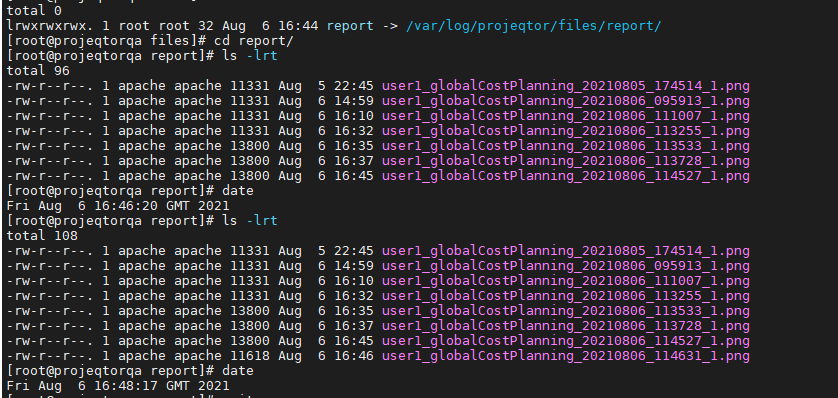

the php user (www-data or apache) must have write rights to directory /var/log/projeqtor/documents/files/report/
Do these permissions have to be given from a confirmation within ProjeQtOr? that is, from global settings or something like that?
No, it is access rights on the system.
Thanks for your comments.
Were given write rights but still the image does not appear, we try using another browser but the problem is the same.
In brower inspector we saw the URL of the imagen and the file name are the same, but i cant see the image.
I think its because the URL point to the file path "/var/log..../user.....jpg" and not to an http address
Is it necessary to make another additional configuration to be able to display the image?
I attach the image.
URL in the browser: src="/var/log/projeqtor/files/report/user1_globalCostPlanning_20210817_123116_1.png"



It's because you changed the path to reports (in global parameters / system)
You must define a location "in the web root" so that apache can serve it to users.
Thanks for your help and comments.
We did the last comment, but it still shows error, I attach the following images.
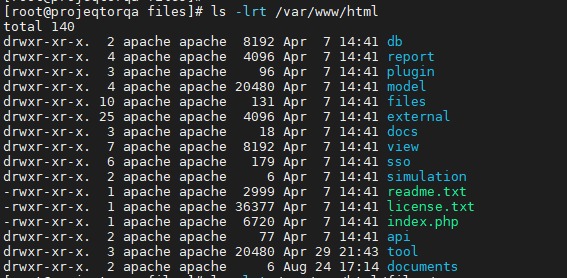
In this first image you can see where the "documente root" is located.

In the second image you can see that "document root" has the permissions
But in this third image you can see the specific new path for the folders, and as you can see, all have the permissions and ownership.
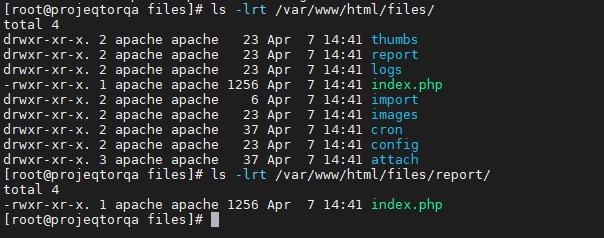
If the folders were created, the directories were placed inside "document root", why does it say it has no permissions when you can see that it does?
Also I attach one image of the error in the reports and the last log

2021-08-24 13:09:34.988 ** ERROR ** [V9.1.2] on file '/var/www/html/external/pChart2/class/pImage.class.php' at line (164)
2021-08-24 13:09:34.988 ** ERROR ** [V9.1.2] cause = imagepng(/var/www/html/files/report/user1_globalCostPlanning_20210824_130934_1.png): failed to open stream: Permission denied
Strange... if user that runs PHP is apache, it should work.
(this is default php user for RedHat-like distros, such as Centos)
Try and chmod 777 the directory report for testing.

Sorry, I mistakenly wrote in this thread, moved my question to a separate topic.
Hello! Please tell me how to fix this error?
2021-08-25 13:50:39.329 ** ERROR ** [V9.2.2] on file '/var/www/html/projeqtor/tool/html.php' at line (2432)
2021-08-25 13:50:39.329 ** ERROR ** [V9.2.2] cause = Undefined variable: title
We tried what you told us but the error is the same, the user if it is Apache.
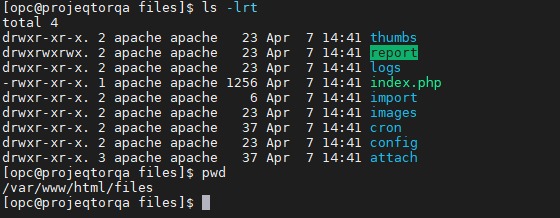

Is there another way to correct the error? It is important to mention that this error also occurs in another enviroment that we have with ProjeQtor.
Anybody knows what could be the problem?
Possibly you have SELINUX running that blocks access.
Hi, good day.
Thanks for your comments and your help.
Effectively, if SELINUX was activated, we followed an tutorial that only disable selinux for projeqtor, we disable all the selinux and the error stopped, Now we see only an icon:

Also we check the Log inside ProjeQtOr but nothing was shown.
Is there any other option or recommendation for this problem?
Hi,
Right click on icon as select "inspect".
Check url of image.
Then check that the corresponding image exists.
NB : the location of the image must be on the web root (check configuration for report files), otherwise images cannot be displayed
Hi,
As a test, we installed projeQtOr again and we saw that in this way the error that appeared in the reports could be solved, we also did it because when we wanted to update to the new version we also had problems.
Now, since these errors have been fixed, we want to migrate all the data that we have in the production environment to this new instance that has no errors. Is there a safe way to do this?
We understand that a complete copy of the binaries cannot be because it would bring the errors that were corrected in this new installation that was made.
Thanks!
Just export (dump) the database and reimport into new instance.
Hi,
Thanks for your answer.
We did the projeqtor update and we also did the steps that you mentioned in the previous post for the database; the update and load of the database was done correctly, it did not show us any errors.
We use these commands to make the copy of the database:
mysqldump -u root -p --all-databases > /home/opc/projeqtor.dump
mysql -u root -p < /home/opc/projeqtor.dump
The problem we now have is that when we see the list of projects, some of the names are not there (As you can see in the image), the same happens with the name of some activities, with the resources, with the dedications.

Do you know why this happens? What has to be done to solve this problem?
I also attach the detail of the log file2021-11-19 15:46:59.403 ===== TRACE ===== NEW CONNECTED USER 'admin'
2021-11-19 15:56:02.205 ===== TRACE ===== DISCONNECTED USER 'admin'
2021-11-19 15:56:03.496 ===== TRACE ===== NEW CONNECTED USER 'admin' (using remember me feature)
2021-11-19 15:56:26.376 ===== TRACE ===== DISCONNECTED USER 'admin'
2021-11-19 15:57:15.597 ===== TRACE ===== NEW CONNECTED USER 'admin'
2021-11-19 15:57:36.797 ===== TRACE ===== DISCONNECTED USER 'admin'
2021-11-19 16:00:47.104 ===== TRACE =====
2021-11-19 16:00:47.104 ===== TRACE ===== =====================================
2021-11-19 16:00:47.104 ===== TRACE =====
2021-11-19 16:00:47.104 ===== TRACE ===== DataBase actual Version = V9.1.2
2021-11-19 16:00:47.104 ===== TRACE ===== ProjeQtOr actual Version = V9.3.2
2021-11-19 16:00:47.104 ===== TRACE =====
2021-11-19 16:00:47.104 ===== TRACE ===== =====================================
2021-11-19 16:00:47.104 ===== TRACE =====
2021-11-19 16:00:47.104 ===== TRACE ===== VERSION V9.2.0
2021-11-19 16:00:47.104 ===== TRACE =====
2021-11-19 16:00:47.107 ===== TRACE ===== 3 lines inserted into table "parameter".
2021-11-19 16:00:47.114 ===== TRACE ===== Table "type" altered.
2021-11-19 16:00:47.165 ===== TRACE ===== Table "activity" altered.
2021-11-19 16:00:47.178 ===== TRACE ===== Table "statusperiod" created.
2021-11-19 16:00:47.180 ===== TRACE ===== 6 lines inserted into table "habilitationother".
2021-11-19 16:00:47.182 ===== TRACE ===== 5 lines inserted into table "habilitationother".
2021-11-19 16:00:47.184 ===== TRACE ===== 1 lines updated into table "status".
2021-11-19 16:00:47.188 ===== TRACE ===== Table "delay" altered.
2021-11-19 16:00:47.194 ===== TRACE ===== Table "project" altered.
2021-11-19 16:00:47.203 ===== TRACE ===== Table "activityworkunit" created.
2021-11-19 16:00:47.204 ===== TRACE ===== 0 lines inserted into table "activityworkunit".
2021-11-19 16:00:47.207 ===== TRACE ===== Table "planningelement" altered.
2021-11-19 16:00:47.213 ===== TRACE ===== Table "planningelementbaseline" altered.
2021-11-19 16:00:47.216 ===== TRACE ===== Table "workcommanddone" altered.
2021-11-19 16:00:47.217 ===== TRACE ===== 0 lines updated into table "planningelement".
2021-11-19 16:00:47.217 ===== TRACE ===== 0 lines deleted from table "workcommanddone".
2021-11-19 16:00:47.218 ===== TRACE ===== 0 lines inserted into table "workcommanddone".
2021-11-19 16:00:47.309 ===== TRACE ===== Table "planningelement" altered.
2021-11-19 16:00:47.381 ===== TRACE ===== Table "planningelement" altered.
2021-11-19 16:00:47.467 ===== TRACE ===== Table "planningelement" altered.
2021-11-19 16:00:47.520 ===== TRACE ===== Table "planningelement" altered.
2021-11-19 16:00:47.584 ===== TRACE ===== Table "planningelementbaseline" altered.
2021-11-19 16:00:47.616 ===== TRACE ===== Table "planningelementbaseline" altered.
2021-11-19 16:00:47.675 ===== TRACE ===== Table "planningelementbaseline" altered.
2021-11-19 16:00:47.710 ===== TRACE ===== Table "planningelementbaseline" altered.
2021-11-19 16:00:47.713 ===== TRACE ===== Table "ticket" altered.
2021-11-19 16:00:47.716 ===== TRACE ===== Table "ticket" altered.
2021-11-19 16:00:47.719 ===== TRACE ===== Table "type" altered.
2021-11-19 16:00:47.721 ===== TRACE ===== 1 lines inserted into table "menu".
2021-11-19 16:00:47.723 ===== TRACE ===== 1 lines inserted into table "navigation".
2021-11-19 16:00:47.725 ===== TRACE ===== 3 lines inserted into table "habilitation".
2021-11-19 16:00:47.728 ===== TRACE ===== Table "documentdirectory" altered.
2021-11-19 16:00:47.731 ===== TRACE ===== Table "documentdirectory" altered.
2021-11-19 16:00:47.772 ===== TRACE ===== Index "documentdirectoryResource" created.
2021-11-19 16:00:47.781 ===== TRACE ===== Index "documentdirectoryUser" created.
2021-11-19 16:00:47.784 ===== TRACE ===== 13 lines updated into table "documentdirectory".
2021-11-19 16:00:47.788 ===== TRACE ===== 1 lines updated into table "menu".
2021-11-19 16:00:47.797 ===== TRACE ===== Table "documentright" created.
2021-11-19 16:00:47.800 ===== TRACE ===== 143 lines inserted into table "documentright".
2021-11-19 16:00:47.803 ===== TRACE ===== 3 lines updated into table "type".
2021-11-19 16:00:47.805 ===== TRACE ===== 5 lines inserted into table "report".
2021-11-19 16:00:47.806 ===== TRACE ===== 5 lines inserted into table "habilitationreport".
2021-11-19 16:00:47.809 ===== TRACE ===== 26 lines inserted into table "reportparameter".
2021-11-19 16:00:47.810 ===== TRACE ===== 5 lines inserted into table "modulereport".
2021-11-19 16:00:47.821 ===== TRACE ===== Table "macrostatus" created.
2021-11-19 16:00:47.867 ===== TRACE ===== 3 lines inserted into table "macrostatus".
2021-11-19 16:00:47.869 ===== TRACE ===== 3 lines deleted from table "accessright".
2021-11-19 16:00:47.873 ===== TRACE ===== Table "subtask" altered.
2021-11-19 16:00:47.910 ===== TRACE ===== Table "workcommanddone" altered.
2021-11-19 16:00:47.991 ===== TRACE ===== Table "workcommandbilled" altered.
2021-11-19 16:00:48.027 ===== TRACE ===== Table "workcommand" altered.
2021-11-19 16:00:48.089 ===== TRACE ===== Table "workcommand" altered.
2021-11-19 16:00:48.124 ===== TRACE ===== Table "workcommand" altered.
2021-11-19 16:00:48.191 ===== TRACE ===== Table "workcommand" altered.
2021-11-19 16:00:48.227 ===== TRACE ===== Table "workcommand" altered.
2021-11-19 16:00:48.284 ===== TRACE ===== Table "workcommand" altered.
2021-11-19 16:00:48.318 ===== TRACE ===== Table "workcommand" altered.
2021-11-19 16:00:48.321 ===== TRACE ===== Table "asset" altered.
2021-11-19 16:00:48.331 ===== TRACE ===== Table "kpivaluerequest" created.
2021-11-19 16:00:48.366 ===== TRACE ===== Index "kpivaluerequestReference" created.
2021-11-19 16:00:48.367 ===== TRACE ===== 1 lines inserted into table "cronexecution".
2021-11-19 16:00:48.369 ===== TRACE ===== 1 lines inserted into table "parameter".
2021-11-19 16:00:48.379 ===== TRACE ===== Table "pokercomplexity" created.
2021-11-19 16:00:48.389 ===== TRACE ===== Table "pokersession" created.
2021-11-19 16:00:48.399 ===== TRACE ===== Table "pokerresource" created.
2021-11-19 16:00:48.413 ===== TRACE ===== Table "pokeritem" created.
2021-11-19 16:00:48.422 ===== TRACE ===== Table "pokervote" created.
2021-11-19 16:00:48.424 ===== TRACE ===== 4 lines inserted into table "menu".
2021-11-19 16:00:48.426 ===== TRACE ===== 4 lines inserted into table "navigation".
2021-11-19 16:00:48.428 ===== TRACE ===== 11 lines inserted into table "pokercomplexity".
2021-11-19 16:00:48.430 ===== TRACE ===== 2 lines inserted into table "type".
2021-11-19 16:00:48.432 ===== TRACE ===== 1 lines inserted into table "module".
2021-11-19 16:00:48.434 ===== TRACE ===== 4 lines inserted into table "modulemenu".
2021-11-19 16:00:48.435 ===== TRACE ===== 9 lines inserted into table "habilitation".
2021-11-19 16:00:48.438 ===== TRACE ===== 11 lines inserted into table "habilitation".
2021-11-19 16:00:48.466 ===== TRACE ===== 16 lines inserted into table "accessright".
2021-11-19 16:00:48.469 ===== TRACE ===== Table "workunit" altered.
2021-11-19 16:00:48.472 ===== TRACE ===== 6 lines inserted into table "cronexecution".
2021-11-19 16:00:48.476 ===== TRACE ===== Table "navigation" altered.
2021-11-19 16:00:48.478 ===== TRACE ===== 1 lines updated into table "navigation".
2021-11-19 16:00:48.481 ===== TRACE ===== 1 lines updated into table "navigation".
2021-11-19 16:00:48.483 ===== TRACE ===== 4 lines inserted into table "menu".
2021-11-19 16:00:48.485 ===== TRACE ===== 4 lines inserted into table "habilitation".
2021-11-19 16:00:48.487 ===== TRACE ===== 3 lines inserted into table "accessright".
2021-11-19 16:00:48.489 ===== TRACE ===== 1 lines inserted into table "module".
2021-11-19 16:00:48.490 ===== TRACE ===== 3 lines inserted into table "modulemenu".
2021-11-19 16:00:48.504 ===== TRACE ===== Table "localizationtranslator" created.
2021-11-19 16:00:48.514 ===== TRACE ===== Table "localizationtranslatorlanguage" created.
2021-11-19 16:00:48.523 ===== TRACE ===== Table "languageskilllevel" created.
2021-11-19 16:00:48.525 ===== TRACE ===== 1 lines inserted into table "menu".
2021-11-19 16:00:48.526 ===== TRACE ===== 1 lines inserted into table "habilitation".
2021-11-19 16:00:48.528 ===== TRACE ===== 1 lines inserted into table "accessright".
2021-11-19 16:00:48.530 ===== TRACE ===== 1 lines inserted into table "menu".
2021-11-19 16:00:48.532 ===== TRACE ===== 1 lines inserted into table "habilitation".
2021-11-19 16:00:48.574 ===== TRACE ===== Table "localizationrequest" created.
2021-11-19 16:00:48.576 ===== TRACE ===== Table "type" altered.
2021-11-19 16:00:48.587 ===== TRACE ===== Table "localizationItem" created.
2021-11-19 16:00:48.590 ===== TRACE ===== 1 lines inserted into table "menu".
2021-11-19 16:00:48.592 ===== TRACE ===== 1 lines inserted into table "habilitation".
2021-11-19 16:00:48.595 ===== TRACE ===== 2 lines inserted into table "mailable".
2021-11-19 16:00:48.599 ===== TRACE ===== Table "type" altered.
2021-11-19 16:00:48.602 ===== TRACE ===== 13 lines inserted into table "navigation".
2021-11-19 16:00:48.604 ===== TRACE ===== 1 lines updated into table "navigation".
2021-11-19 16:00:48.606 ===== TRACE ===== 1 lines updated into table "navigation".
2021-11-19 16:00:48.608 ===== TRACE ===== 3 lines inserted into table "modulemenu".
2021-11-19 16:00:48.611 ===== TRACE ===== 3 lines inserted into table "languageskilllevel".
2021-11-19 16:00:48.613 ===== TRACE ===== 3 lines inserted into table "type".
2021-11-19 16:00:48.616 ===== TRACE ===== 2 lines inserted into table "eventformail".
2021-11-19 16:00:48.617 ===== TRACE ===== 2 lines inserted into table "parameter".
2021-11-19 16:00:48.619 ===== TRACE ===== 1 lines inserted into table "mailable".
2021-11-19 16:00:48.621 ===== TRACE ===== 1 lines updated into table "report".
2021-11-19 16:00:48.623 ===== TRACE ===== 1 lines updated into table "report".
2021-11-19 16:00:48.625 ===== TRACE ===== 1 lines updated into table "report".
2021-11-19 16:00:48.627 ===== TRACE ===== 1 lines updated into table "report".
2021-11-19 16:00:48.628 ===== TRACE ===== 1 lines updated into table "navigation".
2021-11-19 16:00:48.630 ===== TRACE ===== 1 lines updated into table "navigation".
2021-11-19 16:00:48.633 ===== TRACE ===== Table "message" altered.
2021-11-19 16:00:48.665 ===== TRACE ===== Table "message" altered.
2021-11-19 16:00:48.667 ===== TRACE ===== 11 lines inserted into table "reportparameter".
2021-11-19 16:00:48.680 ===== TRACE ===== Index "indicatorvalueType" created.
2021-11-19 16:00:48.681 ===== TRACE =====
2021-11-19 16:00:48.681 ===== TRACE ===== DATABASE UPDATED
2021-11-19 16:00:48.681 ===== TRACE ===== WITH NO ERROR
2021-11-19 16:00:48.681 ===== TRACE =====
2021-11-19 16:00:48.681 ===== TRACE ===== =====================================
2021-11-19 16:00:48.681 ===== TRACE =====
2021-11-19 16:00:48.681 ===== TRACE ===== VERSION V9.2.1
2021-11-19 16:00:48.681 ===== TRACE =====
2021-11-19 16:00:48.683 ===== TRACE ===== 1 lines updated into table "menu".
2021-11-19 16:00:48.683 ===== TRACE =====
2021-11-19 16:00:48.683 ===== TRACE ===== DATABASE UPDATED
2021-11-19 16:00:48.683 ===== TRACE ===== WITH NO ERROR
2021-11-19 16:00:48.683 ===== TRACE =====
2021-11-19 16:00:48.683 ===== TRACE ===== =====================================
2021-11-19 16:00:48.683 ===== TRACE =====
2021-11-19 16:00:48.683 ===== TRACE ===== VERSION V9.3.0
2021-11-19 16:00:48.683 ===== TRACE =====
2021-11-19 16:00:48.687 ===== TRACE ===== Table "pokeritem" altered.
2021-11-19 16:00:48.691 ===== TRACE ===== Table "pokersession" altered.
2021-11-19 16:00:48.694 ===== TRACE ===== Table "pokersession" altered.
2021-11-19 16:00:48.697 ===== TRACE ===== Table "pokersession" altered.
2021-11-19 16:00:48.790 ===== TRACE ===== Table "pokersession" altered.
2021-11-19 16:00:48.864 ===== TRACE ===== Table "pokersession" altered.
2021-11-19 16:00:48.897 ===== TRACE ===== Table "pokersession" altered.
2021-11-19 16:00:48.934 ===== TRACE ===== Table "pokersession" altered.
2021-11-19 16:00:48.965 ===== TRACE ===== Table "pokercomplexity" altered.
2021-11-19 16:00:48.967 ===== TRACE ===== 1 lines updated into table "module".
2021-11-19 16:00:48.969 ===== TRACE ===== 1 lines updated into table "menu".
2021-11-19 16:00:48.971 ===== TRACE ===== 1 lines updated into table "menu".
2021-11-19 16:00:48.973 ===== TRACE ===== 1 lines updated into table "menu".
2021-11-19 16:00:48.975 ===== TRACE ===== 1 lines updated into table "menu".
2021-11-19 16:00:48.977 ===== TRACE ===== 1 lines updated into table "menu".
2021-11-19 16:00:48.979 ===== TRACE ===== 1 lines updated into table "menu".
2021-11-19 16:00:48.981 ===== TRACE ===== 1 lines updated into table "menu".
2021-11-19 16:00:48.983 ===== TRACE ===== 1 lines updated into table "menu".
2021-11-19 16:00:48.986 ===== TRACE ===== Table "pokerresource" altered.
2021-11-19 16:00:48.989 ===== TRACE ===== 1 lines inserted into table "planningmode".
2021-11-19 16:00:48.990 ===== TRACE ===== 4 lines inserted into table "accessright".
2021-11-19 16:00:48.993 ===== TRACE ===== 1 lines updated into table "navigation".
2021-11-19 16:00:48.995 ===== TRACE ===== 3 lines updated into table "navigation".
2021-11-19 16:00:48.996 ===== TRACE ===== 1 lines inserted into table "navigation".
2021-11-19 16:00:49.006 ===== TRACE ===== Table "highlight" created.
2021-11-19 16:00:49.008 ===== TRACE ===== 1 lines inserted into table "cronexecution".
2021-11-19 16:00:49.010 ===== TRACE ===== Table "module" altered.
2021-11-19 16:00:49.066 ===== TRACE ===== Table "module" altered.
2021-11-19 16:00:49.069 ===== TRACE ===== 6 lines inserted into table "module".
2021-11-19 16:00:49.071 ===== TRACE ===== 1 lines updated into table "module".
2021-11-19 16:00:49.073 ===== TRACE ===== 1 lines updated into table "module".
2021-11-19 16:00:49.075 ===== TRACE ===== 1 lines updated into table "module".
2021-11-19 16:00:49.076 ===== TRACE ===== 1 lines updated into table "module".
2021-11-19 16:00:49.078 ===== TRACE ===== 1 lines updated into table "module".
2021-11-19 16:00:49.080 ===== TRACE ===== 1 lines updated into table "module".
2021-11-19 16:00:49.082 ===== TRACE ===== 2 lines updated into table "module".
2021-11-19 16:00:49.084 ===== TRACE ===== 2 lines updated into table "module".
2021-11-19 16:00:49.086 ===== TRACE ===== 2 lines inserted into table "modulemenu".
2021-11-19 16:00:49.099 ===== TRACE ===== Index "historyarchiveRef" created.
2021-11-19 16:00:49.101 ===== TRACE ===== Table "messagelegal" altered.
2021-11-19 16:00:49.103 ===== TRACE ===== 1 lines inserted into table "copyable".
2021-11-19 16:00:49.106 ===== TRACE ===== Table "command" altered.
2021-11-19 16:00:49.109 ===== TRACE ===== Table "inputmailbox" altered.
2021-11-19 16:00:49.111 ===== TRACE ===== 1 lines inserted into table "notifiable".
2021-11-19 16:00:49.111 ===== TRACE =====
2021-11-19 16:00:49.111 ===== TRACE ===== DATABASE UPDATED
2021-11-19 16:00:49.111 ===== TRACE ===== WITH NO ERROR
2021-11-19 16:00:49.111 ===== TRACE =====
2021-11-19 16:00:49.111 ===== TRACE ===== =====================================
2021-11-19 16:00:49.111 ===== TRACE =====
2021-11-19 16:00:49.111 ===== TRACE ===== VERSION V9.3.1
2021-11-19 16:00:49.111 ===== TRACE =====
2021-11-19 16:00:49.114 ===== TRACE ===== 2 lines updated into table "reportparameter".
2021-11-19 16:00:49.114 ===== TRACE =====
2021-11-19 16:00:49.114 ===== TRACE ===== DATABASE UPDATED
2021-11-19 16:00:49.114 ===== TRACE ===== WITH NO ERROR
2021-11-19 16:00:49.114 ===== TRACE =====
2021-11-19 16:00:49.114 ===== TRACE ===== =====================================
2021-11-19 16:00:49.114 ===== TRACE =====
2021-11-19 16:00:49.114 ===== TRACE ===== VERSION V9.3.2
2021-11-19 16:00:49.114 ===== TRACE =====
2021-11-19 16:00:49.117 ===== TRACE ===== 1 lines updated into table "menu".
2021-11-19 16:00:49.165 ===== TRACE ===== 1 lines updated into table "menu".
2021-11-19 16:00:49.165 ===== TRACE =====
2021-11-19 16:00:49.165 ===== TRACE ===== DATABASE UPDATED
2021-11-19 16:00:49.165 ===== TRACE ===== WITH NO ERROR
2021-11-19 16:00:49.165 ===== TRACE =====
2021-11-19 16:00:49.167 ===== TRACE ===== update workCommandDone [9.2.0]
2021-11-19 16:00:49.480 ===== TRACE ===== => 0 to update
2021-11-19 16:00:49.482 ===== TRACE ===== => 0 workCommandDone updated
2021-11-19 16:00:49.482 ===== TRACE ===== update project [9.2.0]
2021-11-19 16:00:49.482 ===== TRACE ===== => 1 project updated
2021-11-19 16:00:50.069 ===== TRACE ===== =====================================
2021-11-19 16:00:50.069 ===== TRACE =====
2021-11-19 16:00:50.069 ===== TRACE ===== DATABASE UPDATE COMPLETED TO VERSION V9.3.2
2021-11-19 16:00:50.069 ===== TRACE =====
2021-11-19 16:00:50.069 ===== TRACE ===== =====================================
2021-11-19 16:00:50.069 ===== TRACE =====
2021-11-19 16:01:16.811 ===== TRACE ===== NEW CONNECTED USER 'admin'
2021-11-19 17:10:34.173 ===== TRACE ===== DISCONNECTED USER 'admin'
2021-11-19 17:10:35.602 ===== TRACE ===== NEW CONNECTED USER 'admin' (using remember me feature)
2021-11-19 17:19:53.798 ===== TRACE ===== NEW CONNECTED USER 'admin'
You have encoding issue.
I guess names that do not appear have accentued characters.
ProjeQtOr expects data in UTF-8.
The dump you export / import may not have correct charset.
Hi,
Sorry for the delay, we have been doing some tests and testing with some commands so that the records that are not shown appear, which are indeed the records that are accented, unfortunately we have not been able to make them appear again.
These are the commands we use:
- The first command
mysqldump -u root -p h3_projeqtor -r utf8.dump
- The second command
mysql -u root -p --default-character-set=utf8 h3_projeqtor
SET names 'utf8'
SOURCE utf8.dump;
- And this is the third command
SELECT default_character_set_name FROM information_schema.SCHEMATA
WHERE schema_name = "h3_projeqtor";
It is also important to mention that the origin is in UTF-8
MariaDB [(none)]> SELECT default_character_set_name FROM information_schema.SCHEMATA
-> WHERE schema_name = "h3_projeqtor";
+----------------------------+
| default_character_set_name |
+----------------------------+
| utf8 |
+----------------------------+
1 row in set (0.000 sec)
Is there anything else that can be done? Or is there some other way to make accented records appear?
Thanks!
First, ensure that exported dump (utf8.dump) is really in UTF-8.
It may happen that even if default charset is in UTF-8, dump exported is not.
If all is OK and data in DB is in UTF-8, ensure you have in projeqtor configurartion file parameters.php
$enforceUTF8 = '1';