
Welcome to ProjeQtOr new Forum. We migrated old forum to the new website.
You will find all your posts here, with your usual account.
Just one point : you’ll have to reinitialize your password. Use “Lost password” feature.

Hi,
Template parameters in description disappeared with upgrade to 5.1.5.
For example:
template
struct B
{ };
template
struct D : B B
{ };
now shown as:
template
struct B
{ };
template
struct D : B, B
{ };
Same we can see with xml tags - they are disappeared as well...
Is it possible to go back to simple text field?

New text editor fileds strip unexpected tags.
Cannot change this behavior.
If you want to revert to simple text fields, you just have to change database fields format from 'mediumtext' to 'varchar(4000)'

Does this setting have any impact on the Notes? I've change the field type from mediumtext to varchar(4000) and yet the field is still uses a smart editor.
I'm afraid no.
Notes are designed in a fixed pop-up that has no dynamic formatting.
We have upgraded to 6.0.5 and this problem appeared again despite database fields format still is 'varchar(4000)'.
Please advice ASAP as we cannot use it with this problem!
Editor selection has no effect at all!
Hi,
I cannot reproduce.
On V6.0.5, if I change format of field "description" on table "ticket" to VARCHAR(4000), I get correct display as plaint text field and not full hml editor.
Could you please detail behavior your are facing, as it does not seem to be exactly like privious one ?
Ok, this is very simple example:
Before upgrade description looks:
=================================
PROBLEM_DESCRIPTION:
Build: QAF-2.1.1-7343-qax (QAF 2.1.1. build #30)
Test environment: Windows 7 64-bit
If qacli view annotated source is executed on a header which itself includes a header file, annotated source is not generated for the included header file. Screenshot, project and logs attached.
METHOD_TO_REPRODUCE:
1. Open the attached project proj1
2. Clean then analyze the project:
qacli analyze -P . -fc
3. Generate the annotated source for test1.h
qacli view -P . -a -m HTML -- src/test1.h
ACTUAL RESULT:
The annotated source is produced only for test1.h
CLOSE_CRITERIA:
The annotated source is produced for test1.h and it's included file test2.h .
SAFETY_RELATED:
N/A
======================================
After upgrade it is looking this way:
======================================
PROBLEM_DESCRIPTION: Build: QAF-2.1.1-7343-qax (QAF 2.1.1. build #30) Test environment: Windows 7 64-bit If qacli view annotated source is executed on a header which itself includes a header file, annotated source is not generated for the included header file. Screenshot, project and logs attached. METHOD_TO_REPRODUCE: 1. Open the attached project proj1 2. Clean then analyze the project: qacli analyze -P . -fc 3. Generate the annotated source for test1.h qacli view -P . -a -m HTML -- src/test1.h ACTUAL RESULT: The annotated source is produced only for test1.h CLOSE_CRITERIA: The annotated source is produced for test1.h and it's included file test2.h . SAFETY_RELATED: N/A
================================================
Changing the editor to plain text:
===========================================
PROBLEM_DESCRIPTION: Build: QAF-2.1.1-7343-qax (QAF 2.1.1. build #30) Test environment: Windows 7 64-bit If qacli view annotated source is executed on a header which itself includes a header file, annotated source is not generated for the included header file. Screenshot, project and logs attached. METHOD_TO_REPRODUCE: 1. Open the attached project proj1 2. Clean then analyze the project: qacli analyze -P . -fc 3. Generate the annotated source for test1.h qacli view -P . -a -m HTML -- src/test1.h ACTUAL RESULT: The annotated source is produced only for test1.h CLOSE_CRITERIA: The annotated source is produced for test1.h and it's included file test2.h . SAFETY_RELATED: N/A
=============================================
Clean the cache:
=============================================
PROBLEM_DESCRIPTION: Build: QAF-2.1.1-7343-qax (QAF 2.1.1. build #30) Test environment: Windows 7 64-bit If qacli view annotated source is executed on a header which itself includes a header file, annotated source is not generated for the included header file. Screenshot, project and logs attached. METHOD_TO_REPRODUCE: 1. Open the attached project proj1 2. Clean then analyze the project: qacli analyze -P . -fc 3. Generate the annotated source for test1.h qacli view -P . -a -m HTML -- src/test1.h ACTUAL RESULT: The annotated source is produced only for test1.h CLOSE_CRITERIA: The annotated source is produced for test1.h and it's included file test2.h . SAFETY_RELATED: N/A
===========================================
As you can see changing editor has no effect
issue recorded as Ticket #2496
Hi,
Ticket #2496 marked as fixed but we still have the same behaviour in v.6.1.3.
As result we still cannot use the functionality we have paid for as we need to stay on the old version to prevent this problem.
Can you please fix this as soon as possible!
Hi Evgueni,
I have re-opend the ticket, but cannot reproduce.
I tested on description, on note, all is correctly displayed after insertion and also when trying to update the note.
Here is just an exemple of previous exemple you gave, as stored in V6.1.3.
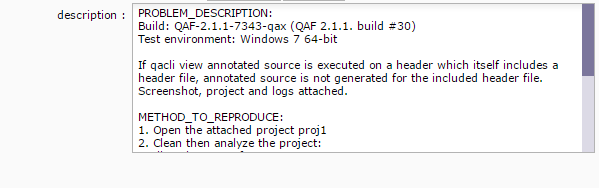
Could you please give exemples of "non working" text.
Maybe some use case is not taken into account...
Some print screen may help solve the issue in all cases.
NB : note that is you saved data with incorrect formatting, we cannot revert to previous format (retreive deleted line breaks).
Fix works for new inputs and inputs not save in wrong format only.
Hi Evgueni,
I think I have the solution.
It seems issue occurs because your "long" fields (description, result) has size <= 4000 characters.
This idea is confirmed (i did not notice it before) by the fact that whatever you choose as editor, the editor displayed is plain text and not the selected editor.
If I remember well, it is a hint I gave you to preserve display of fields in plain text and never use formatted text.
Can you try and replace line 1801 in /view/objectDetail.php
from
echo formatAnyTextToPlainText($val);
to
        if ($dataLength>4000) echo formatAnyTextToPlainText($val);
        else echo $val;
If you confirm this fixes the issue for you, fix will be included in next V6.2.2 patch, and prepared for V6.1.x if any required.