
Welcome to ProjeQtOr new Forum. We migrated old forum to the new website.
You will find all your posts here, with your usual account.
Just one point : you’ll have to reinitialize your password. Use “Lost password” feature.

Hello !
Testing Projeqtor 4.3.0 with an empty database, I have added a client, and some descriptions (as in "designation") contain non-ascii characters. Logically, quite valid as the whole database fields are defined as "utf8_general_ci".
No problem on display and update, but in the database, "résidence" appears as "résidence". And is also wrong in an UTF-8 file when exporting from PhpMyAdmin.
If I rectify directly in the DB or insert a record with "résidence", nothing is displayed in Projeqtor screen ! (But import with "résidence" give a display OK).
My whole configuration is UTF-8 (obvious with Linux), so the only explanation is an erroneous conversion in the code (done in both directions, so work from display/update remains OK).
And this problem prohibits any import of data coming from elsewhere.
Can you see what's the fuck ? 😉

It is a database configuration issue.
Not only database must be defined in utf8_general_ci, but engine must be configured in UTF-8:
in my.ini :
[mysql]
default-character-set=utf8

[mysqld]
character-set-server = utf8
As I said, all the system (currenltly local server on my PC) is utf8 (Linux Mint, not Windows !). I've several other databases, some since a lot of years, and I never seen so a problem.
Nevertheless, I have added "charecter-set-server = utf8" under [mysqld] in /etc/mysql/my.cnf (not my.ini, which doesn't exist), restarted mysql service, restarted apache2 service, closed my Projeqtor session then reopen.
No change. The default remains.
So the problem is elsewhere, sorry.
(for info, "default-character-set" is deprecated)
I saw inside the database: the single character "é" is registered with 4 (four !) bytes, as “é” UTF8-coded.
Thus there is a function in Projector which, in input, takes the external unicode string as an ANSI string then convert it to unicode !
And the inverse process runs when reading, so in front of Projector nothing wrong appears !
I repeat : this occurs on a PC with the whole system in UTF8, included general mysql :
Serveur: Localhost via UNIX socket
Version du serveur: 5.5.35-0ubuntu0.12.04.2
Version du protocole: 10
Utilisateur: xxxx@localhost
Jeu de caractères pour MySQL: UTF-8 Unicode (utf8)
… tested also in a remote server (OVH), almost same OS (local is Linux Mint 13, server is Ubuntu 12.04 server), but with Projeqtor 4.2.0. Exactly the same default !
If "é" is encoded woth 4 bytes in your database, then it is not in UTF8, but UTF16.
This may explain your issues.
I can confirm that with parameters as described in this post, caracters are correctly stored (this works fine in Demo / Track databases)
If "é" is encoded woth 4 bytes in your database, then it is not in UTF8, but UTF16.
This may explain your issues.
I can confirm that with parameters as described in this post, caracters are correctly stored (this works fine in Demo / Track databases)
No, no, no and no, sorry !
Please read carefully given explanations. I said : « the single character "é" is registered with 4 (four !) bytes, as “é” UTF8-coded »
The four bytes are the two UTF-8 codes (2+2=4) for à and ©, nothing to do with an other system (and 4 bytes for true « é » would be UTF-32, not UTF-16(*) !)
So I confirm that storage is wrong !!!
(*) UTF-16 store all characters on 2 bytes, included ASCII, but can't store Unicode characters beyond Uxffff.
To be entirely clear:
hex values for "é":
in ANSI : E9
in UTF-8 : C3A9 (= ANSI string for "é") That's what I should have as stored string.
in UTF-16 : 00E9
in UTF-32 : 000000E9
hex values for "é"
in ANSI : C3A9
in UTF-8 : C385C2A9 <= I've THIS as stored string !!!!!
in UTF-16 : 00C300A9
Hi,
You may be right, as an encoding expert.
What is sure is that you retrieve correct formatting if :
- MySql server encoding parameter is correct ([mysqld] character-set-server = utf8)
- Databse is created with this correct parametering
I can also confirm that you'll retrieve the behaviour you describe if :
- You create database without correct parameters
- You modifiy server encoding parameter afterwards
Now, if you find in the code some unexpected encoding that could be fixed, I'll be glad to study the fix.
I'll spend no time to work on this as :
- application works fine whatever the server parameter
- behavior is correct if server parameter is correct (from the start)
Regards.
What is sure is that you retrieve correct formatting if :
- MySql server encoding parameter is correct ([mysqld] character-set-server = utf8)
Yes
- Databse is created with this correct parametering
Yes
I can also confirm that you'll retrieve the behaviour you describe if :
- You create database without correct parameters
ALL parameters are OK
- You modifiy server encoding parameter afterwards
I made a new installation besides, no changes after.
… But the problem still occurs !!!! One more time verified by internal dump view of the database file !
Now, if you find in the code some unexpected encoding that could be fixed, I'll be glad to study the fix.
I'll spend no time to work on this as :
- application works fine whatever the server parameter
The problem is visible only with uses out of Projeqtor, e.g. PhpMyAdmin, access with external php programs, etc.
- behavior is correct if server parameter is correct (from the start)
Notice: my database(s) are MySql, but with the InnoDb engine, not the MyIsam one, and Apache version is 2.4.9. What's the configuration on your server ?
Hi,
Configuration is same as yours.
Did you try to store none ANSI characters on your Database (Cyrilics, chineese, Arabian).
I know it works fine with projector with correct database set.
Here are screenshots of examples from Demo :
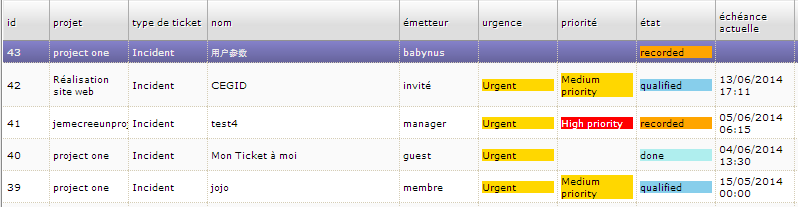
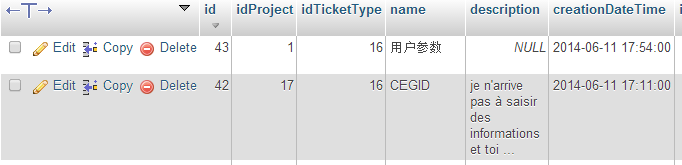
As I said, within Projeqtor all displays OK, so you can show all screenshots you want, that don't probe anything.
But I try to use far UTF8 chars : the string ⁂€ – 0x2042 + 0x20AC, which should be stored as 6 bytes (hex: E2 81 82 E2 82 AC).
Therefore, the real stored string is not that one, and nor C3 A2 C2 81 C2 82 C3 A2 C2 82 C2 AC (UTF8 for 0xE2 0x81, etc.)
In fact, I found C3 A2 C2 81 E2 80 9A C3 A2 E2 80 9A C2 AC, 14 bytes !
It's the UTF8 conversion of the 6 bytes 0xE2… but with 0x82 replaced by 0x201A in the intermediate state !!!!!
0x201A being the Unicode low quotation mark replacing 0x82 as ANSI low quotation mark.
Is this the beginning of a track for you ?
you can show all screenshots you want, that don't probe anything.
Second screenshot is from PhpMyAdmin, not from ProjeQtOr.
Is this the beginning of a track for you ?
Unfortunatly not.
I must admit I'm a bit lost with these explanations, and I don't know how you get these code to compare what is stored in my db.
OK for the PhpMyAdmin screenshot, i didn’t pay attention enough…
After putting a trach in the Sql.php module, I notice that data seems to be send OK, so conversion is inner.
But this problem occurs ONLY with Projeqtor: all other installed or developped applications runs fine… included PhpMyAdmin.
So there is a major difference between, on the one hand, the non-object mysqli functions in my applications and the PMA object of PhpMyAdmin, and on the other hand, your sql object in Projeqtor.
What is your mysql library ?
For info, environment variables related to character set for the Projeqtor database are :
character_set_client = utf8
character_set_connection = utf8
character_set_database = utf8
character_set_filesystem = binary
character_set_results = utf8
character_set_server = utf8
character_set_system = utf8
character_sets_dir = /usr/share/mysql/charsets/
collation_connection = utf8_general_ci
collation_database = utf8_general_ci
collation_server = utf8_general_ci
According with all I found on the web, that's OK.
The only difference with all other databases is for these "collation database = utf8_unicode_ci", but this is also good and very, very edge effect possible. Actuel problem not concerned.
All services restarted, Projector reinstalled from zero… nothing has changed. All runs fine… except Projeqtor. 🙁
Note: to see real storage, open database file with an hexadecimal editor or viewer. 😉
(But I defined InnoDb to have separate tables, better for safety and easier to examinate)
I confirm a fonctional difference between MySqli and PDO (used by Projeqtor but buy no other software on my server nor my local PC), this one requering an extra parameter..
So I success to “repare” Projector by adding this line:
$cnx->query("SET NAMES utf8");
before line 66 in Sql.php which was
$result = $cnx->query($sqlRequest);
Immediately Projeqtor displayed exactly same bad strings as PhpMyAdmin and others, and correcting in the interface puts good characters in the base. 🙂
But this is not proper. Could you give me where set the NAMES value ? (still not found on the web, I continue to search, but…)
Here are my findings
[client]
default-character-set=utf8

[mysql]
default-character-set=utf8


[mysqld]
collation-server = utf8_unicode_ci
init-connect='SET NAMES utf8'
character-set-server = utf8
Take care that some parameters may work or not depending on mysql version
For instacne default-character-set seems to be obsolete in latest versions.
Workaround could be to add
self::$connexion->setAttribute(PDO::MYSQL_ATTR_INIT_COMMAND, "SET NAMES 'utf8'");
after line 257 in Sql.php
so that it looks like this :
if (self::$dbType == "mysql") {
      ini_set('mysql.connect_timeout', 10);
    }
    try {
    	$dsn = self::$dbType.':host='.self::$dbHost.';port='.self::$dbPort.';dbname='.self::$dbName;
    	self::$connexion = new PDO($dsn, self::$dbUser, self::$dbPassword);
    	self::$connexion->setAttribute(PDO::ATTR_ERRMODE, PDO::ERRMODE_EXCEPTION);
    	// Could solve some erroneous default storing in non utf8 format
    	self::$connexion->setAttribute(PDO::MYSQL_ATTR_INIT_COMMAND, "SET NAMES 'utf8'");
    }
Will not be generalized as it can lead to wrong display on existing running instances.
self::$connexion->setAttribute(PDO::MYSQL_ATTR_INIT_COMMAND, "SET NAMES 'utf8'");
don’t work on my installation.
But Replacing that line by
self::$connexion->query("SET NAMES utf8");
(without quotes around 'utf8') works fine !
Problem solved, but PDO need to be documented in installation procedure :
– as it is required (install if not)
– patch in Sql.php module.
Therefore I understand that the « new » problem of wrong display in existing instances is only due to that I've detected was there and active, but without acces other than Projeqtor tools, remains hidden.
Database tables can probably be repaired with global export (before patch) then reimport after patch.
After migration to v4.4, flag 'enforceUTF8' is not set because existing, but need because UTF8 already enforced.
So I have commented the condition “if (isset($enforceUTF8) and $enforceUTF8)”.
But the proper method is to set the flag. Where to define it ?
Just define it in parameters.php file
$enforceUTF8=true;
Added in /files/config/parameters.php :
…
$logFile='../files/logs/projeqtor_${date}.log';
$logLevel='2';
$enforceUTF8=true;
//======= END
but don’t work, even with browser cache void. 🙁
Condition re-commented.
Hi,
It has nothing to do with browser cache as it is pure PHP concern.
Are you sure you are using ../files/config/parameters.php ?
You can check in /tool/parametersLocation.php the location of your parameters file.
It must work as it will do exactely the same than commenting condition as you first did.
It has nothing to do with browser cache as it is pure PHP concern.
I know, but I have to test all possibilities.
Are you sure you are using ../files/config/parameters.php ?
100% and more. What else ? 
You can check in /tool/parametersLocation.php the location of your parameters file.
There is only TWO "parameters.php" files in my projector directory :
../files/config/parameters.php <= referenced by parametersLocation.php, and from which I post a part above.
../tools/parameters.php
It must work as it will do exactely the same than commenting condition as you first did.
Well, it doesn’t…
I checked all :
– parameters.php is loaded in tool/projeqtor.php (and if it was not, an error would occur on database access, isn’t it?)
– $enforceUTF8 is not used elsewhere than in ../model/persistence/Sql.php (except at installation in maintenance.php) and so can’t have been changed.
I’ill check in sql.php what’s the fuck for this variable…

Added in /files/config/parameters.php :
…
$logFile='../files/logs/projeqtor_${date}.log';
$logLevel='2';
$enforceUTF8=true;
//======= END
but don’t work, even with browser cache void. 🙁
Condition re-commented.
I use Greek and I have the same problem
The enforceUTF8 has effect only on new additions in the DB (and only if I do what I write in the end of this post).
After that, the already stored chars in DB, are shown strange
So I think that without this parameter, the characters sent to DB are not UTF8
When I set enforceUTF8 I had also to comment the if statement as in
After migration to v4.4, flag 'enforceUTF8' is not set because existing, but need because UTF8 already enforced.
So I have commented the condition “if (isset($enforceUTF8) and $enforceUTF8)”.
But the proper method is to set the flag. Where to define it ?
in Sql.php and use
self::$connexion->query("SET NAMES utf8");
without the if statement (I made it mandatory)
After the above, I write in utf8 and the chars in DB are UTF8 (I can see them as Greek in phpmyAdmin and the projeqtor GUI)
the parameter "$enforceUTF8" is used to force the "self::$connexion->query("SET NAMES utf8");"
This will ensure that data is stored in UTF-8, even if your server is not fully configured in UTF-8.
But it is dedicated to new installs only.
If you have existing data, they will not be conveted automatically, because your MySql server in not completely configured in UTF8.
In your case, what you should do is :
- export your data
- convert exported file to UTF-8
- adapt my.ini to be full UTF-8 compliant
[client]
default-character-set=utf8
[mysql]
default-character-set=utf8
[mysqld]
collation-server = utf8_unicode_ci
init-connect='SET NAMES utf8'
character-set-server = utf8
- reload your data
All should be clean then.
the parameter "$enforceUTF8" is used to force the "self::$connexion->query("SET NAMES utf8");"
This will ensure that data is stored in UTF-8, even if your server is not fully configured in UTF-8.But it is dedicated to new installs only.
If you have existing data, they will not be conveted automatically, because your MySql server in not completely configured in UTF8.
In your case, what you should do is :
- export your data
- convert exported file to UTF-8
- adapt my.ini to be full UTF-8 compliant[client] default-character-set=utf8 [mysql] default-character-set=utf8 [mysqld] collation-server = utf8_unicode_ci init-connect='SET NAMES utf8' character-set-server = utf8- reload your data
All should be clean then.
I have the projeqtor in a fully UTF8 Linux server with other greek sites, and all behave as expected, without the proposed changes. If I make the changes you suggest, all other sites does not display correct UTF8 characters.
I think that the problem has to do with something like this:
https://mathiasbynens.be/notes/mysql-utf8mb4