
Welcome to ProjeQtOr new Forum. We migrated old forum to the new website.
You will find all your posts here, with your usual account.
Just one point : you’ll have to reinitialize your password. Use “Lost password” feature.

Hi Expert,
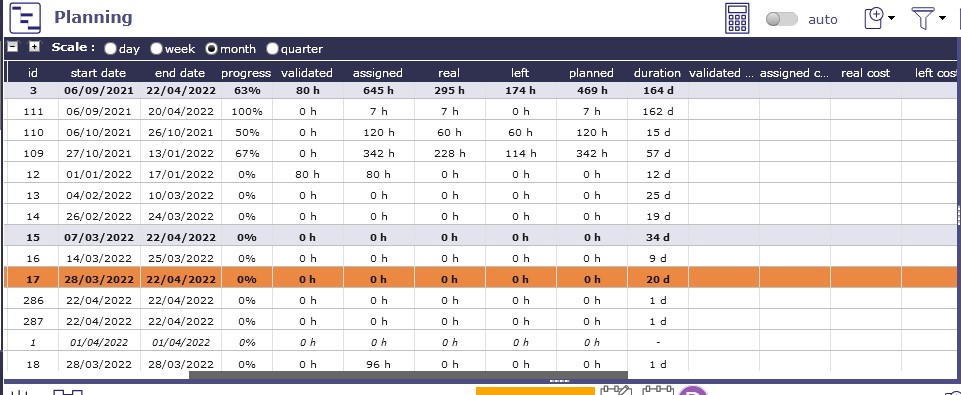
I can't understand about duration shown in planning. I have attached a screenshot. for reference. I am calculating duration=end date - start date.
i.e. for id=3 it is showing "164" (not considering both dates in the calculation)
for id=17 it shows "20" (considering both start and end dates in the calculation).
for id=286 it shows "1" (considering both start and end dates in the calculation).
for id=1 it shows "-"
Please give an understanding of my concern.
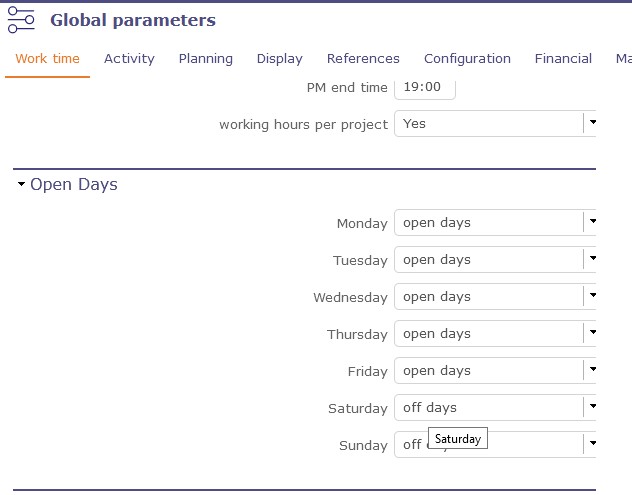
Note We have set off days (Saturday & Sunday).
I am using the xlsx file to find the duration (which is also attached for reference)
I have also attached global parameter screen for reference.

HI,
Have you thought to replan the planning ?
No, I was just observing progress %, planned work, left work, assigned work & I confused about duration column.
You should, data could be refreshed.

Duration is in "Open days" not in "Calendar days".
It removed all off days (week-ends and off days in default calendar)
Thanks, I know that duration is calculated using open day only & I am reaching near to solution but here in our Company it is only second and fourth Saturday off. Can We set the calendar in that way? If I can do so It will get exactness in duration.

Hello !
To be able to do this, you must declare Saturday and Sunday as working days in the global parameters in the Work time tab, working days section.
Then on the calendars concerned you will be able to determine throughout the year which Saturdays and Sundays are not worked.
(yes yes, by hand 🙂