
Welcome to ProjeQtOr new Forum. We migrated old forum to the new website.
You will find all your posts here, with your usual account.
Just one point : you’ll have to reinitialize your password. Use “Lost password” feature.

Hi,
Where is the link to download Project'Or.
Thank you!

Just above.
Click on the word "Download" :whistle:
This will lead you here : http://projectorria.toolware.fr/index.php/menu_download_en
Or you can go directly to sourcforge where files are stored : https://sourceforge.net/projects/projectorria/?source=directory
Thank you
Now all files are on computer!
But, how does work? How to run it?
Hi,
Regarding the technicals requirements, setup instructions and online user manual,
I do not understand what I have to do to start! My knowledge for computer is very basic!
Thank you for your help
You must install a "PHP+MySql" package.
To start, EasyPHP is a good choice.
Install easyPHP, and copy projectorria files in the "www" directory of EasyPHP.
Then, be sure EasyPHP is running and access to "localhost" or "127.0.0.1" in your browser.
Have fun. B)
Thanks for your quick answer!
EasyPHP is now on my screen desk.
What means "copy projetorria files in "www" directory of EasyPHP"?
Is that mean transfert files according the action: see hereby screen-copy.
Thank for your strong support!
What means "copy projetorria files in "www" directory of EasyPHP"?
This means just :
- copy the downloaded file "projectorriaV2.6.3.zip" in the sub-directory "www" of easyPHP directory (on Windows it is something like "C:Program fileseasyPHPwww"
- unzip this file just where it is.
- you should get a new directory "projectorria"
Then you can acces the application through your browser : http://localhost/projectorria
Regards.
Hi Babynus,
I did the copy as you told me; I got new directory -> hereby on 1a file.
Then I've clicked on link "localhost/projectorria"; I had a error message -> hereby on 1b file.
What's wrong I did?
Regards,
Shield
You just unziped the file where you downloaded it : in your own download directory.
You must have it in the directory where EasyPHP has been installed, in the "www" sub-directory.
It should be something like "C:Program fileseasyPHPwww".
Just copy and paste the projectorria folder from "download" to "www" directory.
Hi
I do not know qhat I have to do: I'm lost in the computer jungle!
Hereby the download screen copy with my comments.
What is the next step?
Best Regards,
Shield
Hi,
I do not know what I have to do: I'm lost in the computer jungle!
Hereby the dowload's screen copy with my comments.
What is the next step?
Best Regards,
Shield.
Hi,
I do not know what I have to do: I'm lost in the computer jungle!
Hereby the dowload's screen copy with my comments.
What is the next step?
Best Regards,
Shield.
Hi,
I do not know what I have to do: I'm lost in the computer jungle!
Hereby the dowload's screen copy with my comments.
What is the next step?
Best Regards,
Shield.
Hi
I do not known what I have to do: I'm lost in the computer jungle!
Hereby a screen copy.
What's the next step?
Best Regards,
Shield
Hi
I do not know what I have to do: I'm lost in the computer jungle.
Hereby screen to download.
What's the next step?
Best Regards,
Shield.
You must select "afficher dans le dossier".
You will see your downloaded files.
Find projectorriaV2.6.3.zip. Copy it (right click, "copier")
Go to "C:Program filesEasyPHPwww". PAste file (right click, "coller")
Then unzip it : right click, "extract to here"
You should then have new folder "projectorria" in the "www" directory.
Try in your browser : http://localhost/projectorria
Thanks to your srict & simple explanations the software is now in my computer.
Pls just check with hereby screen copy if the soft is ok in my computer!
Regarding your answer, the next step is - try in your browser: localhost/projectoria -
I did it (not sure on process) and a window had been opened (second hereby file)
What's the problem?
Regards,
Shield.
Hi,
You're almost there !
You just have one intermediate folder projectorriaV2.6.3.
2 solutions :
1) just access http://localhost/projctorriaV2.6.3/projectorria
2) move projectorria folder one step up so that it is just under www folder :
=> in the explorer on the right part of your screen : select "projectorria", right click, "couper"
=> in the explorer on the left part of your screen : right click, "coller"
Regards.
I'm almost there but I'm not there and last steps are hard!
Concerning 2 solutions offered:
1) I clicked and I got a window with error 404.
2) I did copy/paste -> just check with hereby screen copy.
The soft doesn't work -> What the mistake I did?
Regards,
Shield
You move projectorriaV2.6.3 one step up instead of moving projectorria one step up.
What you need to get is :
C:Program FilesEasyPHP12.1wwwprojectorria
Structure you get is :
Program Files
   EasyPHP-12.1
     projectorrriaV2.6.3
        projectorria
     www
Structure you need is
Program Files
   EasyPHP-12.1
     www
        projectorria
That's good.
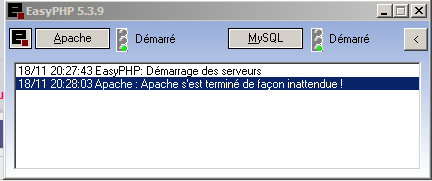
Now just insure EasyPHP is running :
- you have EasyPHP icon is the running tasks : it is the black E with little red squere.
- double click on this icon will opens EasyPHP concole
- you must have PHP and MySql running (green flags : see joined screenshot)
- then, open your browser and go to http://localhost/projectorria
IT WORKS !!!!!
now I've a configuration screen -> something to change in this standard configuration?
Regards,
Shield.