
Welcome to ProjeQtOr new Forum. We migrated old forum to the new website.
You will find all your posts here, with your usual account.
Just one point : you’ll have to reinitialize your password. Use “Lost password” feature.

Version: 6.2.5
Hello,
I have create a project "Indisponibilités" which type is "Administratif".
I was expecting to find it on the "Imputations" screen, but I cannot see it it anywhere apart from the "project screen"?
I read the user guide but found nothing about it...
How can I make users declare some real work on that project?
Kitcat711

You have to add activities to this project.
For instance "hollidays", "sickness", ....
You'll enter real work on these activities.
I added an "Absence" activity and I can see it in the "Imputation screen".
Besides, I can't find my administrative projects neither when going to the "projects portfolio" or the "projects" list screen...
I want to delete a "Test admin project" but I am unable to see it, except when I add an activity and list the "parent activity".
Kitcat711
You cannot see Administrative projects on Planning views (portfolio included)
You may see them on project screen.
Check that you don't have filters or project selected in selector.
Hello,
Well I have no filter on the project screen:
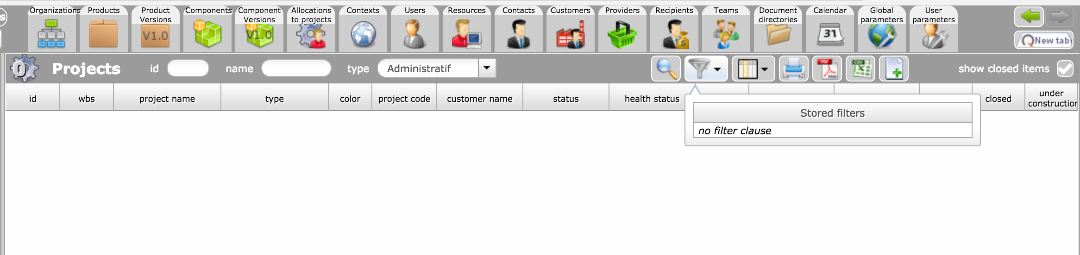
Though I can find my "Indisponibilités" administrative project on the imputation screen:

From there, if I click on it, I go to the project screen:
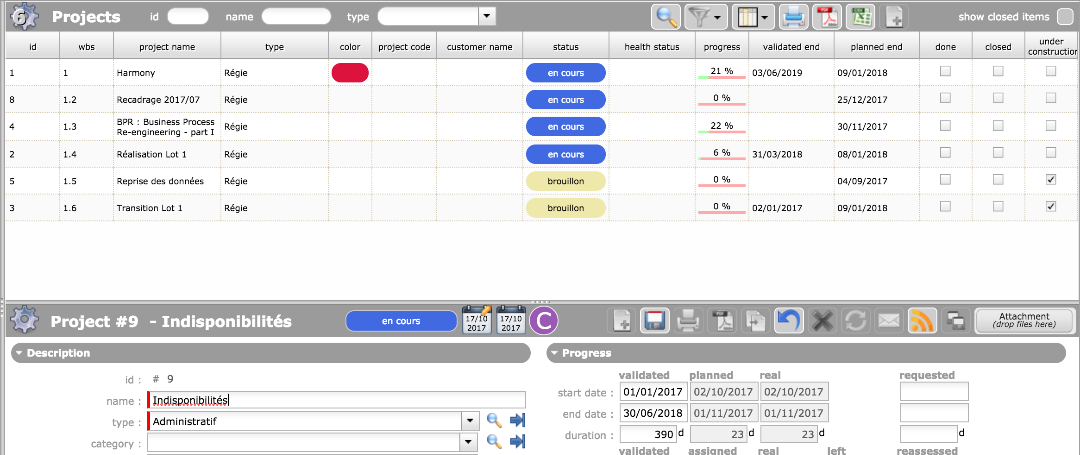
And I can see the selected administrative project details, though it still does not appear in the projects list.
What is going wrong?
Bad parameter on my side?
Thank you
It is just because it is adminsitrative projet.
They are lost listed on project list unless you are allocated to the project as project leader.
In fact, you should not be able to display these projects...
Ticket #3049 recorded
Ticket #3049 cancelled : cannot be reproduces on V6.4
Either you are allocated to project (or have admin rights), then you can see it in the list and have rights to see its detail, or you should neither see it in the list, not have rights to see its detail.
Possibly, you change type to administrative, and did not disconnnect / reconnect to update you access rights.