
Welcome to ProjeQtOr new Forum. We migrated old forum to the new website.
You will find all your posts here, with your usual account.
Just one point : you’ll have to reinitialize your password. Use “Lost password” feature.

Hi,
I would like to export then import assignments into projeqtor in the way that all assignments are defined in a csv or Excel file and they replace enterely the ones inside the projeqtor project. My use case is to be able to work on assignments outside of ProjeQtOr.
The assignment table for imports contains element type - then I can use Activity. So I assume that to assign more than one resource, I have to add as many lines? How do I delete a resource from an activity assignment when importing? Shall I add a line for each resource and assign zero? How is managed then total workload assigned to the activity, does projeqtor sums the assignments for each resource?
What table shall I export to get the table shown in the help of assignment import?


for the export/import of assignments, to have everything, all projects combined, go through the assignments (activities) screen or the allocations (projects) screen.
To delete an assignment/allocation, modify the file by putting 1 in the closed column.
The columns are automatically created based on the information you provided for the assignment
I can find only the Allocations to projects screen, which is only allocation of reources to projects, not to activities.
I cannot find the assignments (activities) screen, only the activities one.
Where can I find it please?


Assignment screen is proposed in V11.0...
If you are already on this version, checjk access rights.
Hi,
We could upgrade to v11.1.2. Rights for assignments looks good cf screenshot, but I cannot find assignments screen but the one in environment which provides only the information to which projects a resource is assigned to.
"go through the assignments (activities) screen or the allocations (projects) screen": What is the menu path to reach it please ?


Hello,
The path to the Assignments and Allocations screens are the same, they are under Environment menu.
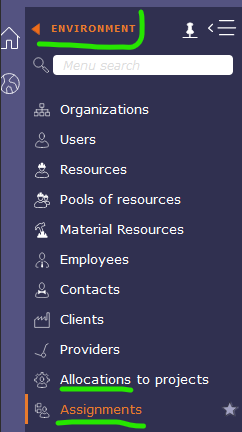
Thank you Plucks, but it does not seem to allow to export all the details, I mean workload assigned/remaining per activity and per resource with percentage of the resource for each activity ?
Hello
Indeed, the assignments screen does not allow you to see the percentage of the load per resource on each activity.
But we can produce the report that would best suit you to have this information. Do not hesitate to contact us via the contact form to obtain a quote quickly !
Hi,
I recall my need: being able to export then import assignments into projeqtor in the way that all assignments are defined in a csv or Excel or JSON or else file at export and they replace enterely the ones inside the projeqtor project at import. My use case is to be able to work on assignments outside of ProjeQtOr with some AI algorithms. So I need in this export/import process all the details. Moreover, mathematically, if I don't change the assignments of workload per activity and per resource nor resource availability, the project state in ProjeQtOr should remain unchanged (Export o ID o Import == ID).
Just export assignments with IDs.
Change data then reimport files with preserved IDs, assignments will be overwritten.
Note that some fields that are calculated by ProjeQtOr will not be imported (plannedStartDate, plannedEndDate, notPlannedWork,...).
Great, thank you. It would be nice to authorize planned dates import (to be used with manual planning calculation in order to disengage this one). This improvement would enable worthy openings to external home made engines.
This rises the additional question: Does the "resource planning calculate" feature computes from scratch or from the "activity planning calculate" feature last results?
I can imagine that for ergonomy reasons you choosed the first, while for the use of an external engine I would need the second solution where I don't want ProjeQtOr to modify the planned dates anymore.
A global checkbox to freeze the planned date might then be a quick-win solution.
This rises the additional question: Does the "resource planning calculate" feature computes from scratch or from the "activity planning calculate" feature last results?
Resource planning does not "calculate".
It is just a view of calculated values with a resource driven approach.
If fact it displays planning of each assignment while activity planning displayed planning of each activity (an activity may contain several assignments)
This is a good piece of news, thank you.