
Welcome to ProjeQtOr new Forum. We migrated old forum to the new website.
You will find all your posts here, with your usual account.
Just one point : you’ll have to reinitialize your password. Use “Lost password” feature.

I want to stop staff having the ability to make new projects or have access to activities. I have read through the manuals and I have done what I think I was meant to do but when I check the user's account, he is still allowed to create a New Project which I don't want him to do. This is what I have done.
- I created a new profile specific to his account
- I assigned the new profile to his user account
- I create a New Access Code specific to how I want their read/create/update/delete rights
- I then went into "Access to Forms" and I unticked the checkbox for his Profile
- I went to "Access to Data (project dependant) and under his profile, I said No access
- I went to "Access to Data "(not project dependant) and made read only for Categories of project and projects type
But yet the user can still open the Projects Page and Create a New Project. How do I stop this from happening. I only want him to be able to create activities and tickets in projects he is assigned to, but no make new projects.

HI,
Your action is good but the resource is still allocated to some projects with upper rights. Change his profil on those.
Regards
Do not understand what you mean by upper rights and where would I do this?
hi
You allocated this resource on one or several projects with a profil allowing to create and so on, which you probably not yet changed for her. So she is holding its rights due to that.
regards.
Mean I cannot change permission now for him?
Do you have the right to do it ? i think so.
You have just to modify the resource's profil with the new profil created on each project she is working on. She could not create any more project or activity with this single profil.
is it ok?
Regards.
I have tried to go to allocation to Project in the project where he is a resource and when I click profile, it does not show the profile I created for him. It only show the 7 default ones.
And under their Resource Account under profile: it shows the one I created, but he Allocations to Project shows the default profile. When I try to edit it on the drop down box in Edit, it only displays the 7 default profiles.
you have just to disconnect and reconnect. Changes will be taken into account.
I disconnected from my admin account and reconnected. I went to Resources, selected the user, clicked on the Edit button and does not show the profile I created. Still only shows the default ones.
I thought I might help if I attached the images for you to see.
Image 1 = shows the resource and the profile correctly although it has the name as [ .... ]
Image 2 - shows the allocation window where it does not show the profile I created.
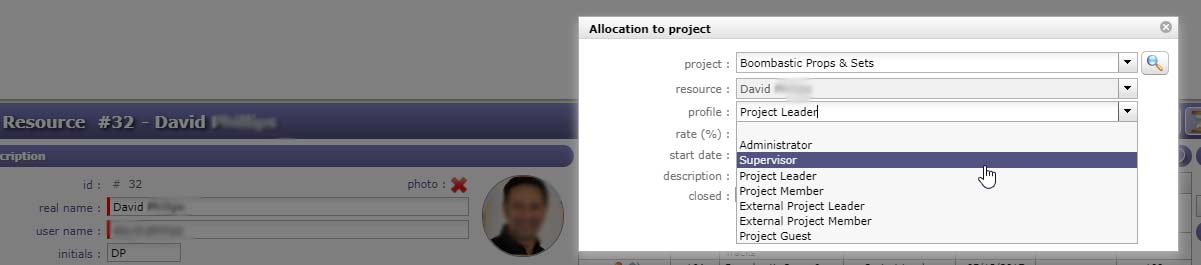
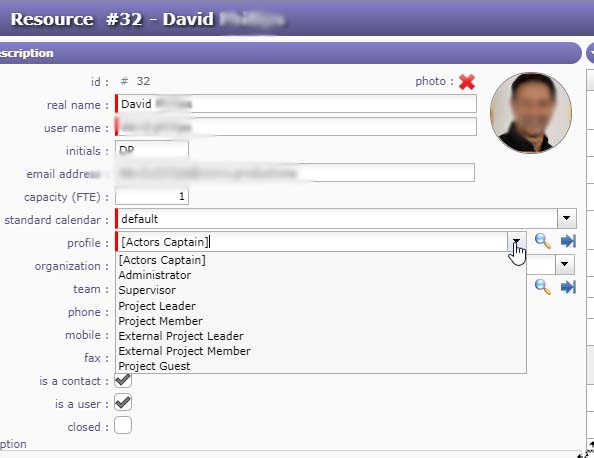

Your new profile has no sort sorder and is so "on top".
So only resources with this profile will be able to allocated a resource with this profile.
The rule is that resource cannot allocate resource with a profile "above his own".
This is done to avoid that a project leader gives admin rights to someone 😉
So take care to order of profiles, it is important.