
Welcome to ProjeQtOr new Forum. We migrated old forum to the new website.
You will find all your posts here, with your usual account.
Just one point : you’ll have to reinitialize your password. Use “Lost password” feature.

Bonjour,
J'ai installé Projeqtor via IIS sur un serveur Windows 2012 R2 avec php 5.5 et MySQL 5.7
Lors de la première connexion , bien que ma base de données soit correctement crée, j'ai un problème et je n'arrive pas a m'identifier avec les accès admin/admin.
le message d'erreur suivant en pièce jointe .
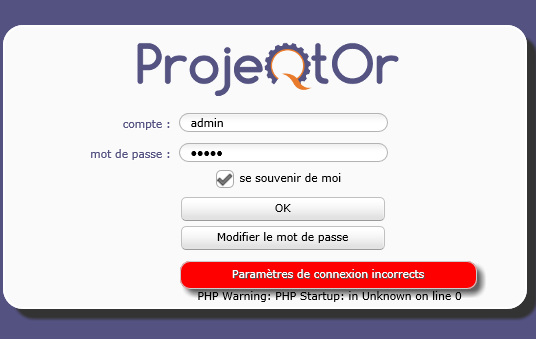
Je précise que j'ai essayé de changer la destination du répertoire ext dans mon fichier php.ini (joint également)
par un chemin de type C://..... et toujours la même erreur).
Auriez vous une piste?
Cordialement,
Gyo

Send the ProjeQtOr log.
Under .. projeqtorfileslog

OK.
Populate of Database was correct. All worked fine.
What passwork do you enter to log in as admin ?
Did you configure LDAP connection ?
Try and clean browser cache and cookies and try again.
We don't use LDAP it's a simple acces by TSE.
the password I had used is 'admin'.
Nevertheless, shoud I clear cache & cookies ?
Nevertheless, shoud I clear cache & cookies ?
Yes please.
It sill doesn't work. Although i cleared cache and cookies
I don't find any issues.
Having a look at initial print screen , I could see "PHP Warning: PHP Startup: in Unknown on line 0" below message for incorrect login.
This error is send by PHP because some modules sould not be loaded.
So your PHP configuration is not correct.
Check for error in Apache error log file.
This sometimes happen on WAMPSERVER where dll are not adapted to the OS.
So ...
But i didn't installed wampserver neither easyPHP.
I have installed a version of php 5.5 and i have installed MySQL server for windows
So, your php 5.5 installation may not be "completely" correct.
Check for errors in PHP log file and Apache error log file (if relevant).
You must find wich module generates warning "PHP Warning: PHP Startup: in Unknown on line 0", because this means that the module is installed but with wrong DLL, so that when trying to use it, some error (possibly silent) will occur.
If you can, try and install an EasyPHP (at least for a test) as it generally works fine.