
Welcome to ProjeQtOr new Forum. We migrated old forum to the new website.
You will find all your posts here, with your usual account.
Just one point : you’ll have to reinitialize your password. Use “Lost password” feature.

Hello
I am testing the HR module and I recorded some Holiday, with configured Notification on accepted and rejected
Now I got a notification, but I cannot make it disapear anymore.
It is shown at the login, and on the left side (secondary menu according to help), but there is no Inidcator in the top menu (Bell symboxl next to the version, user name etc.)
In V10.3.4 is nothing at all and in V10.4.4 i could see flashing a 1 but disapeard imediatley (next to the Log symbol)
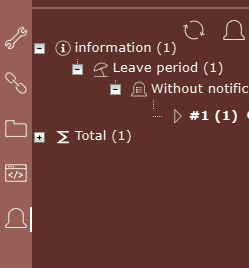
When i click on the notification it goes to the Leaves periods, but Notification is still there.
When i click on the bell symbol on the left side, it opens the notification screen, where i sea my notification with status unread, but the status cannot be changed (V10.3.4)
In Version 10.4.4 it can be changed to read, but I cannot see where i have a difference...
I searched in the workflows, but this doesn't apear (I guess its independant of normal workflws.
There is not jet any notification definition
In "Access to data (not project dependant)"
--> Notifications is "1"
--> in section Automation everything is on "Manager"
Regards

Few thinks were fixed on V10.4.0 and V10.4.2 abot notifications.
So possibly it is the reason why is works better on V10.4