
Welcome to ProjeQtOr new Forum. We migrated old forum to the new website.
You will find all your posts here, with your usual account.
Just one point : you’ll have to reinitialize your password. Use “Lost password” feature.

Hi,
I cannot to install ProjeQtor 4.2.3 with Postgresql 8.4.
Please can you help me to configure ProjeQtor?
Thanks a lot.
Mams

Could you give more detail ?
What did you do ?
What step went wrong ?
What issue do you face exactly ?
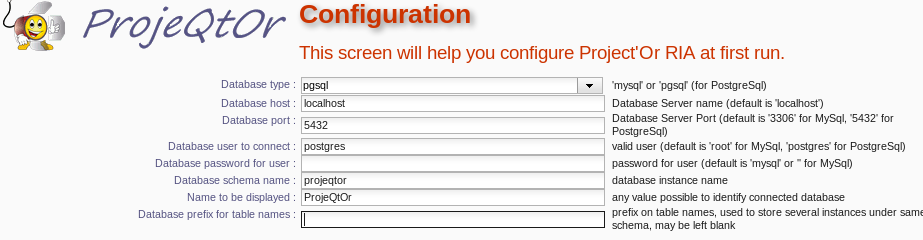
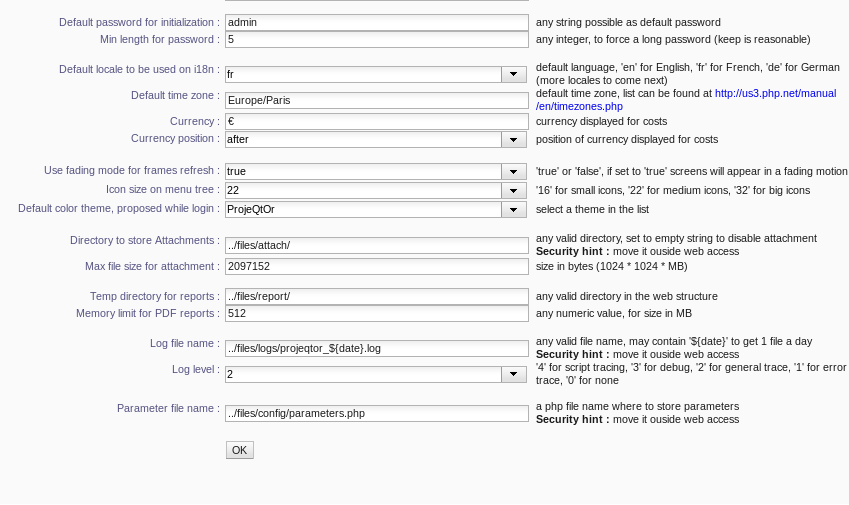
I want to configure Projeqtor with Postgresql 8.4, and the first step is wrong (rf. screens copies in attachements).
For information:
1- The DB postgres is in service and accessible from pgadminIII.
2- I created a second user (root as new user).
Thank you so much for your help.
Mams
Thank you so much for your response
Configuration shown on screeshots seems correct.
And what next ?
What is the issue ?
Any error message ?
Any error in the log File ?
Any error message, and I cannot continue the configuration/installation of ProjeQtor.
Why can't you continue ?
Did you click on button "OK" ?
What happened then ?
Yes. I had already done, I had no error message.
Yes. I had already done, I had no error message.
But what is the behavior ? Nothing happens ?
1) Check javascript console for any error
2) Check PHP log file for any error
Yes, I confirm nothing happens.
Ok, I will check javascript console and PHP log file error, then i send you errors messages.
Thanks soo much
I have no error message in the log files. I will reinstall Postgresql.
You should have an error somewhere (otherwise configuration would complete)...
... unless you just did not scroll down : it happens on some screen resolutions, that the result message and new button are displayed just below visible part of page.
Otherwise, you must have an error :
either in the browser console
or in the php log
of in the apache log
Reinstall postgres should not de necessary.
It is very rare it is not installed correctly.
But access rights should be reviewed.
Also, PostgreSql requires to have the database created before configuring ProjeQtOr. Unlike MySql, database cannot be created on the run.
My install is always KO.Any error message. Which parameters do I use for configure Postgresql (user and right, database name, ...)?
Thank you so much for your reply.
Parameters must be defined in config :
host : server when your database is
port : port to pgsql database (5432 by default for pgsql)
database : an existing database created on pgsql (with utf8 enciding)
user / password : a valid pgsql role granted to create tables on database.
Also check that :
user can access the database and select all tables adn create any type of object (table, sequence)
user must be able to connect to pgsql from PHP server : the rights defined in pg_hba.conf may be very restrictive.