
Welcome to ProjeQtOr new Forum. We migrated old forum to the new website.
You will find all your posts here, with your usual account.
Just one point : you’ll have to reinitialize your password. Use “Lost password” feature.

Hello,
I realised an export of my database using PhpMyAdmin with the standard parameters for "jeu de caractère du fichier
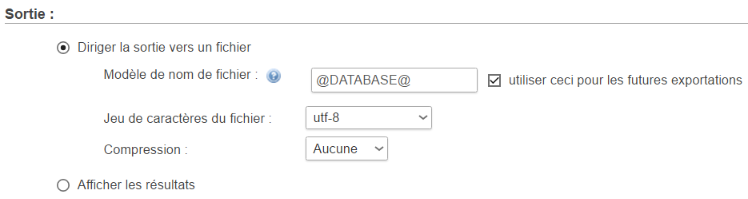
As result, I lost all characters like é à ' ù , etc. Here are some exemples
- Distribués
- Test de l#39;environnement
What do I make for choice in the list to keep theses characters ? Here is what I have in the list
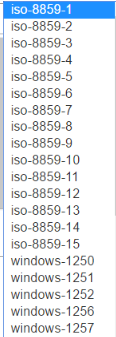
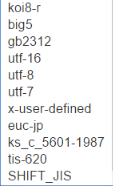
And when I import, does my choice be the same as for export ?
Thanks for help 🙂
Regards,
Damien
-----------------------------------------------
.
ProjeQtOr v12.1.0 - Apache v2.4.56 - MariaDB v10.4.28 - PHP v8.2.4
Plugins installed : PersonalizedTranslation 1.6 - ScreenCustomization 7.2

Hello dnaton ,
Normally , you have to choose the format UTF-8 but ... If your database is not in format UTF-8 it's a little problem .
Since 4.4 , all database are in format utf-8 but if your database is older than 4.4 it's possible that it's not utf-8 .
Then , if in utf-8 you have problem , you can use the format windows1252 or iso8859-15.
For the export it's the same format than the import.
Hello Krowry,
Thanks for your answer.
I'm a little bit confused when I take a look on my Database, and what is store, displayed, and exported.
Here is some example, to try to understand what I say
What is displayed for the user :

The data store in Database (PhpMyAdmin) :

The structure for this field in the Database :

What is exported with a dump :

- I exported with /*!40101 SET NAMES latin1 */; or /*!40101 SET NAMES utf8 */;
- It is the same result
All my tables (without exception) in the Database are like this example :

But I've this information at the end of the list of all the tables :

So, I don't understand anymore :blush:
- Why it is good displayed but not good stored ? (and how it is possible ?)
- What are the good parameters (and where iput them) to export correctly what is displayed
- Is there a way to correct what is stored in the Database ?
I know, there is a lot of questions 😉
Thanks
Regards,
Damien
-----------------------------------------------
.
ProjeQtOr v12.1.0 - Apache v2.4.56 - MariaDB v10.4.28 - PHP v8.2.4
Plugins installed : PersonalizedTranslation 1.6 - ScreenCustomization 7.2

You database is in Latin 1, so I guess you should export in Latin 1 to get correct display of accents.
What happens is that you store UTF8 characteres in non UTF8 database.
This is not blocking for ProjeQtOr as this just characters stored are correctly understood as UTF8, so correctly displayed.
Other solutions :
1) use our plugin "Backup Database". As is uses internal ProjeQtOr connection, you should get correct result.
2) export as is with phpMyAdmin and convert file afterwards using notepad++

Hello,
I have exactly the same problem as dnaton.
I want to transfer my projeqtor database to another server.
Whether I use mysqldump or phpmyadmin, whether my target server is mysql or mariadb, projeqtor does not display accented characters but characters in utf8.
The target and source servers have been installed in the same way.
Thanks to reply.
In most case it is because your db is not really storing UTF-8.
Check your dump file with notepad++ and look for accentuated characters.
If they are not displayed correctly, still with notepad++
=> Menu Encode > Convert to ANSI (file format should be ANSI, but accentuated characters not changed)
=> Menu Encode > Encode to UTF-8 (file format should be UTF-8 and accentuated characters correctly displayed)
Now you can import this file, PRojeQtOr will show correctly accentuated characters
It's OK.
In summary :
In my source database (mysql), for example in the table "activity", the word "Réseaux" is written "Réseaux", but Projeqtor displays the word "Réseaux".
I realized a fast export with phpmyadmin on the source server.
I converted this export with notepad ++ (Convert to ANSI) by following the advice of babynus.
I imported the converted export with phpmyadmin on the target server.
Now, in my target database (mysql), the word "Réseaux" is well written "Réseaux" and Projeqtor displays the same thing.
Thanks a lot.