
Welcome to ProjeQtOr new Forum. We migrated old forum to the new website.
You will find all your posts here, with your usual account.
Just one point : you’ll have to reinitialize your password. Use “Lost password” feature.

Hi,
I've some problems giving a user the correct access rights. Any help would be appreciated.
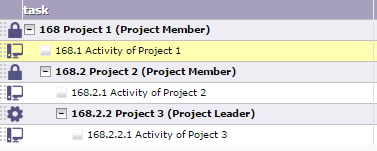
I've the following project structure (showing also the profile of the user for the project)
Project 1 (Project Member)
-Project 2 (Project Member)
--Project 3 (Project Leader)
In the 'Planning' form when he selects any project he gets the following message:
You don't have rights to access this Project.
Any subactivities that he selects are shown fine (even from projects he is not allocated to), although he is not able to create any new activities.
The 'Access to data (project dependant)' form show that a 'Project leader' is a 'Manager' for both 'Projects' and 'Activities'.
How can I find out why access is denied? And what should I change to make sure that this user has access to Project 3?
Thanks in advance.
Kind regards,
Remco Poelstra

Hi,
I thought is was an issue fixed in V6.1.2...
Which version are you using ?
Hi,
Thanks for your reply.
I'm running v6.1.2
Kind regards,
Remco Poelstra
Could not reproduce.
I set the use case in demo.projector.org for user manager (you can connect with password manager)
Connected as manager, you can :
- not see Project 1 (you are member only)
- not see Project 2 (you are member only)
- see and change Project 3 (you are project leader)
- see and change any activity on these projects, as members and leaders can both do this
So for me there is no issue
Hi,
I can't reproduce in the demo database neither. I've attached the projects export from my database. Maybe that will allow the bug to be reproduced.
I've been poking around a bit, so the user now has the following allocated profiles:
Project ID,Profile
4, member
5, member
7, member
8, leader
9, leader
20, leader
All projects show the lock icon.
I'm not sure whether it's a related bug or by design, but even from projects to which he has no allocation at all, he can still see any activities even from sub-projects. I've also attached a screenshot of the structure.

Kind regards,
Remco Poelstra
I noticed another thing that's probably related:
My projects menu (the top) shows like this:
His projects menu (the top) shows like this:
Which is understandable as he has nothing to do with the templates.
But his project's view shows only this:
So, there is only a project he is not part of, and doesn't show the projects he's allocated to...
All projects show the lock icon.
It means the user has not right to plan this project : either the project is locked or user has no right to update the project.
I'm not sure whether it's a related bug or by design, but even from projects to which he has no allocation at all, he can still see any activities even from sub-projects. I've also attached a screenshot of the structure.
Access rights are inherited. So when user has right on project, he gets same rights on all sub-projects (except if changed by allocation with different profile)
I noticed another thing that's probably related:
My projects menu (the top) shows like this:
His projects menu (the top) shows like this:
Which is understandable as he has nothing to do with the templates.
But his project's view shows only this:
So, there is only a project he is not part of, and doesn't show the projects he's allocated to...
This is not clear.
Could you show print screen ?
Something went wrong posting that. Here's the full message again:
-------------------------------
I noticed another thing that's probably related:
My projects menu (the top) shows like this:

His projects menu (the top) shows like this:

Which is understandable as he has nothing to do with the templates.
But his project's view shows only this:

So, there is only a project he is not part of, and doesn't show the projects he's allocated to...
This last described behavior is normal :
He has no allocation to template : so he cannot work on items of this project, and so cannot select project in project selector.
But he has some project leader acces : so he sees template projects in project list, to be able to copy these projects (that's what "tempate" project type stands for)
NB : you must remind that the project selector is used to select a projet to work with, so you have access to list of projects you can work with (for instance manage tickets or activities) and has no link to projects you can see (team members will no see project screen but can work on its items)
Ah, I see. That's explains that part.
It doesn't explain why the projects he's a leader of do not show in this list. Although it does match with all the projects being locked for him. How can I best proceed from here to make sure he gets the correct access rights?
Is there some kind of debug facility to see where it goes wrong?
Remco
It doesn't explain why the projects he's a leader of do not show in this list.
What is the type of this project ?
(take care about Administrative and Template)
All projects are of the OPE type.
I removed all this user's allocations and I then logged him out and back in. No projects (except the template) were shown, as expected.
I then re-added some allocations and logged him out and in and now the projects he's allocated to do correctly appear and he's able to add activities.
So I think that this fixes the problem.
Thanks for your support.
Kind regards,
Remco Poelstra