
Welcome to ProjeQtOr new Forum. We migrated old forum to the new website.
You will find all your posts here, with your usual account.
Just one point : you’ll have to reinitialize your password. Use “Lost password” feature.

Hi,
Th project selector display only the name of the project. But in my case, i have more than 60 current projects and i would like to distinguish them by customer for example. Is it possible to display an additional information such as customer as a prefix, or something else?
Thanks
Damien

HI,
On the list of all projects you can use the icon "filter" to get a new list filtered by customer.
Dynamic option filter allow you to choose which customer(s) you select each time you will use this filter.
Hi,
I understand what you explain, but you do not reply to my request. I'm talking about Project Selector at the top left of the screen

alainforma's answer is correct
On right side of project selector, you have a magnifyer to search for projects.

You get the project list (like on project screen) where you can search on customer.
I will try to make both of you understand better:
Is it possible to get project selector look like the attach file?
To have a hierarchy by customer ?

Well it already does, if you sdelect the "stadard format"
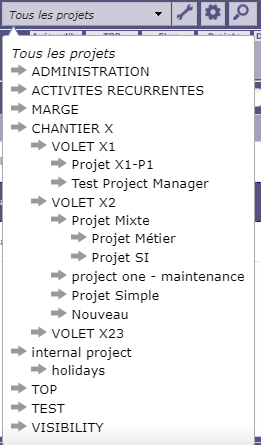
Now, the "Customer" level is not generated automatically.
(you need by customer, but other will need by product or by organization or by projectg type...)
You need to define yourself the coreesponding structure with a "fake" project to define the customer level (and set the projects of this customer as sub-project)
This is what i already did ie adding a fake project which name is the customer, but i do not have the presentation you give me with arrows and indentation...
Moreover, what do you mean by "standard format" ?
And to finish what would be the type of the fake project as we do not want to have action on it 🙂
If you don't have indentation, it is because you selected display mode other than standard
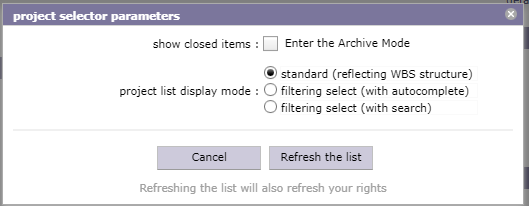
(this pop-up appears where you click on tool icon at right of project selector)
For the fake "project type", the type of porject won't have effect on possibility to create items on it.
All is done through project allocation and management of access rights.
Crystal clear, thank you very much for your help 🙂