
Welcome to ProjeQtOr new Forum. We migrated old forum to the new website.
You will find all your posts here, with your usual account.
Just one point : you’ll have to reinitialize your password. Use “Lost password” feature.

I want to ask about planned ?. How to display the date in the plan. According to the document, it is automatically added. But I entered full, start date, end date, the date is still not displayed. (File attached).
Moreover, according to the document, the margin is the margin between the date of certification and date of the plan, but there is no planned date, the margin is still true? (File attached)
Sincerely thank!
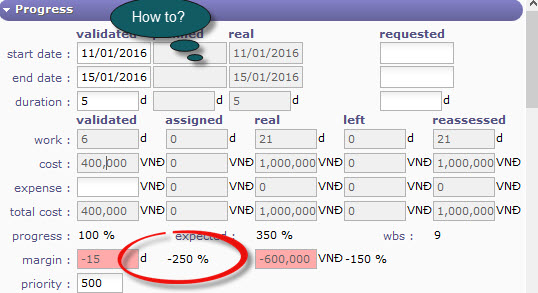

I want to ask about planned ?. How to display the date in the plan. According to the document, it is automatically added. But I entered full, start date, end date, the date is still not displayed. (File attached).
Did you recalculate the planning ?
Moreover, according to the document, the margin is the margin between the date of certification and date of the plan, but there is no planned date, the margin is still true? (File attached)
Sincerely thank!
The margin compares reassessed work vs validated work, so it has nothing to do with dates
I mean , how does planned start date and end date?
Thanks !!!!
In "planning" view, click on calculate button
Check manual : https://manual.projeqtor.org/html_en/Gantt.html#planning

Download:
http://www.projeqtor.org/files/ProjeQtOrUserGuide.pdf
This is the last version.
See chapter : 4.2 Gantt charts (Page : 109)