
Welcome to ProjeQtOr new Forum. We migrated old forum to the new website.
You will find all your posts here, with your usual account.
Just one point : you’ll have to reinitialize your password. Use “Lost password” feature.

Hi,
is there a way to order the entries in the Kanban Backlog? At the moment it seems to always use the id of the entry.
At the moment I'm using a Kanban Board based on Activities and would like to order the different Activities in the Backlog (ones on the top of the list should be done next).
I've tried the following approaches:
- Use the Planning to reorder the Activities. This works nicely in the Planning view, but it doesn't seem to be possible to then use this order (wps?) for the Kanban Board. If I add wps as order to a Kanban filter but it seems to be ignored.
- Use Entry Priority (number) for ordering. This works, but it is quite hard to move tickets exactly around.
Can you give me a hint how this can be done best?
Thanks a lot and best regards,
Oliver

Hello,
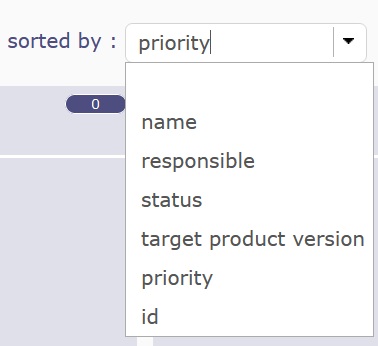
There are filters at the top to find tiles more easily or sort them with the "sorted by".

Have a nice day,
Maxca
Thanks a lot for the hint with the "sorted by"!
But what I still miss is a way to easily re-order individual Kanban items in the Backlog, so that the team members know which item should be done next with a short glance at the board. For example, it would be nice is to use the wbs sorting from the Activity Planning, but if I use wbs for sorting in an Advanced Filter it doesn't seem to have any effect.
Kanban and the whole Agile methology is quite centered around having a nicely ordered Backlog and I'm trying to achieve that in Projeqtor.

Okay, thanks for the feedback ! I'll submit the idea.
Yes, the “Advanced Filter” doesn't work on the Backlog, the ticket has been saved. #9293.
Have a nice day,
Maxca
Just tested with 12.0.1 and I'm now able to use wbs to sort the items in the Activity Kanban board.
My workflow works now, I'm able to order my Activites in the Planning view and then have them ordered the same way in the Kanban Board.
Thanks a lot for the support and the fast fix!!

Can we group the Kanban board bdsed on Month or based on Resource , etc?
Hello,
You can use the advanced filters to get the information you want first.
But if you want to have new columns by resource or by month, etc., it's not possible.
Don't hesitate to explain your question further.
Have a nice day
Hi,
I have not asked for Column-wise grouping based on Resource, month etc. Column-wise based on Staus is ideal. In addition to the column-wise grouping, row wise grouping based on Date (Month / Week, etc.) or by resournce name say R1, R2. Basically like two dimensional grouping column based on Status, Row based on Resource / Month/ Week. This will help to track the weekly activities / monthly activities / Resource-wise activities.
Thanks & Regards,
Kishore
Hello,
OK, I understand, it's not possible to create groups, but it is possible to sort by ascending/descending order using the advanced filters.
Have a nive day,
Hello,
after testing a bit more with more items, I realized that the ordering using WBS does not fully work.
It seems the database is not capable of ordering the wbs correctly, this is how the ordering looks like now on the Kanban board:
[list=1]
Looks like the DB is using some kind of text based sorting.
So I guess that in the planning board there is additional logic in PHP that implements the ordering.
Do you have an idea why this happens and, if possible, how to fix the wbs order?
Thanks a lot and best regards,
Oliver
Hello,
The sorting on the wbs does not fully work on the kanban, ticket recorded #9889
For the moment you can move the tiles manually in the order you want.
Have a nice day,
Thanks for the reply.
Yes, it is possible to move the tiles and re-order them. But it seems this is not stored. That's why I'm trying the whole wbs sorting topic.
Tested with Projeqtor version 12.0.3 and now wbs sorting on the Kanban board works as expected.
Thanks a lot again!