
Welcome to ProjeQtOr new Forum. We migrated old forum to the new website.
You will find all your posts here, with your usual account.
Just one point : you’ll have to reinitialize your password. Use “Lost password” feature.

Hello,
I am starting to use Projeqtor and I have a question.
I created a project with task and I assigned a resource to work on one of the task. I created a new profile : responsable de test which appears in (brackets) . The resource is also a user ( Testeur1) with a pass, word. The project is ''accepted'' state.
When a login as the Testeur1, I see no data and no menues, see attached file. Could you please tell me what I must do so that when I log in as testeur1 I can see the task that I assigned to Testeur1?
Regards
Michel


As you created new profile, it is normal that its name appears between bracket. It is because profile name is translatable and no translation exist for your profile name. You need "personalized translation" plug-in to translate it.
About visibility, it is due to access rights that you must define for new profile. You also need to affect user to a project to see its data...
Thank-you for your fast reply,
The ressource is asssigned to a task (see file testeur 2) but under «planification par ressource» , there is no data to display see file testeur 3.
Merci
Michel


Your print screen shows that you named a responsible for the activity.
But you need to assign so work to some resource (that may be different from responsible).
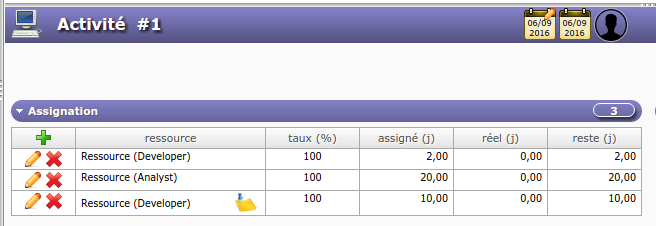
Could you show the assignment section ?
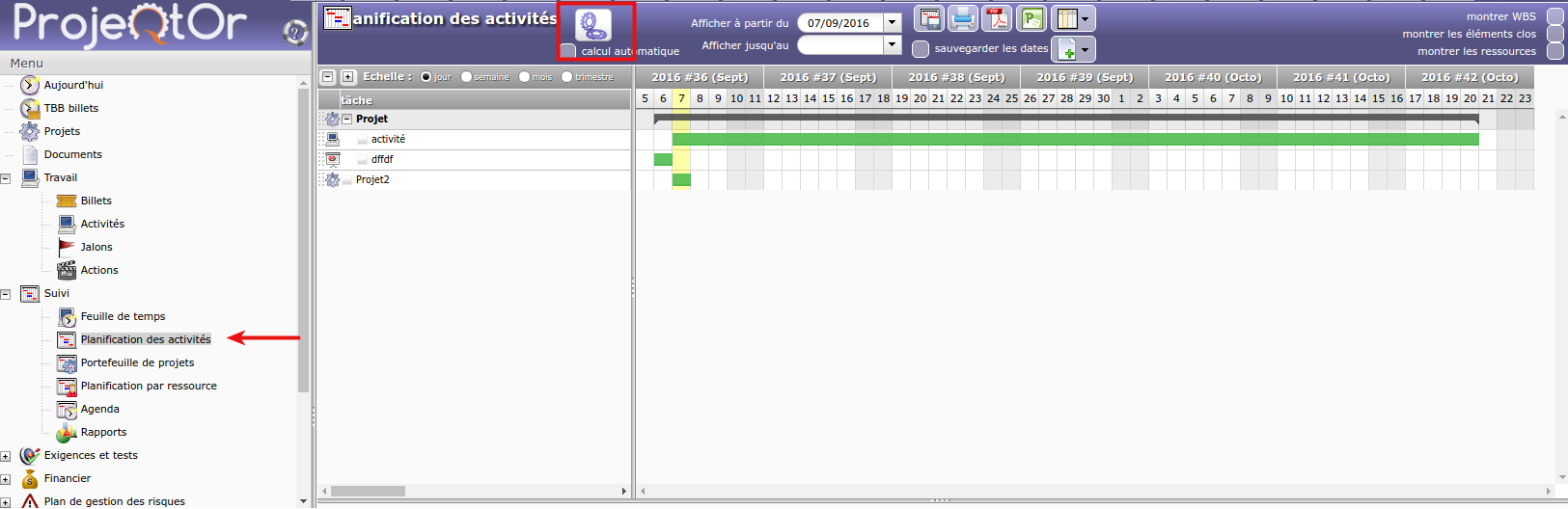
Then you'll have to execute planning calculation before seeing something on the resource planning.
Hello,
I have assigned a ressource testeu1 to the project la banque du Québec and i have affected the ressource to the project see sreen shot testeur 4 and testeur 5. He is assigned to a task see screen shot testeur 2. Do you have enough info to tell me what I am missing so that I can sign in as testeur 1 and see my work and enter activities?
Regards
Michel


You must assign work to resource in the "Assignation" section.
To see, planning in the Gantt view you must build the planning. Click on the gear icon.
----------------
The responsible "Responsable" is not necessarily a resource who work on the task or the delivery. The responsible is like a foreman.