
Welcome to ProjeQtOr new Forum. We migrated old forum to the new website.
You will find all your posts here, with your usual account.
Just one point : you’ll have to reinitialize your password. Use “Lost password” feature.

Good morning,
I have a question about timesheets.
I have a project created with one developer assigned and declared on it.
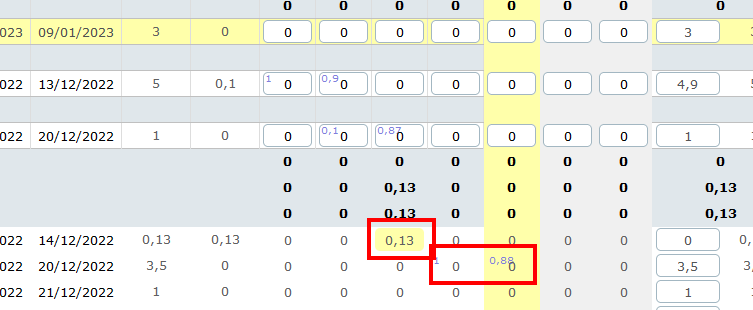
For the first time this morning he tried to declare his timesheet. Cells were available. He entered a 0.13 value for a meeting with a Ctrl+S just after.
just after the saving, all cells are now inaccessible. (see screenshot)
We can see that he has assigned work today and yesterday....
I probably did something wrong with the rights (but I don't see).
Why cells are not accessible ?
Any idea?
Many thanks.
Strange behaviour, if in the properties I check the box "cacher les éléments non commencés" then I can fill the time.
If unchecked, no possible action
See screenshot
My version 10.1.4
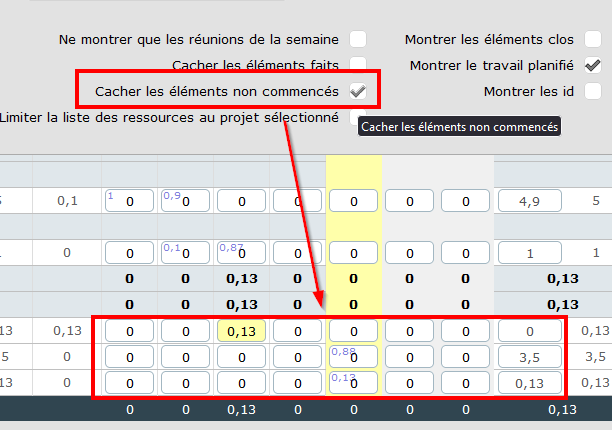

This option "hides" items that are not started. Started means "with in progress"' flag "on". On most case this is done through status change.
I'm OK with your last message, but I do not understand why (for the same activity) :
- I can enter time when the filter is "on"
- I cannot enter time when the filter is "off"
The activity is in progress...
Because when line is expected to be hidden but has to be displayed (because it has visible sub-tasks, or because real work exists) then it is displayed, in readonly mode
Hello,
I am sorry but I do not understand your answer. Just to summarize a bit my issue :
- I have a started activity in the workflow
- For the week, I have planified job to enter in the timesheet
It is in read only. If I click on the "hide not started activity", I can enter some time. But here, the filter has not effect because the activity is already started.
I have then a read only without filtering but read/write with a filter wich has nos effect (on hiding things) except allowing RW.
Normally, I should have the possibility to enter time without any filter.....
Really strange.
Many thanks.