
Welcome to ProjeQtOr new Forum. We migrated old forum to the new website.
You will find all your posts here, with your usual account.
Just one point : you’ll have to reinitialize your password. Use “Lost password” feature.

Hello,
I thinks it was great to be able to create direct link to PROJECTOR's elements (ie projects, tickets, activity, meetings...). If whe're able to create a direct html link (like server/view/main.php?project=103 for example), it was simple to communicate with other users by email for example.
This is what i mean :
In my job, i need to warn someones about project description, task avancement, ticket ... i use email to warn them, but need to add a "manual" link like "see ticket number 130 in projector". To be able to paste a direct link to the element will be usefull either for me to create the mail, and for my contact to access directly on my spot.
Regards,

Hi,
This improvement has already been suggested, to have a direct link in automatic emails.
It is partially implemented in V2.6, but still facing issues :
- if user is not logged on, he gets to the login page and is not redirected to the item after loggin
- item are displayed in new pages. This seems OK, but where closing one of the pages, the current session is closed (it is defaultbehavior), and it is the lost for all other opened pages...
NB : you'll like V2.6.
It brings new functionality to email detail of items to who you want.

Hi,
About direct links, how can I know the direct link to a Task/Activity ?
I'd like to use Skype or email client to send my team some tasks/tickets, without using embed email sending.
The only thing I managed to do is to "print" and item and get the link of the inner frame, but it's a bit hanvy & not really the link that opens ProjectOr smoothly..
Thanks !
Just to know the link, proceed this was :
- Go to and Activity (or else)
- Click on send mail icon
- Send a mail to yourself
- You will receive the mail in your mailbox...
- Click on the link to the item
- This opens a browser window
- Copy the url : it is a template to your items...
You'll just have to change id to point to another item.

Just to know the link, proceed this was :
- Go to and Activity (or else)
- Click on send mail icon
- Send a mail to yourself
- You will receive the mail in your mailbox...
- Click on the link to the item
- This opens a browser window
- Copy the url : it is a template to your items...
You'll just have to change id to point to another item.
Is that possible without email, let say by clicking 'copy link to clipboard' or 'copy to clipboard' and copied to clipboard ?
Thank you
Web Hosting and Server Provider
============================
Web Site: http://www.jfoc.net
Is that possible without email, let say by clicking 'copy link to clipboard' or 'copy to clipboard' and copied to clipboard ?
Request recorded as Ticket #1169

Babynus, suggest this goes in somewhere standard such as the
id: #number
Field on each object view... make the object ID a link (or a cool copy to clipboard link)
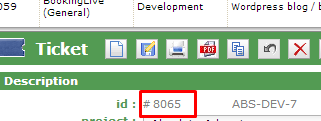
Great !
make the object ID a link
I don't get the idea of a link on the id : click on the ID would lead to .. same item :huh:
Right button > Copy link location
Then paste in any use you want (like on Wiki/Forum for example)
Or just "Middle click" / "Ctrl/Clic" to open in a new tab
Right button > Copy link location
Then paste in any use you want (like on Wiki/Forum for example)Or just "Middle click" / "Ctrl/Clic" to open in a new tab
I think by providing 'Copy link to clipboard' makes better user experience compared with right-click/middle-click.
Just my 2 cents
Web Hosting and Server Provider
============================
Web Site: http://www.jfoc.net