
Welcome to ProjeQtOr new Forum. We migrated old forum to the new website.
You will find all your posts here, with your usual account.
Just one point : you’ll have to reinitialize your password. Use “Lost password” feature.

In Project Screen (and also in Today screen) it would be nice to have a "Planned Overall Progress", so could be used to compare "planned overal progress X overall progress".
Instead of planned overall progress, could also de named expected overall progress.
Kind regards.

Already exists on project screen : expected %
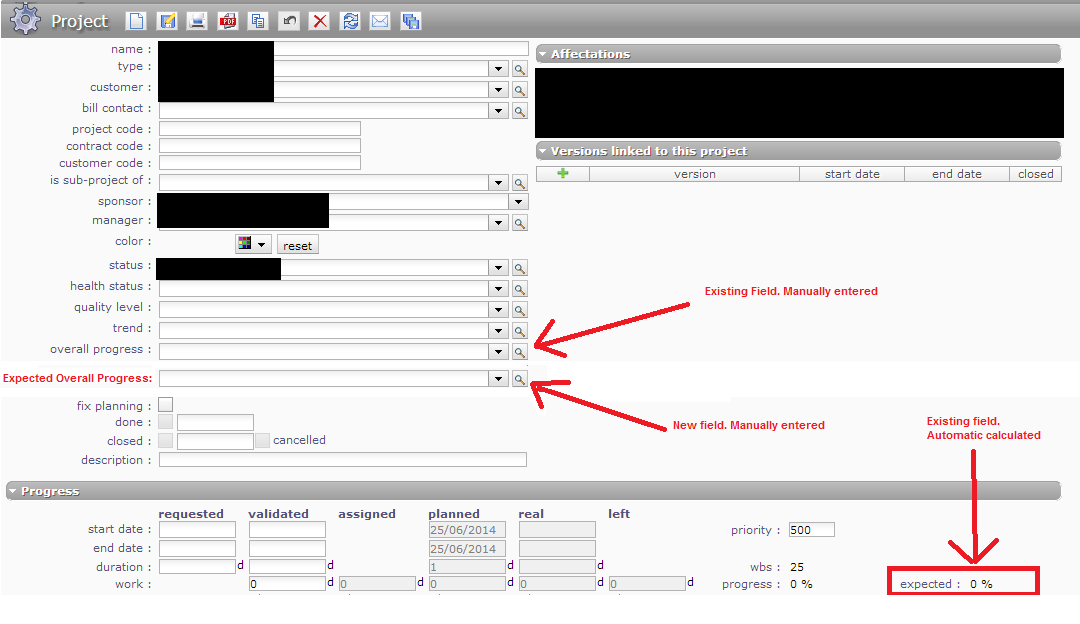
But the field current present is automatic calculated. Differently from "Overall Progress" and the field that I proposed, where the user can choose the %.
This is useful if one is using another schedule tool but wants to use projeqtor for portfolio and store other project data/records.
regards
The field "Overall Progress" already exists. It is not calculated.
You can select a value from list.
You can also define all values you wish in the list.
Hi,
I'm sorry about the last post. I was unable to make myself clear.
I'm aware that "overall progress" is manually chosen and that the current field "expected" is calculated.
I'm proposing a new field, called "Expected Overall Progress", which is manually entered, as "overall progress".
Please see attached file.
Kind regards. Thanks.

Hello,
it seems to be a strange think that a project leader enter manually an "expected overall progress" that is different than the expected progress given by planning...
So, if you're not ok with your planning, it seems to be a good practice to review the planning either than use a specific fields...
Just my advice...
Good day
JM
Hi JM,
I totally agree with you that one should review the planning. I also agree that no one should only enter manually a "expected progress", if they are using Projeqtor's Planning functionality.
However, planning the schedule and tracking the project progress can be done, as it is in my case, in another tool (like MS Project). So I do use all other funcionalities of Projeqtor, expect Planning.
I think Projeqtor is one of the most complete free project management tools available, and it's great to be used as a Portfolio and repository tool. Even not using the planning functionality, the other functionalities (issues, risks, meetings, decisions, test cases, requirements, actions, etc.) are extremely important and are used by me.
So my suggestion, is for those (if there's any other one besides me 😉 ), who do not use the planning functionality of projeqtor, but still use other functionalities, and would like to see the "planned VS real progress" of the projects (calculated in other tool, like MS Project) in the Portfolio (Today Screen, Project Screen, etc.). So, being able to see the comparison of "planned/expected" VS "real" Progress of all projects, is still useful and very important.
I hope I could be able to clarify the reason behind the suggestion.
Kind regards.
Hi,
This seems to be a very specific need.
It will not be implemented in community version.
If you wish, contact me through the constact form, I will send you an estimate to have it implemented as a private evolution.