
Welcome to ProjeQtOr new Forum. We migrated old forum to the new website.
You will find all your posts here, with your usual account.
Just one point : you’ll have to reinitialize your password. Use “Lost password” feature.

Have local directory for server ftp upload and subsquent import into ProjeQtOr
1. Be able to load documents or any file via my ftp access to a "local" import directory.
2. Be able to access the "local" directory under "attachments" or other in the various modules in ProjeQtOr and
3. Be able to move such files to the appropriate directories and register them in the ProjeQtOr system.
To be able to do something like this, or another workaround for this issue I'm having such as having a choice to do ftp style uploads instead of php post which often has issues depending upon so many variables.
In general I'm having troubles with larger php uploads, and will regularly need to import/upload documents types that range in size up to 1/2 Gbytes , and possibly more on occasion. I try to load 125Mbytes and have issues. Small files are no problem.
I have "attachments max size" under Parameters/Global Options set to 250000000.
I've attached a phpinfo report with obfuscation of private information, but all other info is intact.
Also show error_log and error message that shows up.
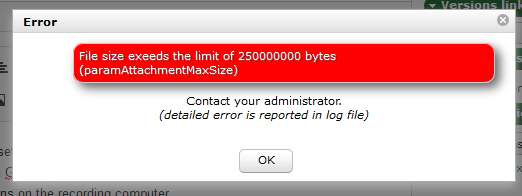
There may be a bug here or configuration behind the scenes on that rented server that I don't have complete control over.
Would love an ftp style of solution.
After reading the text error_log file it is apparent that the server has a cap for php post.
I need to be able to use ftp somehow for the uploads of attachments.
Hosting service is working on the issue that I'm having with PHP limits on that server.
The request for ftp to load large files in one way or another would be a good thing for folks needing to work around PHP POST and file size limits.
Thank you.

Sure you have limitation in php post.
I don't really understand your request
Have local directory for server ftp upload and subsquent import into ProjeQtOr
1. Be able to load documents or any file via my ftp access to a "local" import directory.
2. Be able to access the "local" directory under "attachments" or other in the various modules in ProjeQtOr and
3. Be able to move such files to the appropriate directories and register them in the ProjeQtOr system.
If I understand, you need to have a local directory that will automatically fill server directory throught FTP ?
This would require a client (local) program and this is really out of ProjeQtOr scope.
If you can push files on a directory of the server, (through FTP or else, but it won't be automatic unless you use solutions such as Dropbox, owncloud or nextcloud) you should then be able to use automatic import to import document version.
Have a look at import of Document Version (RTFM)
I have projects where large digital media files are involved as documents/attachments that often easily exceed PHP POST file upload limitations.
My desire is that these files should be directly integrated into ProjeQtOr as documents, attachments, or anywhere ProjeQtOr offers external document/file incorporation, but PHP POST is too often a limitation. Somewhat aside, I am using a cloud service where files could be placed, but this structure is not desired.
I see two solutions and by no means am I proposing they are the only possible solutions.
1. Have a specified directory (hidden from world view) entered into ProjeQtOr settings where the end user will do manual ftp uploads using whatever ftp software the end user has. At the juncture of when an end user would be offered a PHP POST upload, offer a selection of the usual POST upload or a "local/server" directory option in a dialog. If the end user selects "local/server", ProjeQtOr would go to a directory specified in system settings to locate the file(s) for incorporation offering the end user a selection dialog to pick from the possible list of files there. Then ProjeQtOr would copy or move the selected file(s) to the appropriate directories specified in ProjeQtOr settings with ProjeQtOr finishing out the procedure the end user is in.. For me, moving would be preferable to copying in this case.
2. Add code for ProjeQtOr to be using PHP FTP functions in order to directly use ftp style file uploading instead of the PHP POST uploading of the files, and make this end user selectable as in #1 above. I realize some 3rd party servers will not support this. Mine does. PHP FTP does not have the limitations of PHP POST.
3. Even perhaps to allow both of the above suggestions alongside PHP POST in ProjeQtOr.
Information for all of this would be entered into the Global parameters section under System/"Files and directories", and for #2 above to add a new section for ftp parameters.
In neither case should PHP POST be abandoned, it surely has its' place and convenience.
In summary, anywhere that ProjeQtOr would be using a PHP POST upload, also offer as an option to do a "local/server" file selection, and/or offer an option to do a PHP FTP style of upload.
Much of my mess in prior posts had to do with me finally coming to the conclusion that PHP POST is backend limited on my 3rd party server and will only follow my PHP.INI specification to an extent. I apologize for this meandering. I've gone back to read the manual atm per your suggestion. I've missed something there I'm sure.
I hope I've been able to sufficiently clarify the matter, and thank you.
Hi,
Second solution is not possible : only possible way to transfer a file from your local machine ot the server in a browser (through the application) is with PHP POST method.
Any other way to interact with your machine is completely blocked by browser (unless using external borwser Plugins or ActiveX, what we won't do).
First solution can be imagined.
I recorded request as evolution #3350 with very low priority (high cost compared to low improvement)