
Welcome to ProjeQtOr new Forum. We migrated old forum to the new website.
You will find all your posts here, with your usual account.
Just one point : you’ll have to reinitialize your password. Use “Lost password” feature.

Hi,
After I've updated to version 4.5.5, there are three buttons in screen "Planning", there are not working. The buttons are "export to MSProject", "Column selection" and "new item - activity, project, milestone". Please see the attached file.
There are no message errors or logs in the log file. It just seems that the button has no behaviour.
I've already clean up the cache (SHIFT + F5), but didn't solved.
Kind regards.
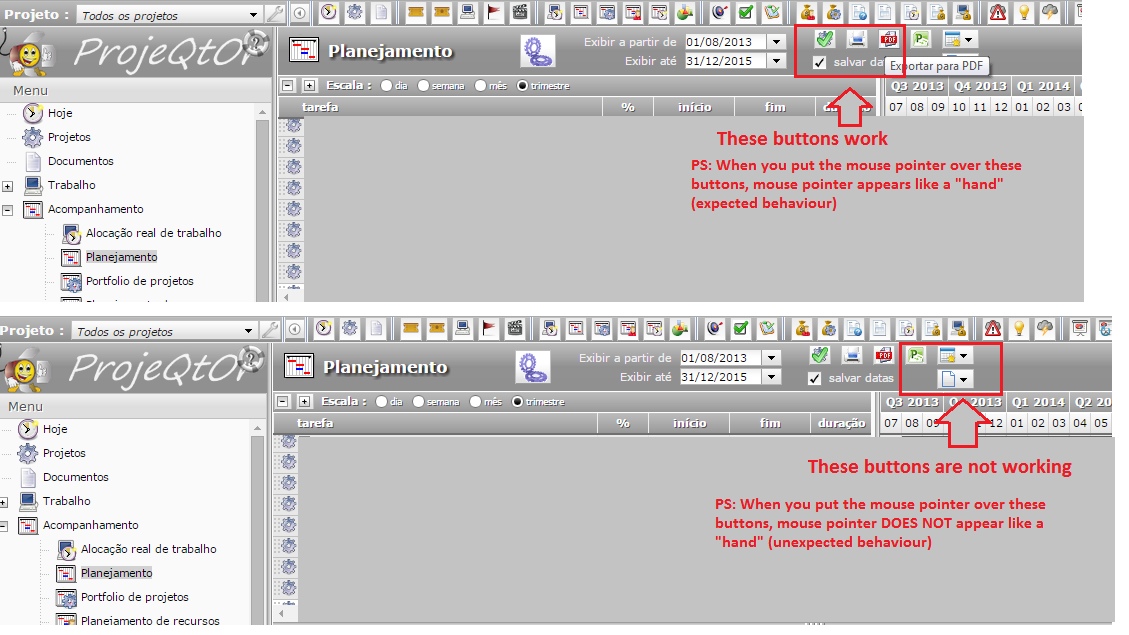

It is issue with message zone, invisible but over buttons.
You may check this by running planning : you'll see not working buttons are hidden by message area.
Quick work around : change zooming or use : hide menu button, the buttons should become active.
I'll look for a fix.
the workarounds worked just fine. thank you