
Welcome to ProjeQtOr new Forum. We migrated old forum to the new website.
You will find all your posts here, with your usual account.
Just one point : you’ll have to reinitialize your password. Use “Lost password” feature.

Hi babynus,
i tried to migrate my projectoria from 3.2.2 to 3.3.1 and i met a planning issue.
So, it seems i lost all start date, in fact when i open the planning for a project all tasks and milestone start at the "start displayed date" but finish normally.
in addition i saw in the planning that the vertical lines are not displayed any more, is it normal ?
I had to go back to 3.2.2 because of this issue.
Thank's for your help.

So, it seems i lost all start date, in fact when i open the planning for a project all tasks and milestone start at the "start displayed date" but finish normally.
It is exactly same behavior in V3.3 and V3.2.
i saw in the planning that the vertical lines are not displayed any more, is it normal ?
You must have some issue about images. New format uses images to display lines. Maybe some cache issue possibly browser cache, but more probably server cache.
re,
i cleared browser cache, and restarted apache, php and mysql service. the problem still present.
i used firefox 18 or Ie 8.
with V3.3.2 :
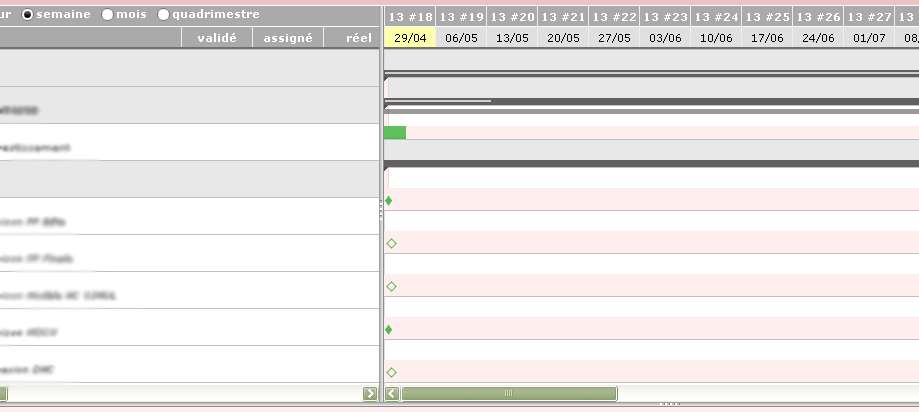
and a click on an activity does not display it.
using 3.2.2 :
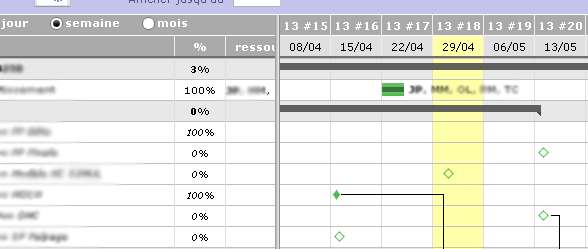
works fine.
One idea.
Thanks.
Hi,
I cannot reproduce :
- FF 20 on Win XP : OK
- IE8 on Win XP : OK
- Chrome 26 on Win XP : OK
- FF 20 on Win 7 : OK
- IE9 on Win 7 : OK
- Chrome 26 on Win 7 : OK
Could you try on Demo instance ? Do you produce the issue ?
On which OS do you produce issue ?
Does it occur on several client workstation or only one ?
Do you have the opportunity to test with Chrome or FF20 ?
hi,
so i performed test, on FF20 the problem still exist.
but not in demo database whatever the browser.
So it seems coming from the server size. for information the server is now on XP using apache 2.2.22, PHP 5.3.13 and MySQL 5.0.88.
i m going to try with 3.3.2 version as soon as possible.
regards.
Yes, it is likely to be a server side issue.
But V3.3.2 will not bring any better from V3.3.1.
What you can try is deploy a brand new set-up in V3.3.2.
hi babynus,
i deployed this morning a new Projectorria 3.3.1 from scratch on my server, i added a project an activity and go to planning, and .... i met the same issue.
so the source of the problem seems to be the server configuration.
did you used specific php extension for planning in 3.3.X ? another idea ?
Best regards.
did you used specific php extension for planning in 3.3.X ?
No, nothing is new on server side...
another idea ?
Only possibility I can think of is that your server does not provide correct css or js files.
Only possibility I can think of is that your server does not provide correct css or js files.
Sorry i don't understand.
could you explain ?
and why on the same server the 3.2.2 work fine and not the 3.3.1 !!!!
why on the same server the 3.2.2 work fine and not the 3.3.1 !!!!
Gantt display has completely changed on V3.3.
New version uses new CSS styles that are very important to have correct display.
If you work with old CSS file, display will be wrong.
But I don't really nderstand how you can get old CSS with new version.
Perhaps some apache static files mess, as they have semae name ...
What you can do on V3.3 is try to display with V3.2 style : just add in parameters.php
$ganttPlanningOldStyle=true;
New version uses new CSS styles that are very important to have correct display.
If you work with old CSS file, display will be wrong.
But I don't really nderstand how you can get old CSS with new version.
Perhaps some apache static files mess, as they have semae name ...What you can do on V3.3 is try to display with V3.2 style : just add in parameters.php
$ganttPlanningOldStyle=true;
i tried your $ganttPlanningOldStyle=true; but doesn't work.
i look in firefox debugger, and it seems th jsgantt.css file is the old one, the one packaged with 3.2.2 but not in 3.3.1.
So the next step : to find why Apache is using the wrong css file.
hi all,
we found the root cause and the solution of this issue.
in fact, it came from "compatibility parameters" in Internet explorer, why the problems was present in Firefox stays a mystery.
so, my IE 8 was configured to be in compatibility mode for all intranet site. that's why on Projectorria's demo, the display was good.
So, today, my projectorria is on production server, the compatibility parameters are set to "no" for all sites (internet and intranet) and everything is OK under IE and Firefox on version 3.3.2.
Thank's everybody.
see you.

Hello,
I had exactly the same problem Firefox 21, ubuntu 12.04, and it has been solved just forcing the refresh of the planning page.
I suppose the new css and js have not been renamed (or at least some of them), than it is just a browser cache problem.
Ciao
Jean Pierre