
Welcome to ProjeQtOr new Forum. We migrated old forum to the new website.
You will find all your posts here, with your usual account.
Just one point : you’ll have to reinitialize your password. Use “Lost password” feature.

Hi Babynus,
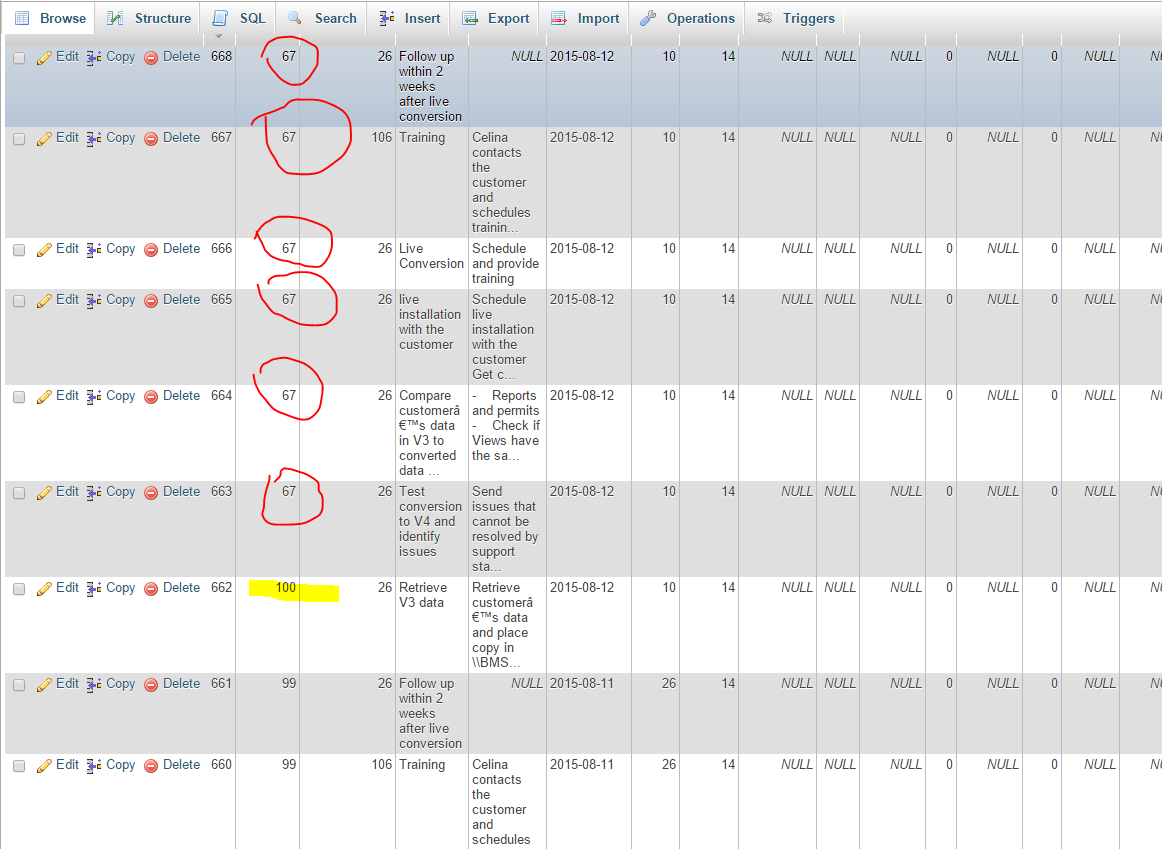
When I create copy of a project (in this case project id 67) associated activities copied but, except for the first one, the copies remain part of the original project. See attached screenshot showing the first activity assigned to correct new project highlighted with yellow and remaining activities circled in red. We can schedule some time to let you on my machine to show the problem if you are not able to replicate it. I am using version 5.0.2
Thank you.

Cannot reproduce.
Could you check in log files if there is any error ?
Could you try and reproduce on Demo ?
Hello Babynus,
Attached is the log file from yesterday. There are errors related to SQL command incorrect type and fields not found. Please review.
Thank you.
Sorry, no log file attached (some format are forbidden, try and zip file)
I see many error between 12:40 up to 12:56
Did the tests occur during this period ?
It is possible that you MySql timeout is too small.
Yes. I did not do anything else yesterday.
What it should be? Also it creates the records but assigns wrong projects. Does it assign project id after server confirms that record created??
Check you MySql configuration, about timeouts.
For instance wait_timeout should possibly be increased.
Other variables to check (I indicate default values):
interactive_timeout=28000
lock_wait_timeout=31536000
wait_timeout=28800
Here is what I got from my hosting support:
MySQL connect timeout value is set to 10.
If you see error message 'MySQL server has gone away', it might be that your script is not optimized and makes too many connections to the database (or your website is very active, has many users online at the same time).
You may also get this error if your script executes heavy/slow MySQL queries.
First of all you should check if your database is well optimized and has indexes where needed. You should contact the script developers and ask assistance.
Hi,
Issue is not about "connect timeout". 10 s for this is correct, as is it delay to get a connection to db.
Issue is about maintaining the connection. Defaut value in MySql is 8 hours (28800 seconds).
Your provider changed this value, and this is an issue for long treatments.
It forbids any "long time" process, such as batch treatments.
It is a choice of some "shared" hosting providers to avoid too hard load for single user, but may be an issue (as it is in this case).
No solution exists, unless changing provider.
NB : I agree that copy process is not really optimized; there is some work planned about this, not really easy as copy of projets is quite complex when you also copy assignments.