
Forum

Error sending mail ...
 
Notifications
Retirer tout

Error sending mail for outlook mail server

30 Posts
3 Utilisateurs
0 Reactions
16.6 {numéro}K Vu
(@mc540052)
Posts: 26
Active Member
Début du sujet
 

@babynus

Check acces rights : check that acces rights for admin on "emails sent" is "manager +" or "reader +" (on acces to data) --->> reader +

There is Reader+ only for admin..!! I don't why its not showing..!??

Thanks in advance..!!


Posté : 13 Avr PM 19:044
(@mc540052)
Posts: 26
Active Member
Début du sujet
 

@Babynus..!! Thank you soo much for your great support.!!

Its showing for "Manager+" access right.!
Is this one is the highest right..?? Or "Reader+" ??

Kindly clarify it.....!

Thanks in advance .!!


Posté : 13 Avr PM 19:044
Gautier
(@gautier)
Posts: 207
Membre Admin Registered
 

Hello,

You should maybe check your current project and select "all projects" If you did not. Because the project filter works on screen emails sent.


Posté : 13 Avr PM 19:044
(@mc540052)
Posts: 26
Active Member
Début du sujet
 

@Gautier, Thanks for kind response and clarification.!!

Kindly see this screenshot and let me know where is my fault ??
If anything wrong...
But i have lot of records in my database table (mail, alert)..

Thanks in advance.!!


Posté : 13 Avr PM 19:044
(@babynus)
Posts: 14952
Membre Admin
 

Idea og Gautier was a good one...
But you have selected "all projects"...

Can you please show content of table "mail" ?


Posté : 13 Avr PM 19:044
(@mc540052)
Posts: 26
Active Member
Début du sujet
 

@Babynus, Thanks for your Support.!!

Kindly check the attached screenshot for mail table data.!
Thanks in advance..!!


Posté : 14 Avr AM 08:044
(@babynus)
Posts: 14952
Membre Admin
 

OK,

So first : table has data, at least for user 330
1) when user 330 connects, does he see mails (if you give him acess to this screen)
2) no mail displayed means an error occurs (sure !)
=> open console in browser
=> access mail page
=> post here content of console
=> post here log file after
=> post here apache error log file (not the access file)


Posté : 14 Avr AM 11:044
(@mc540052)
Posts: 26
Active Member
Début du sujet
 

@Babynus, Thanks for support..!!

There is no error in console, log file...
I am asking that if admin can see all the mails in our system right..?
For admin itself not showing for the Data access rights in "Reader+". But i changed the right to "Manager+" records showing.!

My doubt is which is highest rights "Manager+" or "Reader+" to view all records as a admin.????

Thanks in advance..!!


Posté : 14 Avr PM 13:044
(@babynus)
Posts: 14952
Membre Admin
 

If you didn't change the acces modes :
"Reader+" can read all items whatever the project, but cannot update anything
"Manager+" can read and update all items whatever the project

So Reader+ is enough to read mails.

Can you please chek and post screenshot of Access mode "reader+" ?


Posté : 14 Avr PM 13:044
(@mc540052)
Posts: 26
Active Member
Début du sujet
 

@Babynus, Thanks for your great support.!!

Kindly see the screenshots....

And let me know where is my fault or misunderstand going on.!!???

Thanks In Advance.!!


Posté : 14 Avr PM 14:044
(@babynus)
Posts: 14952
Membre Admin
 

OK, you changed Reader+ access mode.
So, even admin cannot see all mails, only mails of own projects and as admin is not allocated to project as he sees all projects as Manager+, he cannot see any mail.

Here is defaut access modes definition
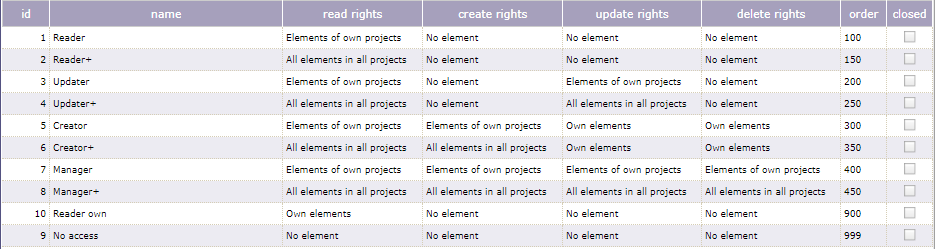
My advise : never change existing modes. If you need something specific, create your own.


Posté : 14 Avr PM 14:044
(@babynus)
Posts: 14952
Membre Admin
 

As a conclusion : all your emails (at least the ones visible on the previous screenshot) are in status ERROR.
This means that emails are not sent ... and this may explain why they are not received 😉
Check your email configuration and use unit test to check it is correct.

NB : for emails sent through CRON process (automatic email) you will need to restart the CRON (in admin page) to take into account new parameters.


Posté : 14 Avr PM 14:044
(@mc540052)
Posts: 26
Active Member
Début du sujet
 

@Babynus, Thank you soo much for your great support up to this level.!

I have made some update in defaut access modes definition. Now i understood why its happened.

Now i reverts back to the default mode based that screenshot which you sent.!! Will follow the same in future as you said..

Once again thank you so much for great tool and your support.!!


Posté : 16 Avr AM 08:044
(@mc540052)
Posts: 26
Active Member
Début du sujet
 

@Babynus,

I have fixed one more issues in the internal cron execution of administration section.

There is a spelling mistake in MAil instead of Mail in view/admin.php on line 101.

See Screenshot below i have attached and kindly update this in the next version of release.

Thanks in advance..!!


Posté : 16 Avr PM 15:044
Gautier
(@gautier)
Posts: 207
Membre Admin Registered
 

Hi,

Thank you for this bug reporting, we solved this problem in the last version projeqtor V7.0.4.


Posté : 16 Avr PM 20:044
Page 2 / 2
Share:
Retour en haut