
Welcome to ProjeQtOr new Forum. We migrated old forum to the new website.
You will find all your posts here, with your usual account.
Just one point : you’ll have to reinitialize your password. Use “Lost password” feature.

Hi,
Gantt chart is not compatible with Firefox 24 and 25 - see enclosed screenshot.
I believe this problem happened some time ago and now again.
Regards,
Evgueni
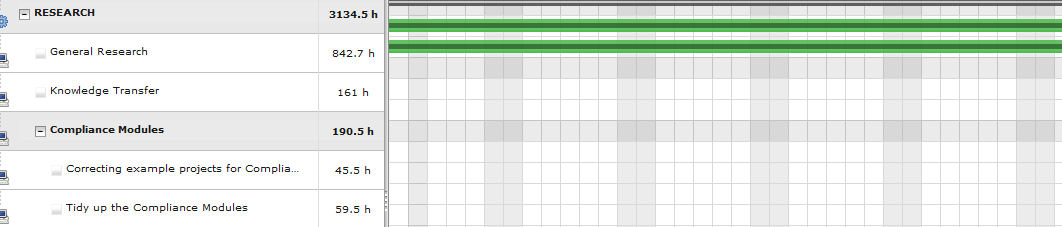

Hi
I could not reproduce.
Gantt is working fine on my side.
Firefox V25 gives exactly same (and correct) display as V23.
Did you reproduce on several work stations ?
Is it linked to some specific display ? For instance, if you limit display to few projects, does the issue still occur ?
What is sure is that issue is due to unexpected line break betwin drgger icon and Class icons. I'll investigate.
Ticket #1215 recorded.
Happening not on all but on some projects - very strange. Probably some special characters somewhere.
Works Ok in IE
If you have a hint about how to reproduce (what special caracter or other potential source of issue) please let me know.
The knowledge of the source will help the fixing.
Sure will do if I will find it. Checked all the projects - happening only with one...
Any suggestions how to localize the problem?
I you identified the project, try to find any difference or specificity :
- long name
- special cars
- length of data in other columns that could force a line break
I got it :woohoo:
This happens when the value in one of the columns is largest than the column itself.
To reproduce, I just entered 999999,99 days in the validated work field.
This produces the issue on FireFox and Chrome.
Surprisingly, IE display is still correct. :silly:
In fact, it is because IE font size is a bit smaller than other browsers.
Entering 9999999,99 days in the validated work field also displays the issue on IE 😛
I'll look for a fix.
I think I have a workaround.
Try code in attached file :
- unzip and copy it into /view/js to replace existing one
- clean web cache
- test
Thank you very much - it works!