
Welcome to ProjeQtOr new Forum. We migrated old forum to the new website.
You will find all your posts here, with your usual account.
Just one point : you’ll have to reinitialize your password. Use “Lost password” feature.

Hello,
I'm trying to import PROJECTS into PROJECTOR (V 3.0) for preparing annual work plan for 2013.
For test, i'm using a CSV file as attached.
When i'm using IMPORT DATA function in PROJECTOR, there is no message, and nothing is imported. 🙁
Log is attached to...
Thanks !

Hi,
I cannot find attached log.
Could you also attach or send me CSV file (or at least extract of it) ?
Attachments updated (wrong file type)
Your CSV file has 2 erroneous lines (line 2 and 3)
id;nom;type;MOA;CdP MOA;SI de rattachement;Numéro GSIM;est sous projet de;manager;couleur;état;fait;date de fin;clos;date de clôture;description;date de début initiale;date de début validée;date de début planifiée;date de début réelle;wbs;date de fin initiale;date de fin validée;date de fin planifiée;date de fin réelle;avancement;durée initiale;durée validée;durée planifiée;durée réelle;travail validé;travail assigné;travail planifié;travail réel;travail restant;coût validé;coût assigné;coût planifié;coût réel;coût restant
int(12);varchar(100);int(12);int(12);int(12);varchar(25);varchar(25);int(12);int(12);varchar(7);int(12);int(1);date;int(1);date;varchar(4000);date;date;date;date;varchar(100);date;date;date;date;int(3);int(5);int(5);int(5);int(5);decimal(14,5);decimal(14,5);decimal(14,5);decimal(14,5);decimal(14,5);decimal(11,2);decimal(11,2);decimal(11,2);decimal(11,2);decimal(11
Oups ! :S
I need to sleep a little more...
By the way, even with to new file (as attached), there's no message and no import...
Thanks for reactivity !
Even waiting for a while ?
You should have some problem to upload file.
Can you easily upload attached files (for instance on tickets) ?
yes, it's works fine for attaching files, tickets, project, activity, every attachement is working.
I do another test with same file, nothing append... only waiting wheel, just 1 second and nothing more...
Very strange.
I tried on test database : all is working fine with your file :
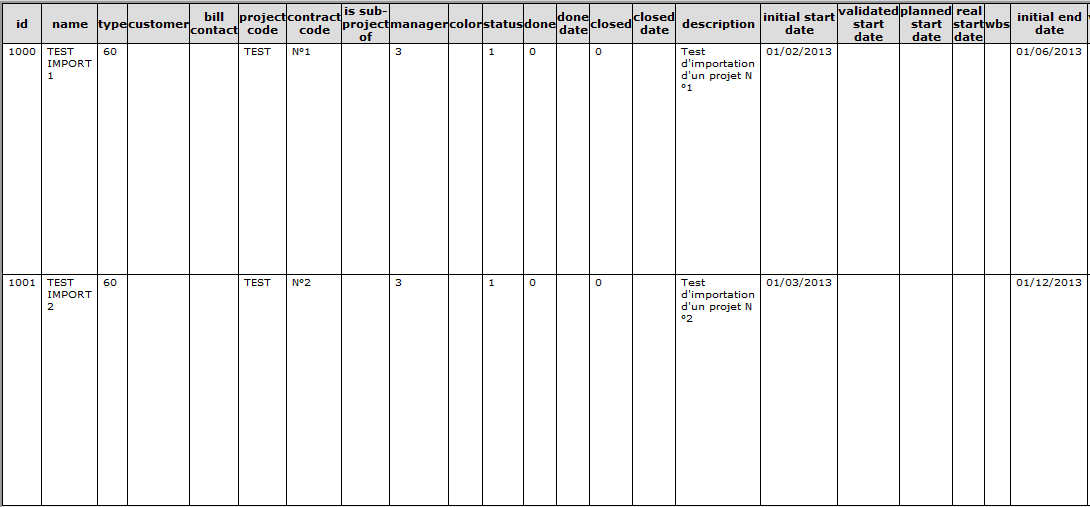
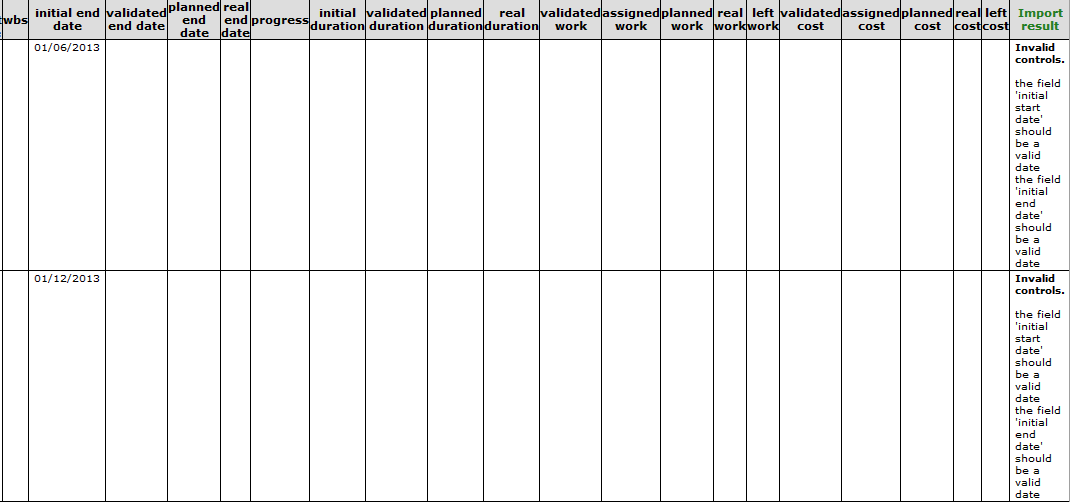
(You have date format error, but not hard to fix 😉 )
Check you have access to temporary directory :
../files/attach//import/
, with write access.
Check that file "Test import.csv" is present.
Try to remove space in file name.
If all this does not work, you'll have to debug :
in /model/Importable.php, in the function import(), add several lines :
echo "import - Step 1"
...
echo "import - Step 2"
Log show you enter correctly the import function :
import(../files/attach//import/Test import.csv, Project)
Hello,
file is present in ../files/attach/import
After delete, i do a new import, files is present again (whitout space in filename) but doesn't work anymore.
Even with ECHO in import function, i can't get any result, here's the log :
2012-11-28 17:38:03 ..... SCRIPT .... XX.XXX.12.130 /tool/import.php
2012-11-28 17:38:03 ..... SCRIPT .... XX.XXX.12.130 ->/tool/import.php
Attachement is Importable.php after inserting ECHOS.
You previously had the first trace in the procedure in the log.
You don't have it anymore ?
2012-11-28 12:52:48 ..... SCRIPT .... 10.xxx /tool/import.php
2012-11-28 12:52:48 ..... SCRIPT .... 10.xxx    ->/tool/import.php
2012-11-28 12:52:48 ..... SCRIPT .... 10.xxx import(../files/attach//import/Test import.csv, Project)
Could you also add "echos" just at the begining of the procedure (step 0) ?
Hello,
New test this morning...
Function import will be executed until BeginTransaction
Log is :
2012-11-29 08:56:28 ===== TRACE ===== NEW CONNECTED USER 'bremont'
2012-11-29 08:56:28 ..... SCRIPT .... /tool/saveDataToSession.php
2012-11-29 08:56:29 ..... SCRIPT .... /tool/saveDataToSession.php
2012-11-29 08:56:29 ..... SCRIPT .... /view/main.php
2012-11-29 08:56:29 ..... SCRIPT .... ->/view/main.php
2012-11-29 08:56:29 ..... SCRIPT .... ->/view/menuTree.php
2012-11-29 08:56:29 ..... SCRIPT .... ->/view/menuBar.php
2012-11-29 08:56:32 ..... SCRIPT .... /tool/saveDataToSession.php
2012-11-29 08:56:32 ..... SCRIPT .... /tool/saveDataToSession.php
2012-11-29 08:56:32 ..... SCRIPT .... /tool/jsonDirectory.php
2012-11-29 08:56:32 ..... SCRIPT .... ->/tool/jsonList.php
2012-11-29 08:56:32 ..... SCRIPT .... /tool/saveDataToSession.php
2012-11-29 08:56:32 ..... SCRIPT .... /tool/saveDataToSession.php
2012-11-29 08:56:32 ..... SCRIPT .... /tool/cronRelaunch.php
2012-11-29 08:56:32 ..... SCRIPT .... /tool/saveDataToSession.php
2012-11-29 08:56:32 ..... SCRIPT .... /tool/saveDataToSession.php
2012-11-29 08:56:32 ..... SCRIPT .... /view/today.php
2012-11-29 08:56:32 ..... SCRIPT .... ->/view/today.php
2012-11-29 08:56:37 ..... SCRIPT .... /view/importData.php
2012-11-29 08:56:37 ..... SCRIPT .... ->/view/importFile.php
2012-11-29 08:56:55 ..... SCRIPT .... /tool/import.php
2012-11-29 08:56:55 ..... SCRIPT .... ->/tool/import.php
2012-11-29 08:56:55 ..... SCRIPT .... import(../files/attach//import/Testimport.csv, Project)
Very strange. :huh:
Can you try to comment the transaction lines :
Sql::beginTransaction();
and
Sql::commitTransaction();
in this function to see how it goes ?
It done, here is the result :
Import - Step 1 : initImport - Step 2 - Class existImport - Step 3 - Sql::beginTransaction()
Function stop before CommitTransaction...
Here is the log :
2012-11-29 18:13:53 ..... SCRIPT .... /tool/import.php
2012-11-29 18:13:53 ..... SCRIPT .... ->/tool/import.php
2012-11-29 18:13:53 ..... SCRIPT .... import(../files/attach//import/Testimport.csv, Project)
Hi,
I really don't understand why you can't get it work.
I tried on :
- windows / mysql : OK
- linux (debian) / mysql : OK
- linux (debian) / postgresql : OK
Could you precise your test environment :
- php server OS / version
- php version
- db server OS / version
- db used (mysql/postgres) and version
Also, could you also test with joined Importable.php file ?
I added many debug line to track progress of treatment.
For information, I joined the log file that was geznerated with this debug level, with correct treatment of your test file.
Hello,
PHP : 5.2.3
MySQL : 5.0.77
I'll tried with new version of IMPORTABLE.PHP, log is attached...
Thanks !
Hi,
The issue is on these lines :
			if (trim($line)=='') {
				continue;
			}
			if (! mb_detect_encoding($line, 'UTF-8', true) ) {
				$line=utf8_encode($line);
			}
Can you check mbstring plugin on you php ?
(run joined info.php file)
You should get something like this :
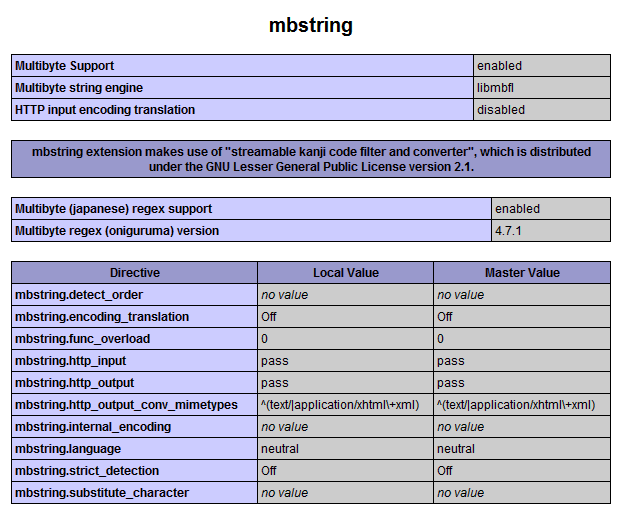
Ok, that's the reason.
After enabling mbstring plugin, it works !
Many thanks !
Great !
I will add a control on V3.1 to check availability of the module befroe trying the import.
Regards.