Welcome to ProjeQtOr new Forum. We migrated old forum to the new website.
You will find all your posts here, with your usual account.
Just one point : you’ll have to reinitialize your password. Use “Lost password” feature.

I installed V11.2 to test. I noticed that the planning is extremely slow. Looking at the browser task manager, I noticed very high CPU usage. Something must be wrong is generating the GANTT view.
.

Hello,
thank you for your feedback.
I'm not reproducing your problem. Can you tell me how many activities/projects you have? Are there log errors? console errors? What browser are you using?
Don't hesitate to describe anything you can on this subject, as the new version 11.2 includes : "Noticeable improvement in planning view performance: a Gantt of a thousand lines is displayed in a few seconds".
Maxca
Hello, Thank for your feedback.
Please see attachment with some screenshots.
I cannot see any errors in the logs. Neither Apache- neither ProjeQtOr. The log garnularity is set to "Debug".
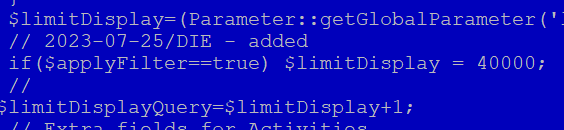
Please note that I have a large project and patch jsonPlanning to allow more lines.
I use intensively the filter feature.
It takes a while to load the schedule. Once it is loaded and display, if you scroll, it lags a lot or freezes for some time.
I did not encounter this with previous versions.
Hope this helps.
Hello,
I was testing both latest releases and wonder if you found the root cause to the issue I described previously ?
With large projects, the gantt display still freezes or slows downs considerably the browser.
Because the project is large, I use the filter feature to limit view to display specific sections only.
This limits the number of lines but demonstrates same symptomes, whereas still very high CPU usage when generating the gantt view and especially when scrolling down throughout the plan.
Many thanks in advance.

Hi,
The jsonPlanning has largely changed and should not rfequire extension to show large projects.
Try and reinstall defaut code and do not patch jsonPlanning
NB : scrolling should not "block" the browser.
We identified issue when scrolling very quickly from top to bottom : lines are not aligned (left-right parts) but never faces blocking.
Hi,
Thank you for your feedback.
I use the original code, except this patch (see attachment)
It needed because the filter criteria does not see project lines behond the "global setting".
If I change the global setting to the patch value, it loads the full schedule, which is not desired.
Thank you for your support.