
Welcome to ProjeQtOr new Forum. We migrated old forum to the new website.
You will find all your posts here, with your usual account.
Just one point : you’ll have to reinitialize your password. Use “Lost password” feature.

Hi all,
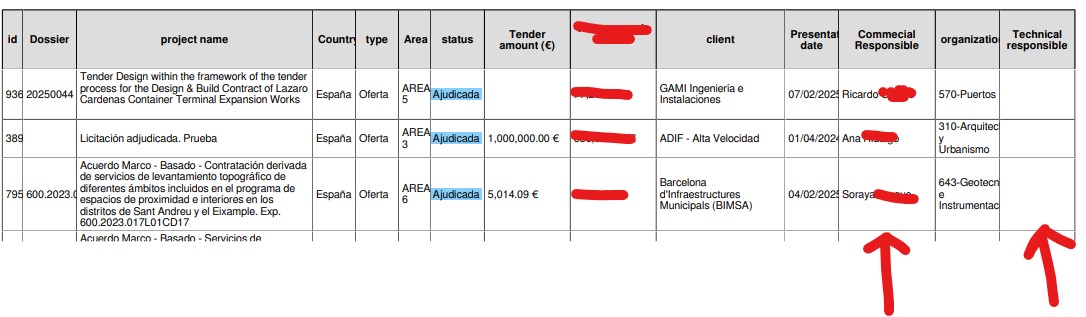
we are facing this issue: when we export the PDF with the list of projects, the column with the manager is empty. However, we have other fields with "reference to idResource" and they are correctly displayed.
This is not occurring if we export in csv and in the list of projects in the platform, the manager name is well visibile. (see attachments).
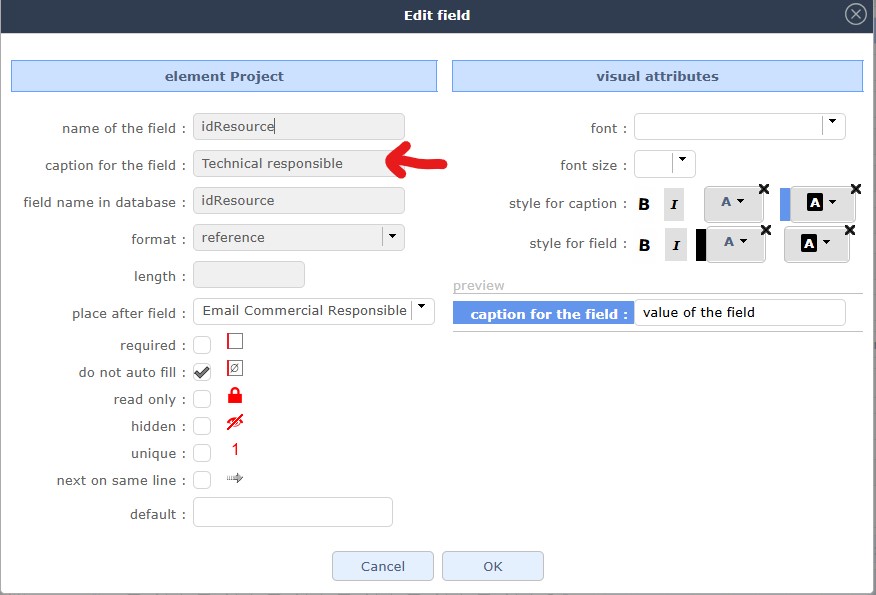
We have another instance of the platform and there it doesn't occur. The main difference between the two is that we rename "manager" in "Technical Responsible", but unfortunately now that there is data, we can't roll back this change anymore. In attachment you can find the configuration.
We are using the last version (v12.0.2) but it was occurring even with previous versions.
Thank you very much in advance,
Silvia


Hello,
Can you show us how your "commercial responsible"?
If you put a idResource in database, that would explain your problem.
In this case, you would have to create a new idTechnical (or other) field and enter your data. If you want to use a list of resources, you can enter idTechnical__idResource.
Have a nice day,
Commercial Respoinsible is defined as following: commecialResponsible__idResource
and it is correctly displayed both in the PDF and csv export.
Technical Responsble is defined as idResource as it is the original "manager", simply renamed as Technical Responsble
and it is correctly displayed in the csv export but not in the PDF export.
I hope it helps.
Hello,
OK, I've done the same as you and it works on my side.
What version of pluggin are you using?
Do you have any log errors? console log errors?
yes, I understand it is hard to reproduce. We have another instance of Projeqtor and the issue is not occuring. 🙁
About your questions: the screenCustomisation version is v6.6 and the platform version is v12.0.2
No errors in the log or in the console.
Hello,
hum, maybe you're using a different browser?
Maybe by swapping the order of the columns?
The plugging is available in v7.0.
Have a nice day,
Answer for the rest of the community
The problem was caused by the user parameter "show photo thumbs in list"= NO.
The problem has been corrected in 12.1