
Welcome to ProjeQtOr new Forum. We migrated old forum to the new website.
You will find all your posts here, with your usual account.
Just one point : you’ll have to reinitialize your password. Use “Lost password” feature.

Hello,
for some users, there is a problem in the problem list.
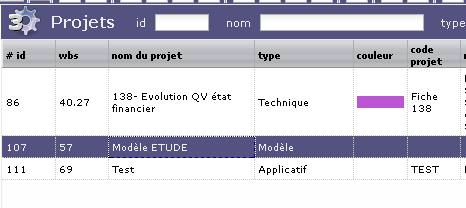
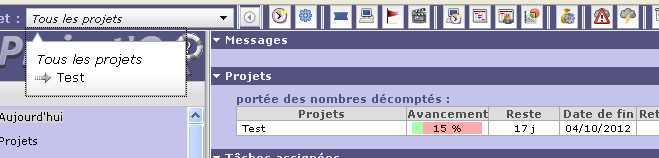
All projects are visible PROJECT screen (see attach 1), activities are visibles too, but some projects doesn't appears in TODAY screen and combolist (see attach 2).
Regards,
Jean-Marie

hi,
Highlighted project is of "Modèle" type.
If this is translation of "Template" type, with code = "TMP", it is normal.
Template projects are not displayed on the Today screen.
They are visible to users with "Project update" right (typically project leaders), just to be copies.
Try and change the project type, you'll see the difference.
Also have a look at the user manual; it contains some interesting things. :whistle:
RTFM 👿
Highlighted project is not signifiant. I Speak about project 138 that is not displayed in TODAY screen or combo.
Also, even when changing project type, it doesn't appear anymore (I've refreshed the page too).
Check rights to the projects : if visibility rights are set to "own projects", it will appear only if user is affected to the project.
Also consider that if project has been newly created or affected to, if will correcly appear only after new connection.
Thanks for reactivity !
I've just created a new project for test, it appear in project list and combo, but project 138 doesn't appear anymore...
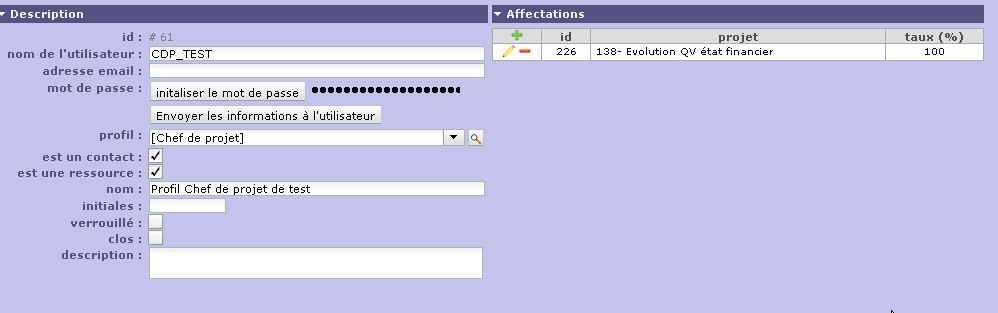
CDP_TEST is ressource and contact on this project (see attachment).
This is an example, i have many occurrence of this problem...
Actualy, there are 43 "reals" projects in the database, and at least 4 users report the problem.

Just go to your project and save it, without any change.
It appears that if project has been copied, it must be saved so that status is correctly defined.
By defaut copied items have no status, and it may lead to visibility issues. An improvement is planned to introduce new status for initialy copied items to avoid this issue.
No effect.
Project 138 was created from scratch. however, i try to change description and save the project... still invisible for cdp_test (and the real user who work on it !).
Can you show / post printscreen of :
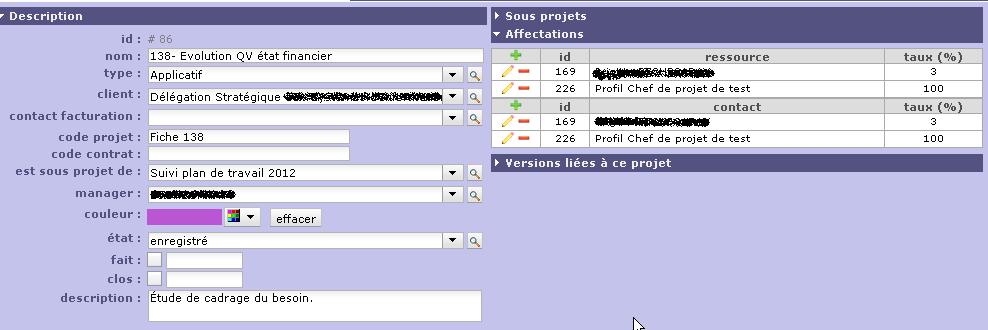
- project 138 detail
- user CDP_TEST detail
- access modes screen
- access mode to data screen
Here are the details :
Attach 1 : project 138 details
Attach 2 : User CDP_TEST details
Attach 3 : access modes screen
Attach 4 : access mode to data screen
EDIT : I try to create a new project from CDP_TEST profile, it works fine, but Project 138 still invisible...
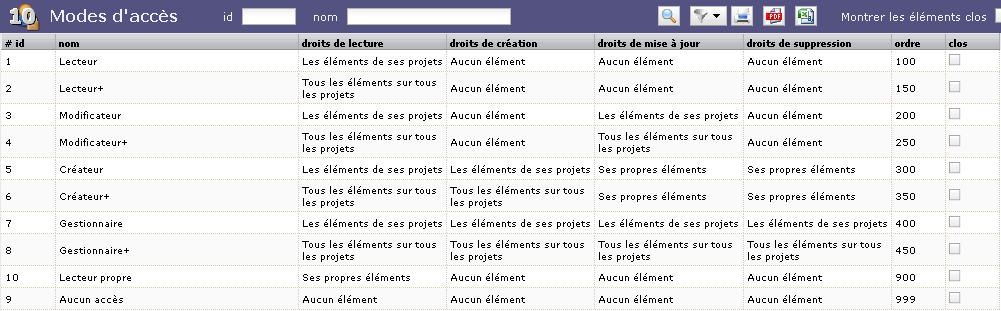
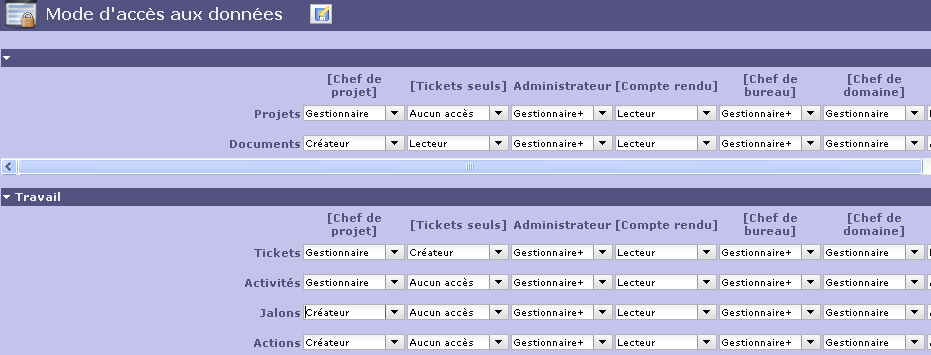
Hi,
I cannot see any issue.
All seems correctly configured.
Did the user CDP_TEST explicitly disconnect and reconnect ?
Yes, disconnect and flush the cache... 🙁
Very strange because new projects are visible and project 138 can be accessed and updated via project screen.
???
Hi,
Yes, very strange :huh:
What is the code of the project type "Applicatif" ?
Could you try to update some field in the "progress" part of the project and try again ?
Could you try to change Project status ?
Does it change something ?
Could you check database, table planningelement for lines with refType='Project' and refId='86' ? How many lines ?
What version of Project'Or RIA ?
Did the issue appear with some new version or was it always the behaving this way ?
Thx
Sorry for lake of reactivity... lot of works here ! :silly:
Project type "Applicatif" Has Id = 60 (look at attach 1 for all type)
Cannot change anything in Progress, unable to access it from ACTIVITIES or REAL WORK (not in project list).
Changing status to "Assigned" was no effect.
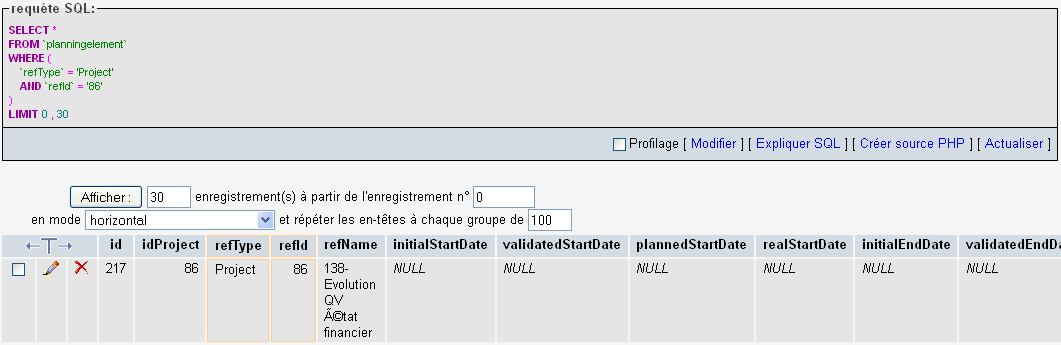
Only 1 line for refType='Project' and refId='86' in planningelements (see attach 2)
Projector is version 2.5.0. Issue was detected on previous version (2.4.3) also.
Regards
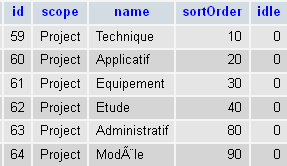
Project type "Applicatif" Has Id = 60 (look at attach 1 for all type)
What I'd like to know is the code of the project type, comlumn code, the last one.
Cannot change anything in Progress, unable to access it from ACTIVITIES or REAL WORK (not in project list).
I mean the "progress" part of the project, on the Project screen : try to change something like "initial start date" on the project.
Only 1 line for refType='Project' and refId='86' in planningelements (see attach 2)
So, you're not facing old issue which created several lines for 1 project, leading to visibility issue.
Projector is version 2.5.0. Issue was detected on previous version (2.4.3) also.
So, it's not a regression from 2.5.
Project type "Applicatif" Has Id = 60 (look at attach 1 for all type)
What I'd like to know is the code of the project type, comlumn code, the last one.
Code is 'OPE'
Cannot change anything in Progress, unable to access it from ACTIVITIES or REAL WORK (not in project list).
I mean the "progress" part of the project, on the Project screen : try to change something like "initial start date" on the project.
Ok, dates changed, no effect
Huhu :dry:
I don't have any more idea, and don't know how to investigate without data.
Could you provide an anonimized export of your database ?
Difficult to anonymize data. Do you have an email where i can send packed database export ?
support@toolware.fr
mail sent
received.
I investigate. 😉
Hi,
I got it : it's a bug.
Projects are not displayed if they are sub-projects of not visible project ...
Except if parent project is the firts project...
I'm working on the fixing.... Not easy...
Thanks for your great work !
Since fix, i will made parent project visible.
Regards,
Hi,
The issue is fixed.
But it showed new ident issues on Today, Planning and Real Work Allocation.