
Welcome to ProjeQtOr new Forum. We migrated old forum to the new website.
You will find all your posts here, with your usual account.
Just one point : you’ll have to reinitialize your password. Use “Lost password” feature.

Hi there,
We have been using projeqtor for almost 10 years but for several weeks two of my project managers have not been able to impute their work.
They are correctly assigned to the tasks of their projects and despite all attempts to modify their permissions it is impossible for them to impute their work.
We have given them the same role as another project manager who does not encounter this problem without success.
I went so far as to give them administrative rights and even then they are not able to impute their work.
We notice this problem on version 9.1 and today we have version 9.1.3.
Thanks for your help.


Could you please give more hint :
They are correctly assigned to the tasks of their projects and despite all attempts to modify their permissions it is impossible for them to impute their work.
Please explain what happens exactly.
- They do not see the activities ?
- They see the activities that are readonly ?
- They see activities, can change values, but cannot save ?
- They see activities, can change values, can save, but adfter refresh value is not changed ?
Hello
They can view, edit, change categories. The changes are well saved. The only dysfunction that we have noticed is the impossibility of being able to impute the work.
As a project manager, they can also create activities, a project etc.
Thanks
The only dysfunction that we have noticed is the impossibility of being able to impute the work.
But how do you mean "impossible" to input work ?
Please show print screen for assignments and Timesheet screen.
Hi there
What I mean is for each assignment it is not possible to imput work as describe in the pic attached.
As I said, they can create, modify project, activities.
Tks.
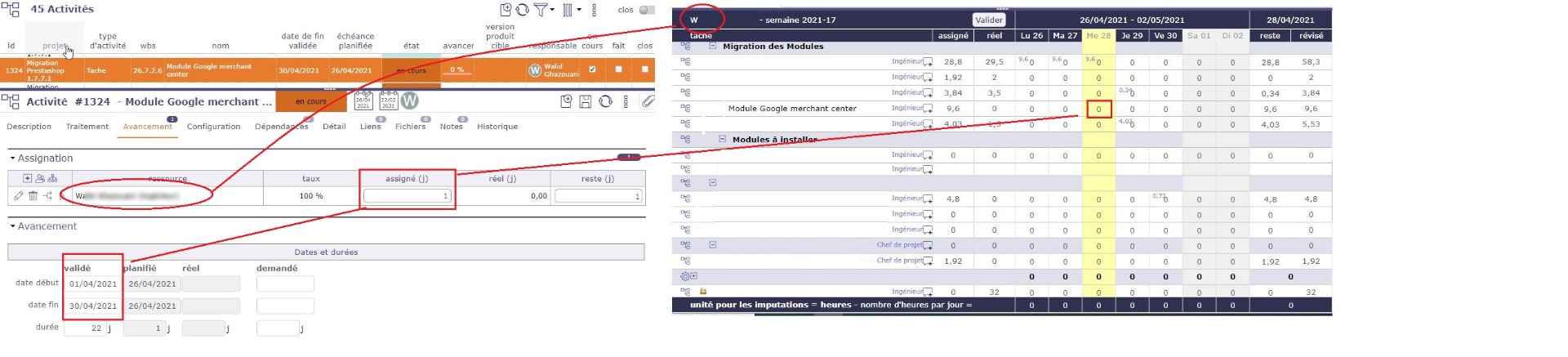
Maybe week is submitted of project is locked (on Monthly consolidation screen)
Unfortunatly, nothing is locked. Some ressources can input their word some cannot.
Other suggestions ? Tks

Hi,
Is the issue about inputing some work "for themselves" or "for another resource" ?
IT it's the second choice, then this user does not have rights to change timesheet for this resource.
See constraints in specific access rights.
Is s about their own imputation, "for themself". As I said, even if I gave them administration rights, their could not imput their own work.
Tks
Very weird.
We cannot reproduce this issue and cannot find possible source.
Can you please answer these questions step by step :
[list=1]
Thanks
Yeah, that's weird behavior.
Question 1
The audit identified errors, regarding the assignment of tickets to activities, which have been corrected. No evolution after that
Question 2:
We had already performed this scenario. The problem remains the same
Question 3: The same.
Regardless of the activities, I have one resource with normal behavior and two others that cannot charge their own work.
Question 4: No, we haven't changed the code. The only changes are the updates.
Is it possible to reinstall a new version with the current database?
Thanks.
Question 2:
We had already performed this scenario. The problem remains the same
Question 3: The same.
So issue is only linked to resource, not to the activities.
Is it possible to reinstall a new version with the current database?
This won't change anything
Yes the issues is about resources, not activities.
I forget to tell that the peoole (ressources) that cannot charge activities they are assign for can charge the tickets they are assign for.
what do you suggest ?
Tks
I really cannot understand where it comes from.
We should find what is specific with these users, characteristics that they share in common that they don't share with other users.
[list=1]
To try and debug :
Save file /model/ImputationLine.php.
Install attached patch (unzip like a new version).
Set debug level to 3 (debug) in Admin page.
Display timesheet with issue.
Reinstall saved ImputationLine.php file
Set debuglevel back to 2 (trace)
Post log file (part when Timesheet is displayed) here.
Tks I wil try this and come back asap

Hello,
just in case : do those people have projects that are "under construction" that appear in the beginning of their timesheet ?
I think I already saw that : one project displayed at the very beginning of the timesheet was "under construction" so all the timesheet was locked (we quickly solved it by changing the wbs level of the project causing the problem)
Hope this helps

I can confirm that this erroneous state occurs under described circumstances.
In our case we had a ticket, linked to a deleted project (and so a deleted activity also) which blocked the ability to enter worktime. In addition, there was an entry of abou 174 hours booked in ticket on 18.06.2021).
The formular was disabled from the past to a concrete date (e.g. until 18.06.2021).
Steps to correct the erroneous state:
1. Removed project & activitity form ticket via database
2. Changed ticket-state from closed to re-open
3. Corrected wrongly entered hours spend on ticket
4. Changed ticket-state from closed to closed
Best regards,
Torben