
Welcome to ProjeQtOr new Forum. We migrated old forum to the new website.
You will find all your posts here, with your usual account.
Just one point : you’ll have to reinitialize your password. Use “Lost password” feature.

Hi Babynus,
Maybe I'm wrong at some step that lead to the bellow issue that I think it can be a bugs:
1. I create several activities: task
2. I create another activities: phase.
3. I use gantt chart to indent all to this phase --> The phase time is now start from the min start date & end by max end date of these task
4. Then I map some activities (tasks) as successor.
--> Then here there are a problem:
a. The phase time line is not cover all the the time of the task, it shorten to a random date (I think)
b. The task that is a successor in step 4 is set planned & disable even I remove the successor link. So I cannot change it back to previous validated date.
==> Could you help check if it's a bug or I just make a mistakes some where else?

Hi,
a) This behavior is not an issue, even if it may be confusing (and may require some improvments) :
when moving a task (through the add of predecessor), the task is moving correspondingly (it's new in V5.0) but the parent task is not updated yet (on the fly).
You have to run planning calculation in order to re-establish all the planned dates.
b) I don't understand the point
is set planned & disable
. Could you explain ? (and possibly post screenshot)
Hi Babynus
Thank you for your quick answer.
But for a. point, I make calculation already, but it still the same
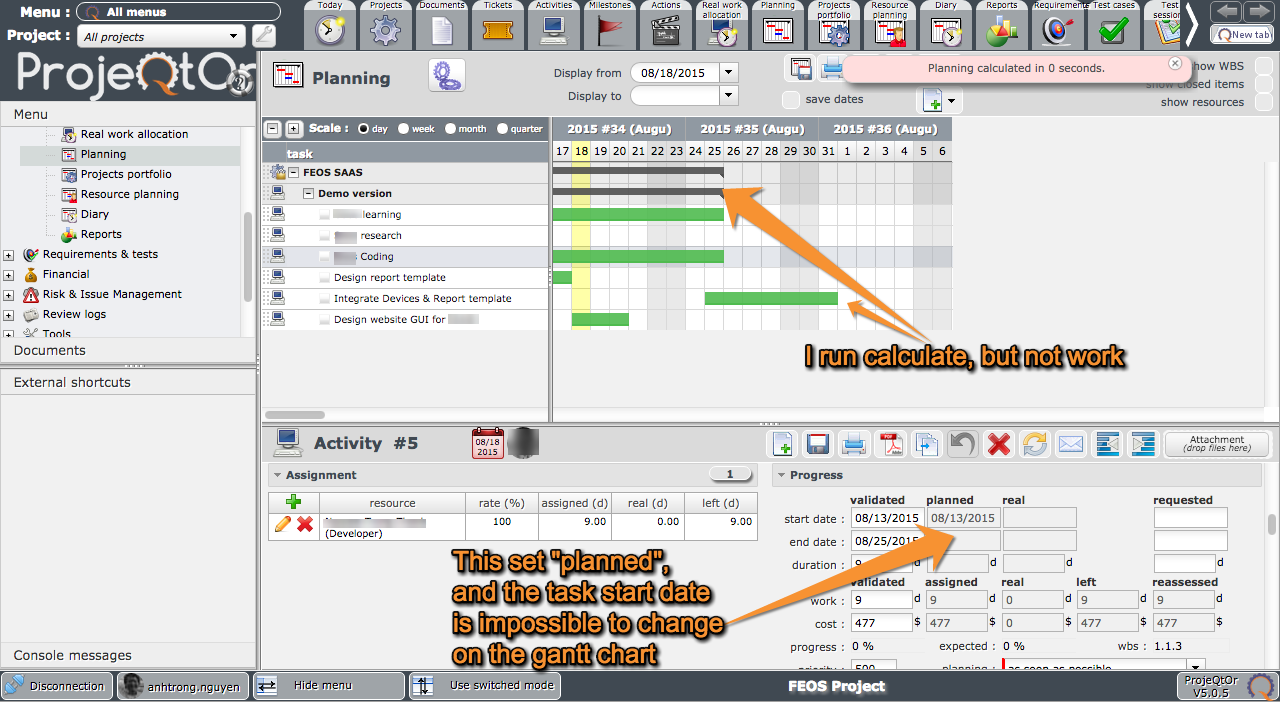
For b, I attached the image to be easy to understand --> I cannot change start date on the gantt chart.
Many thanks for your big projects that is really worth for us.
Jotrong
Hi,
Could you first check for errors in log file.
What is weird for me is the caclulation message : "planning calculated in 0 seconds" (it's faster than light)
and message is in ping background.
Dear Babynus,
I already check in the log file and found no record for this.
I think there is something may be wrong at this as it's quite strange.
Rgds,
Jotrong
Hi,
I think the issue comes from planning calculation.
It is not normal to have zero calculation time : even with only 1 project, with no activity, I could never go below 0,02 second for planning calculation...
Please try and clean log file, run planning calcuation and post log file here (whatever it contains)
Also check for errors in browser console and in apache log file.
Thanks
Got it :woohoo:
The project is simply not planned :silly:
Why :ohmy:
Most possibly because "fixed planning" is checked :whistle:
I just tried with single project with "fixed planning" checked, and got same result as yours : "planning calculated in 0 seconds", in pink background.
Thank you very much for your solution.
So I just need to uncheck "fix plan" and see the result.
By the way, "fix plan" is for static planing?
Many thanks
jotrong
Yes "fix plan" is to be sure you will not change the planning.
Very usefull when you plan a group of projects. For instance, if you have a project with several sub-projects, you can fix one on the sub-project and replan all the others running planning on parent 🙂