
Welcome to ProjeQtOr new Forum. We migrated old forum to the new website.
You will find all your posts here, with your usual account.
Just one point : you’ll have to reinitialize your password. Use “Lost password” feature.

Hi,
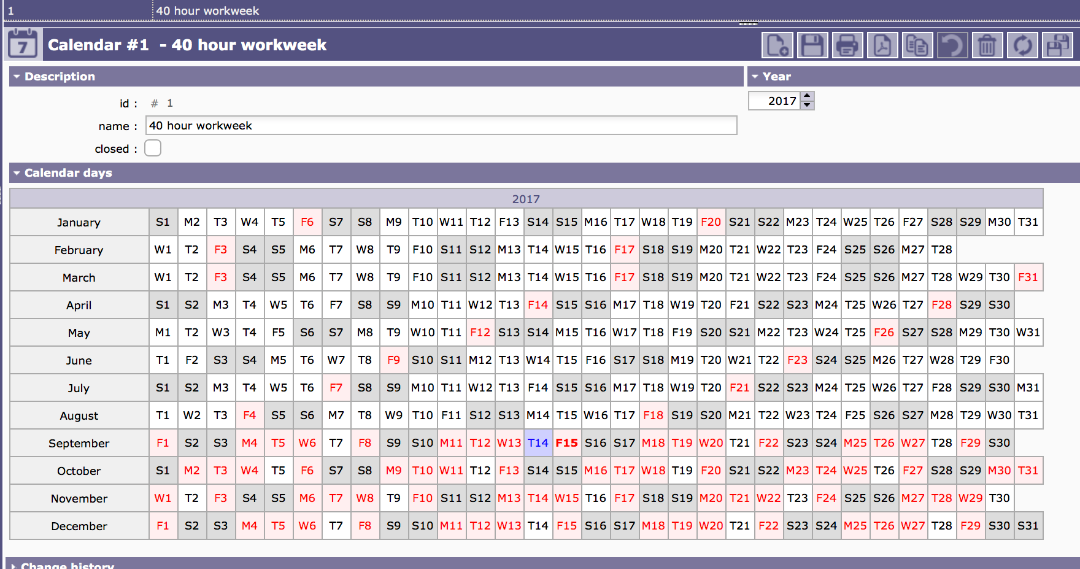
Recently I discovered my default calendar has changed according to another calendar (8 hr workweek for a specific resource) and has integrated this somehow into the default calendar. I cannot seem to reset the default calendar and I am left with the working days according to the 8 hr workweek for a specific period....
Any suggestions on how to reset the default calendar to its default settings?
Respons much appreciated.
Regards,
Mike

Possibly your default calendar has been "imported" from another one.
You must update it manually.
just click on dates to change on/off day.
Possibly your default calendar has been "imported" from another one.
You must update it manually.
just click on dates to change on/off day.
Clicking the dates does not do the trick...
I will try what you suggested in the other email.
Thanks.
Hi,
As stated in my other thread, the only solution was to reset the default calendar, which solved my issue.
Many thanks for the support!
Regards,
Mike