
Welcome to ProjeQtOr new Forum. We migrated old forum to the new website.
You will find all your posts here, with your usual account.
Just one point : you’ll have to reinitialize your password. Use “Lost password” feature.

Hello,
I'm having trouble with creating new profiles in the 4.2.2 version. The new name always appears with rectangular brackets.
Thanks!
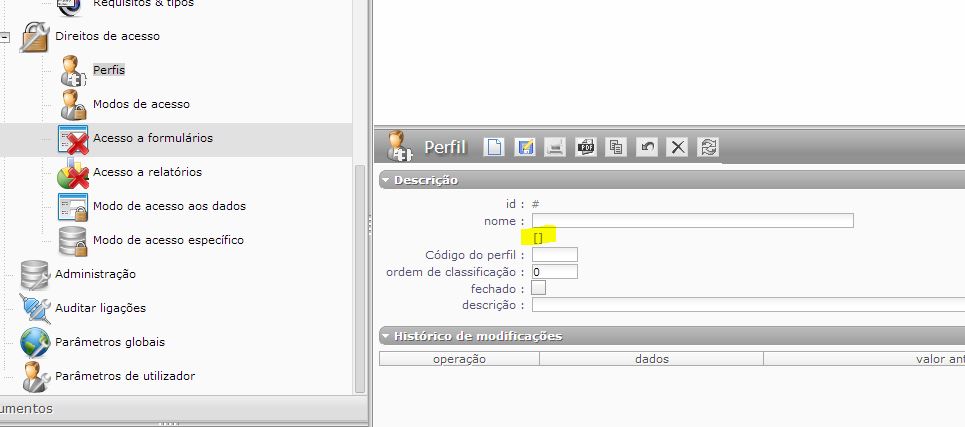

It is because prfile name is "translatable".
But the key name you gave hase no entry in the translation talble...
So you'll need to add this new name in the translation file 😉
Thanks for the quick answer.
Well, I've created the translation line in the table, but the name sitll appears in the upper part of the screen inside the square brackets.
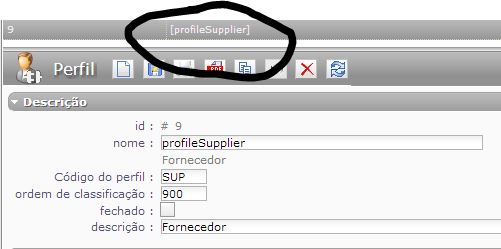
To have the list updated, you must reshesh the browser cache.
I've cleared the cache, but the name on the upper frame keeps the same.
This happens in Chrome, IE doesn't have this issue...
Nevermind, issue solved. Thanks for the help!
Hi,
Where did you change the file name ?
In xls on js file ?
If you changed on xls (which is the good way) you must generate new js files using Generate button.
Hi,
Where did you change the file name ?
In xls on js file ?If you changed on xls (which is the good way) you must generate new js files using Generate button.
Well, initially I did change the js file by hand. But after reading this AND the Help section on translateable items, I did it the good way. 🙂
Thanks for the direction!
How do we know when the lang.xls file is updated in projeqtor's website?
How do we know when the lang.xls file is updated in projeqtor's website?
It should be deployed on each major version (X.X.0).
But it may happen to be forgotten 😳
Don't hesitate to request for the file if it is not updated.
(for information, there is a column version that should contain values for each new version...)
Hello again,
In the Access to Forms and Access to Reports screen, even after clearing the cache, I still see the name between square brackets.
This happens in IE or Chrome.
I would appreciate your help.
Thanks!
Please check that lang.js is correct.
And once again, you are right. 🙂
Thanks!