
Welcome to ProjeQtOr new Forum. We migrated old forum to the new website.
You will find all your posts here, with your usual account.
Just one point : you’ll have to reinitialize your password. Use “Lost password” feature.

Hi.
I recently installed 12.4.0, and had gotten everything going when I found that I could not print or get a pdf of the gantt chart in the print preview on the planning page (at least, I'm hoping that it is a gantt chart).
Here is what happens:
[list=1]
2026-01-15 12:38:43.458 ** ERROR ** [V12.4.1] [1] Impossible to load class Replan
=> Not found in ../model/custom/Replan.php
=> Not found in ../model/Replan.php
=> Not found in ../model/persistence/Replan.php
2026-01-15 12:38:43.458 ** ERROR ** [V12.4.1] [1] === Trace Stack for last error ===
2026-01-15 12:38:43.458 ** ERROR ** [V12.4.1] [1] => /var/www/html/tool/projeqtor.php at line 1870 calling debugPrintTraceStack()
2026-01-15 12:38:43.458 ** ERROR ** [V12.4.1] [1] => /var/www/html/view/print.php at line 338 calling projeqtorAutoload()
2026-01-15 12:38:43.458 ** ERROR ** [V12.4.1] [1] => /var/www/html/view/print.php at line 312 calling finalizePrint()
2026-01-15 12:38:43.458 ** ERROR ** [V12.4.1] [1] ===
2026-01-15 12:38:43.458 ** ERROR ** [V12.4.1] [1] EXCEPTION **
2026-01-15 12:38:43.458 ** ERROR ** [V12.4.1] [1] on file '/var/www/html/view/print.php' at line (338)
2026-01-15 12:38:43.458 ** ERROR ** [V12.4.1] [1] cause = Class "Replan" not found
2026-01-15 12:38:43.458 ** ERROR ** [V12.4.1] [1] => #0 /var/www/html/view/print.php (312) -> finalizePrint()
2026-01-15 12:38:43.458 ** ERROR ** [V12.4.1] [1] => Error on print for parameters:
2026-01-15 12:38:43.458 ** ERROR ** [V12.4.1] [1] -> page : objectDetail.php
2026-01-15 12:38:43.458 ** ERROR ** [V12.4.1] [1] -> object class : Replan
2026-01-15 12:38:43.458 ** ERROR ** [V12.4.1] [1] -> object id : 1
2026-01-15 12:38:43.458 ** ERROR ***** [V12.4.1] [1] -> report name :
It says it cannot find Replan.php. So I figure: "OK a packaging bug"... so I downloaded 12.4.1, and upgraded -- but I still get the same error. I also notice in 12.4.1 I now have
2026-01-15 12:18:06.382 ===== TRACE ===== [1] Cannot check Version at http://projeqtor.org/admin/getVersion.php
2026-01-15 12:18:06.382 ===== TRACE ===== [1] Maybe allow_url_fopen is Off in php.ini..
That wasn't there in 12.4.0... but there is no "admin" folder in the projector archive at all (another packaging issue?). Incidentally, allow_url_fopen is set to "On"... so that is wrong too. But I don't want to de-focus. I would really like to get that rendering properly. I need a project solution ASAP, and this one looked good.
Thank you for your help.
-MG

Hello,
It's bug ticket recorded #11084
The error occurs on projects that need to be recalculated. If you recalculate your project, you will be able to print your document. Alternatively, you can also go to the project screen and print the project.
Have a nice day,
Thank you. That is it all right... I'm not sure why that didn't come up when I was searching, but I do see it now, although there is no work-around posted in the thread.
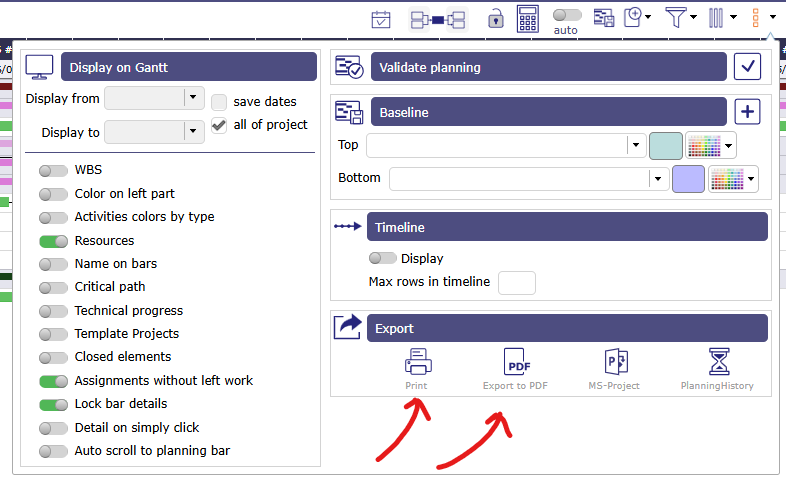
I'm still very new to Projeqtor, I have recalculated the capacity planning, and as you stated, the error went away. However, it is still not what I'm hoping for. I was hoping for something that would create a nice print out of just the Gantt chart. I thought maybe that red block was the gantt chartt, then I could use my browser's "Show image in new tab" feature or something. Is there a way to get a nice print of the Gantt chart for a particular project?
Thanks again.
MG
You can select a project in the project selector and print your Gantt chart using the options below.
There is a manual that can help you, as well as training courses provided by our trainers.
Training : https://www.projeqtor.org/en/services/training-en
Manual : https://demo.projeqtor.org/docs/user/html_en/index.html
Have a good day,
Thank you.