
Welcome to ProjeQtOr new Forum. We migrated old forum to the new website.
You will find all your posts here, with your usual account.
Just one point : you’ll have to reinitialize your password. Use “Lost password” feature.

Hello,
i'm just looking at new interface (nice ;)) and finding the strike back of an old issue with alignment in gantt view, see below (see in demo instance) :

Have a better year than 2020 ! (not so difficult in fact ...)

Hi,
Thnaks for reporting, we'll have a look.
Ticket #5143 recorded.
My best wishes for the coming new year.
Hi,
I could not reproduce this issue...
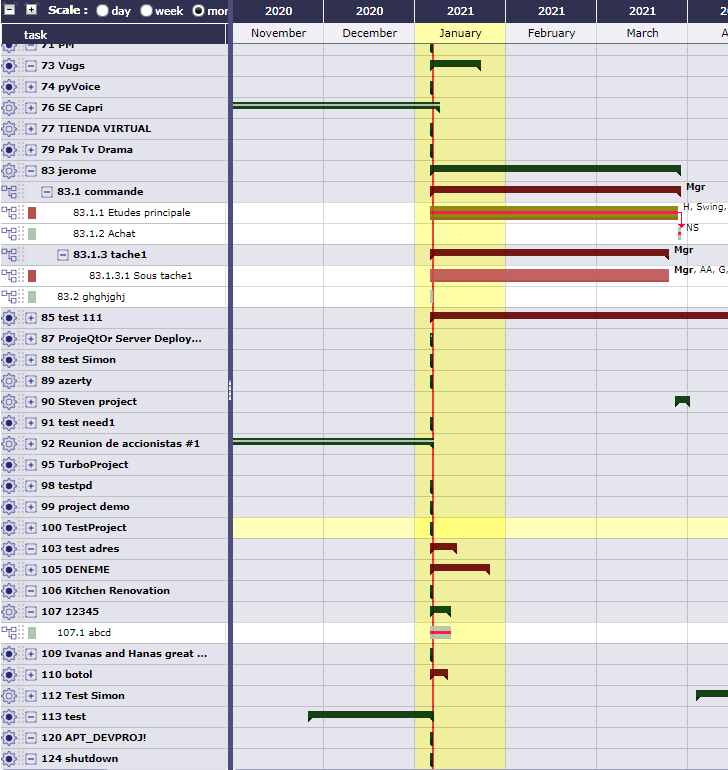
Which Browser / Version are you using ?
Are you using some Zooming in the browser ?
Not able to reproduce anymore.
Strange...
Cache effect ?
Yes, possibly cache effect...

Dear all,
I had a similar issue on the previous version only when the browser zoom was not 100%.
It seems to be the same here.
To reproduce it I've done the following.
Open the Gantt
Zoom at 67%
move the gantt down
The left part is de-synchronizing with the right part of the diagram.
Hope this helps.
Hi,
I could not reproduce, even with your (very clear) scenario.
Even with zoom at 67%, scrolling moved line correctly.

Hello
Couldn't reproduce it with Edge and Chrome but with Firefox it could be reproduced.
The lines of the date (right side) seams to have a slightly different hight than the left.
The offset gets worse the longer the list is.
But it doesn't happen at all zoom "states"...
Reagards
Fix included in V9.0.4.

Hello,
I allow myself to complete the subject,
I am in version 9.2.2 and I still have the alignment problem if the browser zoom is different from 100% with chrome.
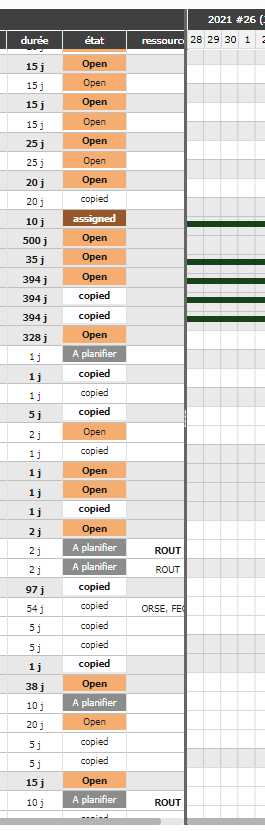

Hello,
I'm embarrassed but I can't reproduce ...
Can you describe how you did it?
Does this happen all the time?
Did you opened the browser's console, put it in full screen and then did several manipulations.
Hi all,
I have no more the issue either. I'm on firefox.
Hi,
Very strange, may be a configuration problem !!
I perform the test on Chrome and firefox, same result on 3 colleagues station.
I open Browser,
Open Projeqtor (initial zoom 100%)
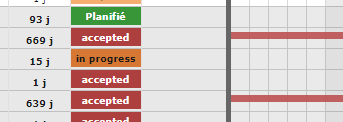
--> OK
Scroll down zoom to 90%
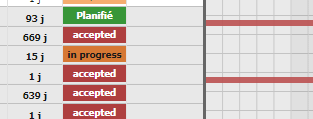
--> NOK
Scroll down zoom to 80%
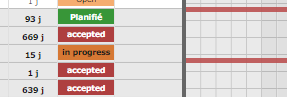
--> NOK
Scroll down zoom to 75%
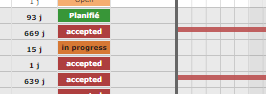
--> OK !!!
If you scroll UP zoom >100% (110%, 130%, etc...)
--> alignement is OK
Hi,
I could reproduce on Chrome.
I guess it is due to some rounding on browser, that may change trhough version.
Maybe next version of Chrome will get things back.4
I recorded a ticket, but not sure we'll be able to improve this.
So best it to keep browser zoom at 100%, and change windows zooming if required.

Hi,
For your information, I get the same mis alignment with v9.3.1 and Firefox. Zoom was 100% at start up. Zoom in and out doesn't change anything.
It works correctly on Edge.
Hello,
Indeed there is an issue, ticket #5772 created and planned for next version.