
Welcome to ProjeQtOr new Forum. We migrated old forum to the new website.
You will find all your posts here, with your usual account.
Just one point : you’ll have to reinitialize your password. Use “Lost password” feature.

Hello Babynus
When I would like to edit a work flow I see the flowchart but not the matrix to change it. the spindle (ascenceur) is not present or inactive. if I mask the upper area I can only see the starter of matrix that all.
I'm using 1.8.2 and try it on FF, EI and Chrome with same issue
Thank
Thierry,

Hi,
I cannot reproduce.
Could you send a print screen to support@toolware.fr ?
Thanks.

Hi Babynus,
I see the same problem : the screen area where is the flowchart of a workflow, (when editing a workflow, as administrator), is without scroll bars.
As the flowchart don't fit in the window, we can't scroll up or down, left or right to see the rest of the chart.
Another minor detail, in french language, the title of the flowchart is "Giagram de workflow" instead of "Diagramme de workflow".
Thanks for your help,
Regards,
hI,
Thierry solved his problem be reinstalling last version.
Maybe you can try this.
But for now I cannot explain what's happening...
Let me know if reinstalling solves this issue for you.
Regards.
Hello Fred,
To solve this I had used a new database. I don't find exatly why original database was corrupted but I have done some test on this and it could be the reason.
And you do you perform any test on you database that can explain the issue?
BR
Thierry,

Is there any more information on this issue as I am experiencing the same thing. I have tried re-installing everything and still everything past the workflow diagram is not accessible. No scroll bars show up.

FYI: I already deployed V1.8.2 in productiv environment and as well V1.8.3 in my test environment, but didn't have probleme mentioned in both enviroments.
Is there any more information on this issue as I am experiencing the same thing. I have tried re-installing everything and still everything past the workflow diagram is not accessible. No scroll bars show up.
Did you change anything in status and/or workflow ?
It's an issue reported by several users but I have never been able to reproduce it.
I would like to be able to reproduce, to have first clues for a fixing.
I noticed it prior to completely understanding how it worked but it never really triggered what was below the diagram until I printed the report. Now I am in the process of trying to make some changes but can't scroll all the way down to get to all of the settings. All that pops up is the diagram in the full pane. The scroll bar arrows show up but there is no actual scroll bar and the down arrow doesn't produce any result.
If I go into switched mode I can at least see a small part of the settings (there is more screen area) but the scroll bar will still not let me move down to look at them all.
Version 1.8.3 is installed and using Chrome/Safari/IE all produce the same result.
I can get you any information you would like to see...
Thanks for any help you can provide.

Hi all,
i searched for my issue and i found your topic.
so I have the same problem in 2.6.3 installed on an test environnement.
when i see Workflow, scroll bar appears but they are not permit to scroll the entire page , and i don't see all status, and the whole graphics.
I'm using IE 8 (the only browser allowed in my company). Application is deployed on WampServer under Windows XP.
Strange : this issue was fixed in V2.1.1 (see Ticket #504)
I tried on Track and Demo Databases and could not reproduce, using IE8 on Win XP.
Can you post print screen of what you get ?
Can you try changing user parameter "display history" ?
Can you try on demo Database if you produce the issue ?
Regards.
hi, thank's for your quick answer.
so i tried your demo, and i switch on the "display parameter", so i currently get the same problem on these two site. the problem is less important than without using history parametres but still present.
on horizontal part it works for status but not for the graphics where i can only see the validated status, and just the beginning of the close status, nothing more.
Regarding vertical part it works fine .
have a look in the attached jpg.
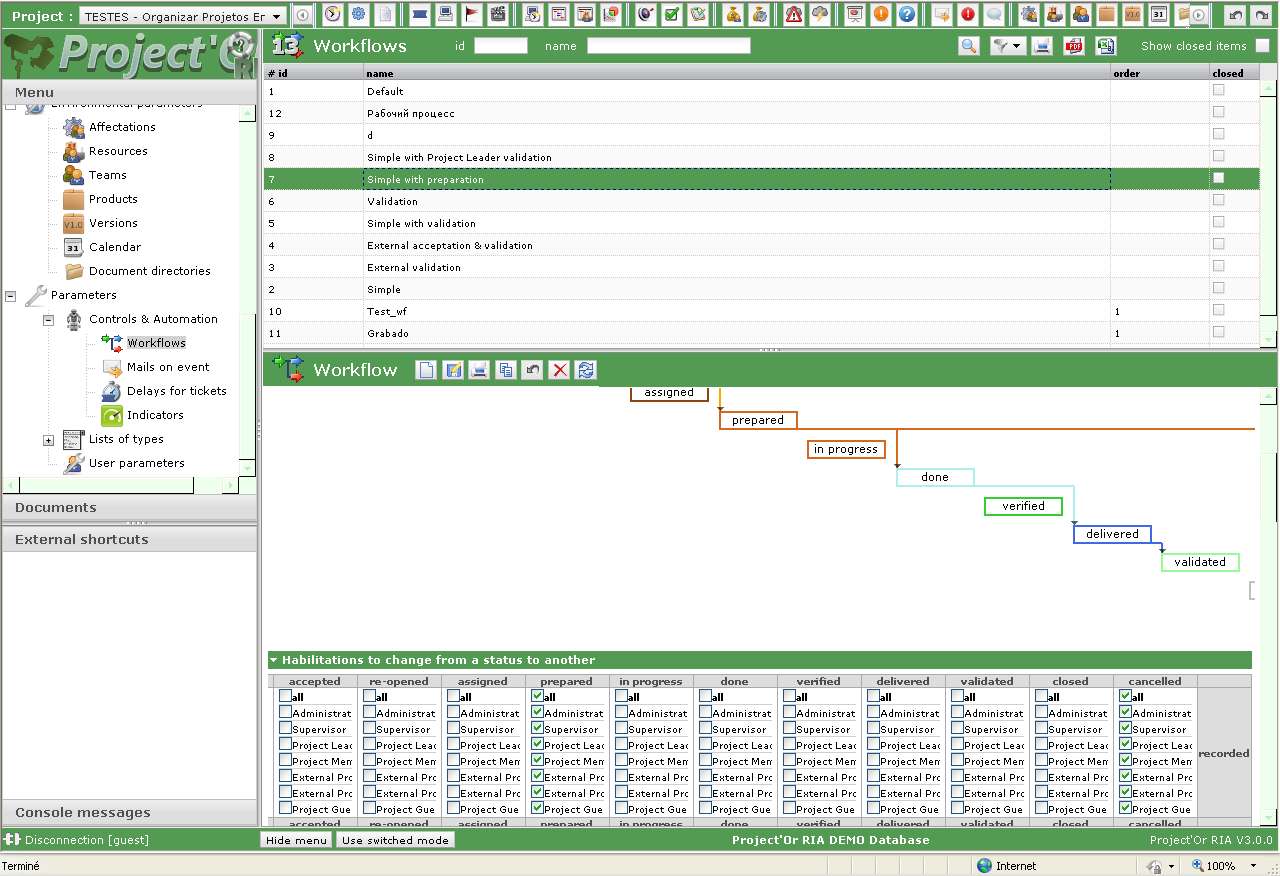
for the moment i can stay in this situation, nothing prevent me using your fabulous project management tool ... 😉
Hi,
I see what you describe.
It is not the same as previously identified issue.
Previous issue war about missing vertical scroll-bar, and it was blocking to define workflow for status on bottom of page.
What you face is just a display issue.
As a workaround, you can use the "hide menu" button, to display wider screen.
I'll have a look at an improvement to add horizontal scrollbar on graph.
Ticket #891 recorded.
hi,
there is still a problem when "display historic" is off.
in this case no vertical neither horizontal scroll bar allow to see the whole information.
regards.
Hi,
Reproduced on IE8.
Not on Chrome or FireFox.
Ticket #893 copied from #504.