
Welcome to ProjeQtOr new Forum. We migrated old forum to the new website.
You will find all your posts here, with your usual account.
Just one point : you’ll have to reinitialize your password. Use “Lost password” feature.

When the user is entering a new activity, ProjeQtor cannot show him the drop-down list of other existing activities (to be selected as predecessor, successor or parent activity).
He has to save a partly entered screen. Only then ProjeQtor shows him the other data.
This is not intuitive. Let the user access the data saved earlier even when the new activity is not saved.

Maybe not intuitive, but technically diffucult to avoid.
Adding a predecessor or successor will add a dependency referencing both items : predecessor or successor and current item.
The dependency will store the "id" of each item, but this is not known unless you save once.
Ah I get it: The key can be generated only when the entry is saved.
Ok in that case, can the screen be split in two sections?
Once the essential details are entered in the first section, let ProjeQtor submit that automatically.
Then an id can be assigned to that activity.
Then the remaining drop-down lists can be populated easily.
Mandatory fields are highlighter with red border on the left.
These are the ponly mandatory to save.
Before save, lists cannot be added (buttons are not visibile).
Once saved, buttons appear.
We cannot be more clear.
NB : there is no other way to split in "essential", as this has not same meaning for everyone...
(some will same Description is essential, some not...)
Yes, that was my point: The first three mandatory fields should be sufficient.
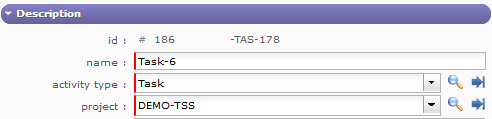
Once the user enters something in these fields, ProjeQtor should save the data automatically, and then provide the existing fields for linking purposes (predecessor element, successor element, parent element, assignment).
This will make the entire workflow very intuitive.
This will make the entire workflow very intuitive.
Maybe not so intuitive.
Because we would need to refresh the screen, and possibly user may be entering data during refresh...