
Welcome to ProjeQtOr new Forum. We migrated old forum to the new website.
You will find all your posts here, with your usual account.
Just one point : you’ll have to reinitialize your password. Use “Lost password” feature.

Hi everyone,
I have one project with 2 activities, one activity has a cost to 100$ for exemple, the project's cost is 100$ (Sum of all activities).
If I reset the activity's cost to 0, the project's cost isn't reset to 0.
It's a bug or I miss an action ?
Thank
Hi everyone,
Any solution ?

No, it's not a bug, it's expected design.
If project has no activity (for instance only tickets) then cost is entered manually.
If project has activities, cost for project is sum for activities.
If you remove the last activity, you get back to the last case : cost manually entered, the the cost of last activity is concidered as project cost.
This may seem weird for project, but concider it's the same algorythm for activities, if an activity has sub activities, ...

Hello,
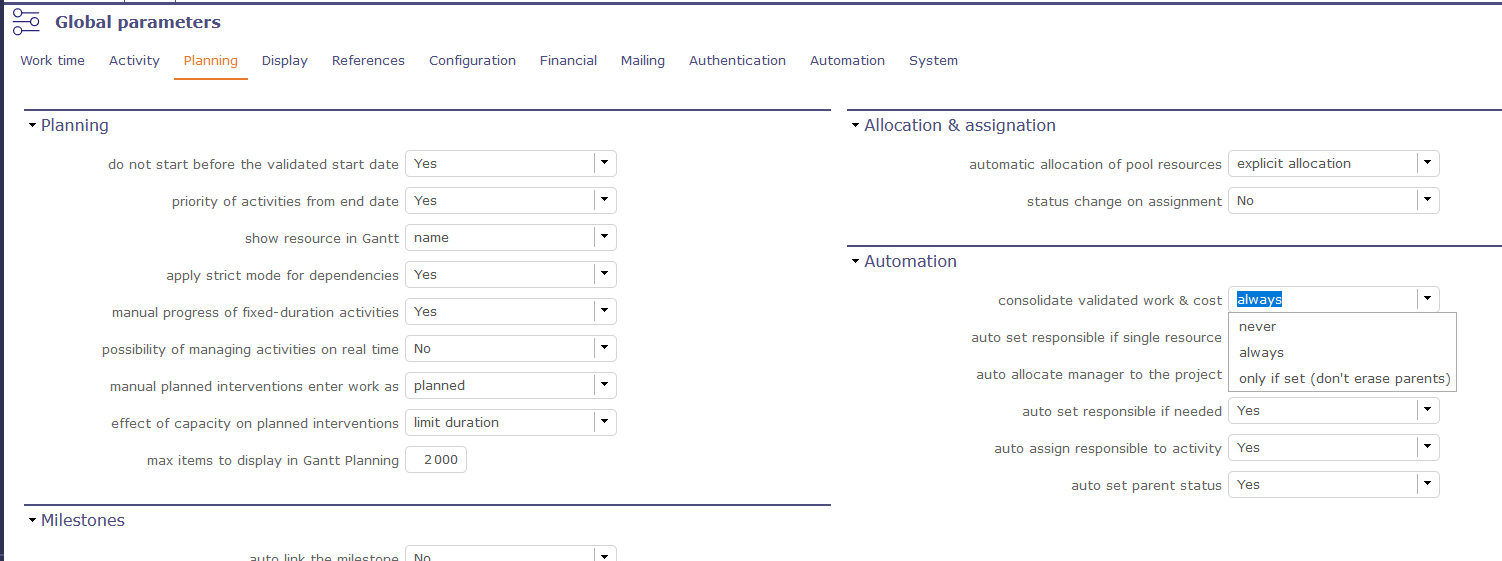
If you really want to reset the project cost, you may need (connected as an admin) to modifiy an option in : Global parameters/Planning/Automation
You need to set "consolidate validated work & cost" to "Always" (because of what Babynus explained just before).
See the screen below.
Then, re-enter the cost of 100 on your activity, save. Enter 0, save. Your project cost will be correct (it will sum the cost on other activities, etc.)
Thanks a lot.
This setting help me !!!