
Welcome to ProjeQtOr new Forum. We migrated old forum to the new website.
You will find all your posts here, with your usual account.
Just one point : you’ll have to reinitialize your password. Use “Lost password” feature.

Good morning,
because of the throubleshooting here, i try to set up a new install on my webserver windows 2022 IIS, pHp 8.3.14 and MySQL 8.4.3, but i have a 500 error, with this PHP Warning
PHP Warning: Undefined variable $svnRevision in C:WWW2index.php on line 76
PHP Warning: Undefined variable $svnRevision in C:WWW2index.php on line 77
If some one can helping me?
Regards,

Hello,
Yes, there was a problem that has just been corrected.
To get around this problem, go to your sitre by typing in the url: your sitre/view/main.php
Have a nice day,
Maxca
Thanks for this, it's ok for this point.
Now i have the "Paramètres de connexion incorrects" message like on the other post with the 11.4.2 fresh install????
here is the log file, an error about md5 crypt?
Regards,

You refreshed your browser page before DB update was complete.
Please let the time to finish.
DB is populated at this step, this may take few minutes.
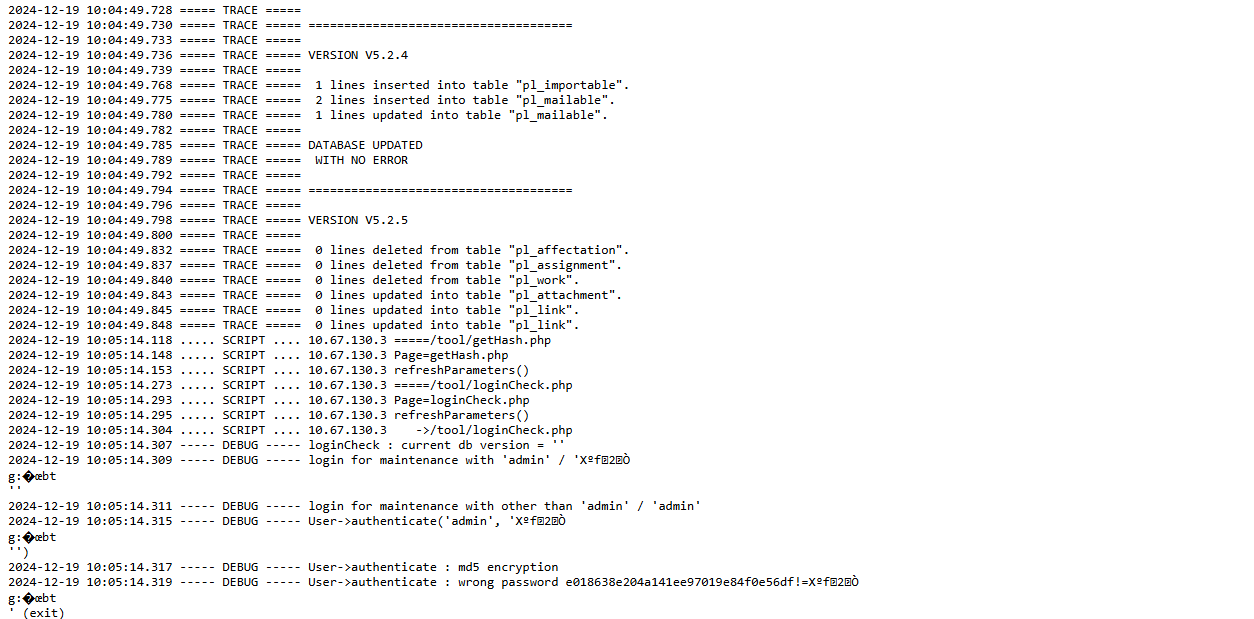
NB : migraation was stopped at step V5.2.5 after about 1,5 minutes.
It seems your server is quite slow (possibly some shared hosting ?)
On our servers complete process (up to V12.0) is less that 1mn
Wait until migration ends up.
thanks a lot.
I try on another server and i have the same troubleshooting, is like the process stop it self????
I just saw the size of the log growing and sudently it's stop...the wheel on the browser disappear and nothing else appaer?
regards,
Log stops on V9
2024-12-19 15:33:23.968 ===== TRACE ===== =====================================
2024-12-19 15:33:23.982 ===== TRACE =====
2024-12-19 15:33:23.995 ===== TRACE ===== VERSION V9.2.0
2024-12-19 15:33:24.006 ===== TRACE =====
2024-12-19 15:33:24.021 ===== TRACE ===== 3 lines inserted into table "pl_parameter".
2024-12-19 15:33:24.053 ===== TRACE ===== Table "pl_type" altered.
2024-12-19 15:33:24.089 ===== TRACE ===== Table "pl_activity" altered.
2024-12-19 15:33:24.152 ===== TRACE ===== Table "pl_statusperiod" created.
2024-12-19 15:33:24.171 ===== TRACE ===== 4 lines inserted into table "pl_habilitationother".
2024-12-19 15:33:24.190 ===== TRACE ===== 3 lines inserted into table "pl_habilitationother".
2024-12-19 15:33:24.209 ===== TRACE ===== 1 lines updated into table "pl_status".
2024-12-19 15:33:24.236 ===== TRACE ===== Table "pl_delay" altered.
2024-12-19 15:33:24.279 ===== TRACE ===== Table "pl_project" altered.
2024-12-19 15:33:24.340 ===== TRACE ===== Table "pl_activityworkunit" created.
2024-12-19 15:33:24.354 ===== TRACE ===== 0 lines inserted into table "pl_activityworkunit".
2024-12-19 15:33:24.410 ===== TRACE ===== Table "pl_planningelement" altered.
2024-12-19 15:33:24.458 ===== TRACE ===== Table "pl_planningelementbaseline" altered.
2024-12-19 15:33:24.486 ===== TRACE ===== Table "pl_workcommanddone" altered.
2024-12-19 15:33:24.499 ===== TRACE ===== 0 lines updated into table "pl_planningelement".
2024-12-19 15:33:24.510 ===== TRACE ===== 0 lines deleted from table "pl_workcommanddone".
2024-12-19 15:33:24.522 ===== TRACE ===== 0 lines inserted into table "pl_workcommanddone".
Check apache error log for errors
Thanks a lot for replying,
but it's not an apache server but a IIS.
And i do not have anything in the server logs 🙁
Regards
After severals setting and try i have this error:
2024-12-20 11:57:32.025 ** ERROR ** [] Exception-[42000] SQLSTATE[42000]: Syntax error or access violation: 1064 You have an error in your SQL syntax; check the manual that corresponds to your MySQL server version for the right syntax to use near 'manual int(1) unsigned DEFAULT 0 COMMENT '1'' at line 1
2024-12-20 11:57:32.028 ** ERROR ** []    For query : ALTER TABLE pl_assignment MODIFY manual int(1) unsigned DEFAULT 0 COMMENT '1';
2024-12-20 11:57:32.031 ** ERROR ** []    Strack trace :
2024-12-20 11:57:32.033 ** ERROR ** []    #0 Sql->query called at [C:WWW2dbmaintenanceFunctions.php:72]
2024-12-20 11:57:32.034 ** ERROR ** []    #1 runScript called at [C:WWW2dbmaintenance.php:1057]
2024-12-20 11:57:32.036 ** ERROR ** []    #2 include called at [C:WWW2toolloginCheck.php:58]
2024-12-20 11:57:32.039 ===== TRACE =====
2024-12-20 11:57:32.040 ===== TRACE ===== Error # 1 => SQL error while executing maintenance query for version V8.6.0.mysql (see above message)
2024-12-20 11:57:32.042 ===== TRACE =====
2024-12-20 11:57:32.044 ===== TRACE ===== *************************************************
2024-12-20 11:57:32.045 ===== TRACE =====
Regards
Hi,
Strange as Query should be
ALTER TABLE `pl_assignment` ADD `manual` int(1) unsigned DEFAULT '0';
With the reverse quotes.
This is important as manual seems to be a resereved key work in MySql 8.4, but was not on MySql8.0
Ensure you correctly selected "mysql" as DB type.
If this is already the case, only option seems to be to revert to older MySql DB version (8.0) or MariaDB or PostgreSql.
We'll study the option to fix the new incompatibility with MySql 8.4
Hello,
Have an happy new years everybody 😉
Sorry for the delay...
I set a maraidb server and all it's ok.
Thanks a lot.
Regards,