
Welcome to ProjeQtOr new Forum. We migrated old forum to the new website.
You will find all your posts here, with your usual account.
Just one point : you’ll have to reinitialize your password. Use “Lost password” feature.

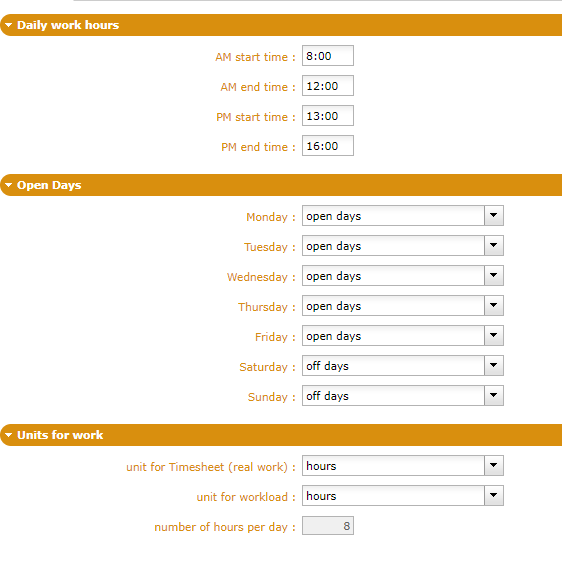
I want to change the default number of hours per day however the field is greyed out. How can I change it? Thanks!

hi
You have just to change per hour by per day, Then you can modifiy the number and change once again per day by per hour. Be careful, in the interests of good reading, it is not recommended because of new numbers of hours, due to conversions, will be mentioned.

You cannot change when unit for work is hours and there exist some real work.
This is because all work data is stored by projeqtor in days.
So display of hours is a conversion.
As of today users have entered 8 hours for a full day.
If you change ratio, for instance to 7 hours per day, users returning to Timesheet will now see 7 hours where they entered 8 hours.
That's why it's lock.
Now, if you really want to change the ratio, there is a trick.
Chande work unit to days.
Save
Quit screen and come back.
Ratio is now updatable...
You can change it and get back to unit as hours...
Thanks! It's working now.
The reason I'm changing it is that we have some hours that we don't work on projects each week so the actual working hours are approx. 7 hours per day. When calculating planning it will calculate days by the number of hours per day right? So if I planned 56 hours for an activity for a resource who works 100%, it will be planned for 7 days however it is actually 8 days. Or is there any other ways to do it? I thought about the capacity for each person however it varies from time to time as well so I'd rather keep it as 1.
When calculating planning it will calculate days by the number of hours per day right?
Well, in fact it will plan days, not hours...
So if you enter 56h, it will be done in 8 days for a 7 hours per day ratio, and in 7 days in a 8 hours per day ratio.
Or is there any other ways to do it?
You can play with capacity.
With 8h / day ratio, a resource will capacity 0,875 will be planned 7 hours per day so will execute a 56h tasks in 8 days.
I thought about the capacity for each person however it varies from time to time as well so I'd rather keep it as 1.
We will introduce variable capacity in a future verison 😉
That's exactly what I meant. So I can only set it to 7 hours per day to make the plan more reasonably, do you agree?
I see that the feature is planned in version 8.0, where will it be released? 😉 I'm looking forward to it.
I see that the feature is planned in version 8.0, where will it be released?
Planned, started, but devs may not be ended soon enought, so possibly deployed on V8.1 (on en of june) and not on 8.0 (mid-april)
Well, then I have to wait...:(