
Welcome to ProjeQtOr new Forum. We migrated old forum to the new website.
You will find all your posts here, with your usual account.
Just one point : you’ll have to reinitialize your password. Use “Lost password” feature.

That's possibly a stupid question, but I could not really find an answer so far in the online manual. Points to the correct docs are appreciated.
How can I deal with Acitivities which will only take about a few hours at most?
Are Activities supposed to be larger chunks of work? If so, how do I model small "Activities" in ProjeQtor?
I currently modelled several Activities which will only take about an hour or slightly longer, far from a whole day. However I don't seem to be able switch the "duration" input boxes to "hours", they always state "days". I was only able to switch the work allocation boxes from days to hours, but this didn't have any effect on the estimated duration entry boxes.
In this forum I read about the possibility to work with half-day activities at least, but I also cannot figure out how to do this. The input box does not accept "0.5" and while I can enter "0,5", this will be interpreted as "0" by ProjeQtor, which is clearly not what I intended it to be...
Another question which doesn't get clear from the manual: If a lower Activity priority value "more important" or a higher one?
Everywhere it's stated that Activity planning is done according to priority values, but I couldn't find a single place which actually explains how the priorities are supposed to be used. 🙂 And while I already played with ProjeQtor for quite a while now, my modelled Projects / Activities are not yet sufficiently fleshed out such that I could just try it with the integrated planner. This will probably still take a while until I get to the point that I can actually press this button...

Hello,
All you need to do is go to the global parameters and then to the work section, then into work unit to change from day to hour.
Priorities are taken into account only after dependencies and some planning modes while respecting the availability and the working capacity of the resources.
That's why the button calculate the planning is done in order to present to you a capacity planning.
you can also use checklist or jobs list if you do not want to plan your activities because they are very short. LIke this, you have just to ckeck that is done or not.
we are carrying out some tutorials that will explain ( as soon as poosible) the right approach to adopt with the application.
Thanks for your reply.
Unfortunately, I'm not quite sure if we understood each other correctly.
All you need to do is go to the global parameters and then to the work section, then into work unit to change from day to hour.
Priorities are taken into account only after dependencies and some planning modes while respecting the availability and the working capacity of the resources.
Please refer to the attached screenshots:
As I wrote, I was able to switch the work allocation boxes to hours with the config settings you see in the first screenshot.
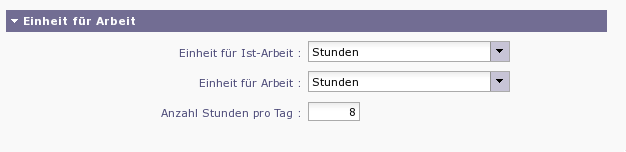
However, the planning effort boxes do not respect this setting and still show "days" as the unit, as shown in the second screenshot.
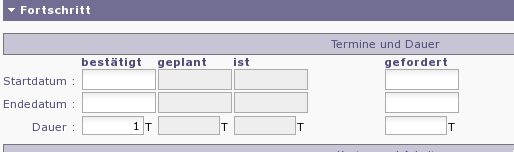
How can I make those boxes respect the "hours" setting, as you suggest?
you can also use checklist or jobs list if you do not want to plan your activities because they are very short.
What is the "checklist" or "jobs list" you're suggesting to use? I've not read about those concepts so far in conjunction with ProjeQtOr. ( https://pq.ohrner-it.com/docs/user/html_en/Concept.html)
Another question which doesn't get clear from the manual: If a lower Activity priority value "more important" or a higher one?
Also, I still didn't understand whether a higher priority value means "more important" or a lower one - however I guess this distinction will be very important for correct planning.
So which value means "more important", a lower value ("Priority 1") or a higher value ("Priority 999")?
Thanks and regards,
Gunter
Hi Gunter,
Trying to understand and solve your issue, i answer you firstly for your last question.
Prirority 1 is higher than 999. It means that the activity "1" is taken into account before that of "999" during the calculation. It does not mean that in fact "1" will be systematically planified before the "999" one. It is just an order that Projeqtor will try to respect depending on anothers priorities like and for instance "dependencies" beetween activities or some calculation modes.
Thanks a lot for your answer! 🙂

How can I deal with Acitivities which will only take about a few hours at most?
You can : just enter assigned work as hours... Planning will take it into account.
Don't mind about duration : projector always calculate durtion in days... so smallest duration is 1 day, even if it really takes 1 hour.
Are Activities supposed to be larger chunks of work? If so, how do I model small "Activities" in ProjeQtor?
Yes. It is plroject management, not exploitation management.
Good scale for tasks, in my opinion is 5-10 days.
Larger tasks are difficult to understand by resource who will execute it.
Smaller will take too much time to manager of the project manager : he will spend more time to manage the tasks than the resource ot work on it...
In this forum I read about the possibility to work with half-day activities at least, but I also cannot figure out how to do this. The input box does not accept "0.5" and while I can enter "0,5", this will be interpreted as "0" by ProjeQtor, which is clearly not what I intended it to be...
You can enter assigned work of 1 hour, but duration will be displayed as 1 day. Duration is alwyas in open days and you cannot define duration with decimals.
If a lower Activity priority value "more important" or a higher one?
Yes, smaller value is the more important. 1 is the highest priority.
Thanks for your answer.
How can I deal with Acitivities which will only take about a few hours at most?
You can : just enter assigned work as hours... Planning will take it into account.
Don't mind about duration : projector always calculate durtion in days... so smallest duration is 1 day, even if it really takes 1 hour.
Ok.
However this means that Activities estimated to take only 1 or 2 hours cannot be used in planning as such - for planning, they will always take at least about a day, right?
Are Activities supposed to be larger chunks of work? If so, how do I model small "Activities" in ProjeQtor?
Yes. It is plroject management, not exploitation management.
Good scale for tasks, in my opinion is 5-10 days.
Ok.
So if I have a bunch of smaller issues / todos, I could combine them into a single, larger Activity and document them there.
However, I then would have to manually keep track about the resolved and still open TODOs within this Activity. An example would be an Activity which has 10 sub-TODOs.
I'm also not quite sure how I would handle it if those TODOs are actually implemented / execute by different Resources which I do not exactly know before - an Activity is always assigned to a single responsible Resource, I think...
Maybe I could use Tickets to model this? Those could then also be linked to an Activity for time/effort tracking, if I understood the manual correctly?
How is it handled in this case if the tickets are assigned to and resolved by different resources - will the Activity stay unassigned, or will each Ticket have to be linked to an Activity assigned to the same responsible Resource as the Ticket?
However this means that Activities estimated to take only 1 or 2 hours cannot be used in planning as such - for planning, they will always take at least about a day, right?
No, duration will be displayed as 1 day, but planned work will take just 1 or 2 hours.
So if I have a bunch of smaller issues / todos, I could combine them into a single, larger Activity and document them there.
However, I then would have to manually keep track about the resolved and still open TODOs within this Activity. An example would be an Activity which has 10 sub-TODOs.
Maybe I could use Tickets to model this? Those could then also be linked to an Activity for time/effort tracking, if I understood the manual correctly?
This is exactly why we have "Tickets".
You plan an activity to treat tickets.
You enter detail TODO on a dedicated ticket.
You link the ticket to the activity (with planning activity flied)
You enter work directly on ticket, it is automatically subtracted from left work on planning activity.
How is it handled in this case if the tickets are assigned to and resolved by different resources - will the Activity stay unassigned, or will each Ticket have to be linked to an Activity assigned to the same responsible Resource as the Ticket?
You just have one activity. All ressources are assigned to the acitivity. Each resource enter some real work on the ticket... That's easy (see button "Dispatch work" for more detailed input mode)
However this means that Activities estimated to take only 1 or 2 hours cannot be used in planning as such - for planning, they will always take at least about a day, right?
No, duration will be displayed as 1 day, but planned work will take just 1 or 2 hours.
I'll then probably use the "Tickets linked to an Activity" approach in the future.
But just to make sure I understood you correctly:
This is possible also for future estimation / planning, before any work has been booked on / assigned to this Activity?
Possibly I still haven't understood some concepts correctly then - as the screenshot I have posted shows, I can only enter estimated efforts in whole days, not hours.
So how to I specify an estimated amout of, say, 2 hours for an Activity, so it's considered with only 2 hours during planning?
And, another question:
What happens with Tickets which are not assigned to any Activity?
How (if at all) are those considered during planning,
and where does the real work time assigned to those end up?
The idea with palnning activity is that you don't plan only 2 hours.
You plan activity for several tickets (let's say tickets for a month or for a year)
Then you plan the activity "regular between dates" to book time to work on tickets you don't even know.
When you have the ticket you register it, treat it and enter real work on the ticket (in hours if you wish).
Time spend on ticket is decreased from left work on activity.
Tickets not linked to a planning activity are just not planned.
Real work is counted on the project, but not on an activity.