
Welcome to ProjeQtOr new Forum. We migrated old forum to the new website.
You will find all your posts here, with your usual account.
Just one point : you’ll have to reinitialize your password. Use “Lost password” feature.

Hello
I am entering to configure the reception of email through QTOR with the IMAP protocol
I tested my settings through an email client and I manage to connect correctly
My IMAP server uses port 993 with SSL.
I can't find where to specify the IMAP port number or the SSL for receiving emails
Can you tell me the information so that I can configure the reception of emails in QTOR
Thanks in advance
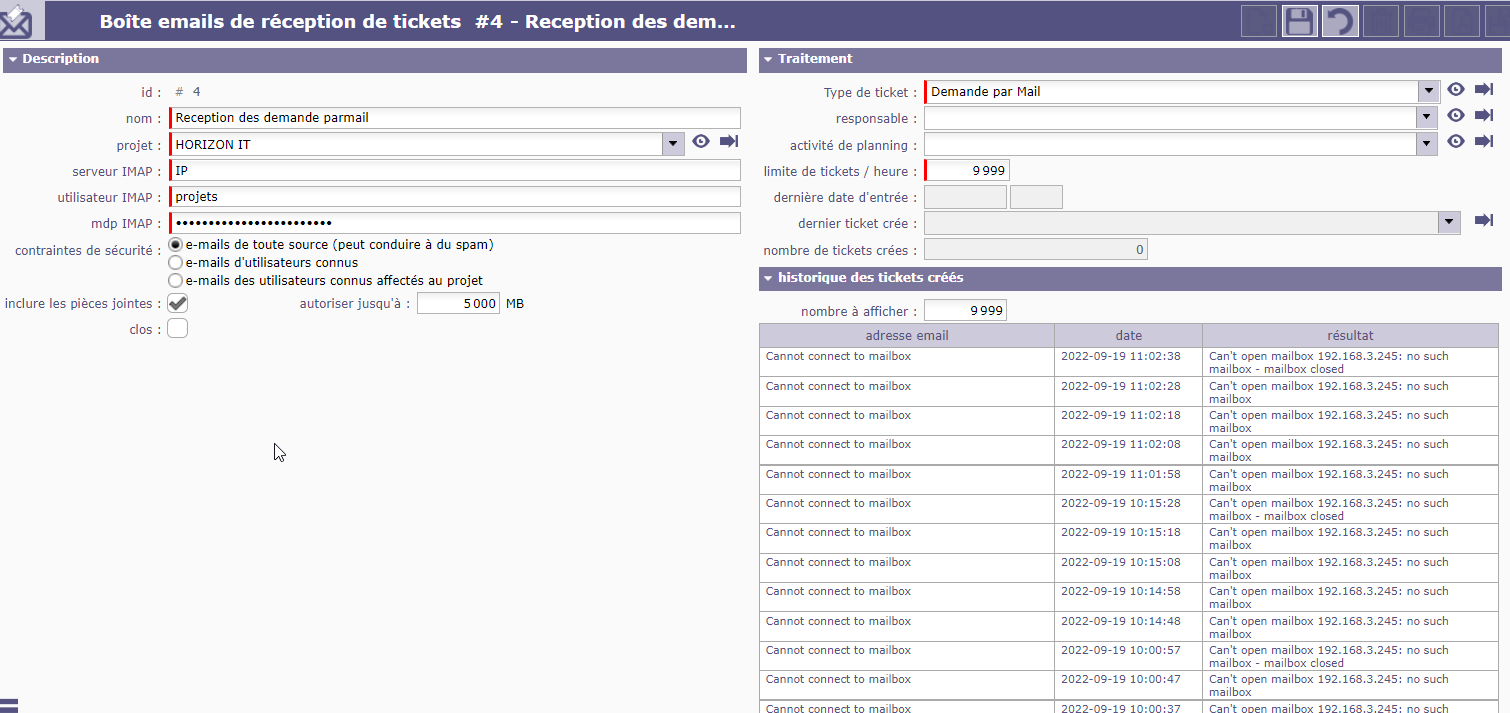
Bonjour
Je suis entrant de paramétrer la réception d'email à travers QTOR avec le protocole IMAP
J'ai testé mes paramètres à travers un client de messagerie et je parviens à me connecter correctement
Mon serveur IMAP utilise le port 993 avec SSL .
Je ne parviens pas à trouver l'endroit ou spécifié le numéro du port IMAP ni le SSL pour la réception des emails
Pouvez-vous m'indiquer les informations pour que je puisse paramétrer la réception des mails dans QTOR
D'avance merci Hello
I am entering to configure the reception of email through QTOR with the IMAP protocol
I tested my settings through an email client and I manage to connect correctly
My IMAP server uses port 993 with SSL.
I can't find where to specify the IMAP port number or the SSL for receiving emails
Can you tell me the information so that I can configure the reception of emails in QTOR
Thanks in advance

Hello,
You can open the manual when you're on the "input mailbox for tickets" screen (by pressing F1 or opening the manual into your ProjeQtOr instance).
There, you'll find some usefull information about your imap server.
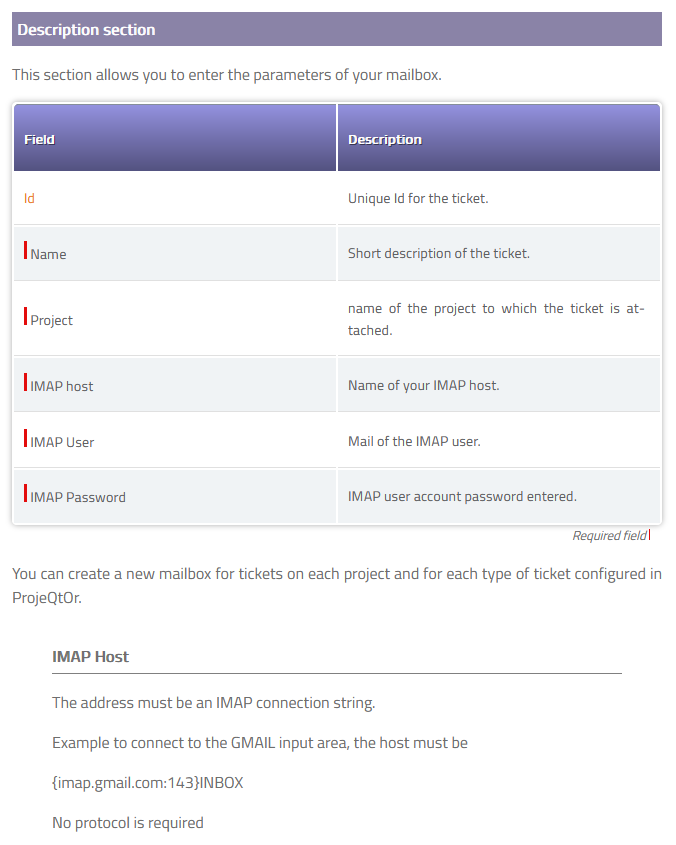
https://manual.projeqtor.org/html_en/Ticket.html#ticket-fromemail
You probably should enter your imap and port information in the "imap server" field.
Something like :
imap.xxxx.xxx:993
(replace the xxx with your info)

To configure IMAP through SSL, I know there is an option on Global paramleters.
But I'm not sure it works on Mailbox for tickets. You should try
Hello
I modified the information and to date the mailbox that receives the tickets is still activated and I have no error message in the logs.
I created a ticket type with a workflow, but I still don't receive an email?
I saw the SSL parameters in "Global Parameter" but it is the configuration of the answer to the mail (function which I do not use)
Is there anything else to configure to receive emails in the ticket section?
Hello,
The syntax of your IMAP server is probably wrong (IP address is not expected there).
In my previous post, I mentioned the manual and copied the extract about the configuration you're looking for.
For instance, for gmail, you must type
{imap.gmail.com:143}INBOX
(don't forget the { } )
So you should input your email server domain, there (and your 993 port). Maybe you can ask the administrator of your company to get those infos.
Also, your IMAP user "Projets" or "projets" is weird. We usually expect a full email address there (such as name.lastname@domain.com) or at least the left part of it (name.lastname). Are you sure you have the right information ?
Obviously, you won't receive any email as long as you get the error message (on the right of your picture) : "cannot connect to mailbox"
So you really need the right imap server and user informations.
ello
Thank you for your answers
I have modified the information in relation to your recommendations
I obviously have no error but the email does not reach the ticket section
Is there another parameter to configure to allow the reception of emails in the ticket section?
Bonjour
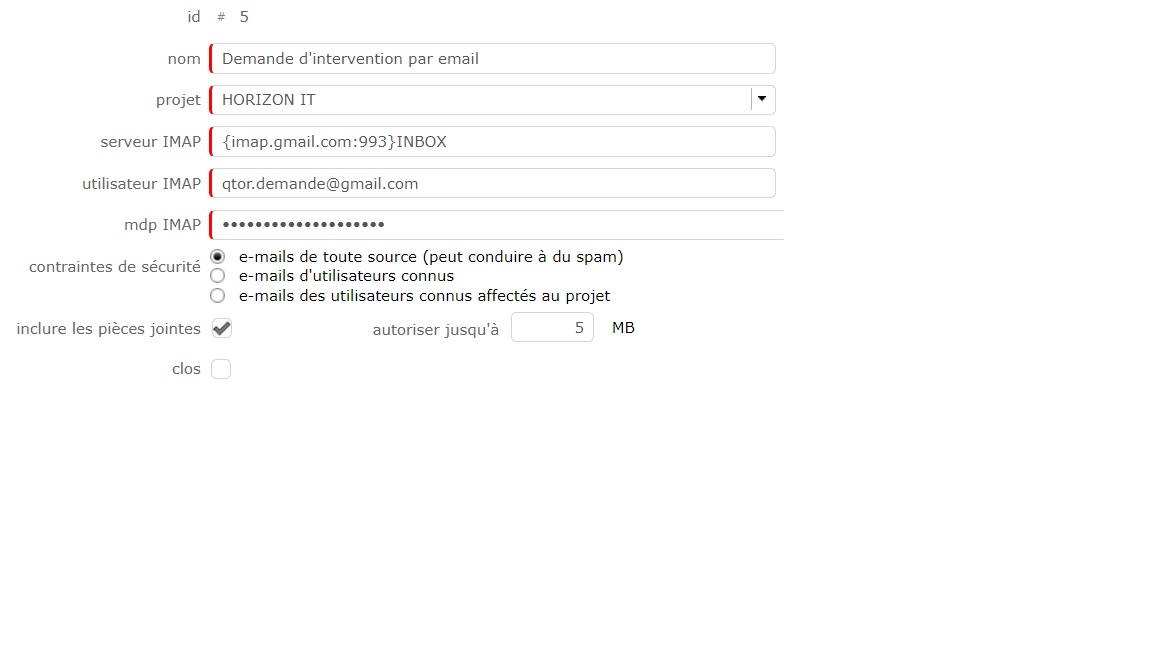
Suite à la formation administrateur, j'ai modifié les informations IMAP communique et j'ai même ouvert une adresse mail GMAIL avec activation du protocole IMAP et les infos ci-dessous pour recevoir des mails .
J'ai respecté la syntaxe fournis
Pourquoi je ne peux pas recevoir de mail ?
Merci pour vos remarques
cordialement

Hello,
Your configuration seems correct, so the problem is probably with a password or another personal field.
If you can send your log file to see the problem.
Also please respect forum rule and write post only in english !
If my remembering is correct, Google requires that you define application allowed to request over IMAP.
Allowing IMAP is not enough
HELLO
I set up imap gmail with the following information {imap.gmail.com:993}INBOX I also tried {imap.gmail.com:143}INBOX
When restarting crom, the setting changes to "CLOSED" Can you give me additional syntax to make imap reception work.
For information I installed a new VM of QTOR.
THANK YOU