
Welcome to ProjeQtOr new Forum. We migrated old forum to the new website.
You will find all your posts here, with your usual account.
Just one point : you’ll have to reinitialize your password. Use “Lost password” feature.

Hi,
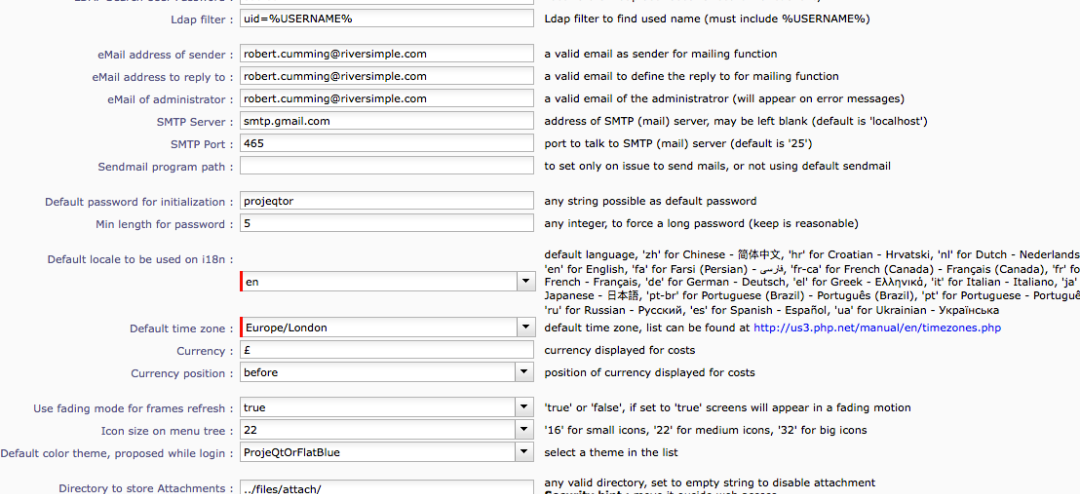
I have recently set up projeqtor and I am trying to configure it to run with my email address.
I have tried the attached configuration.
can you please advise?
Many T
hanks
Bob

First check that SSL is ocrrectly enabled on your php server.
Then go to global parameters and enter valid gmail account (gmail does not allow anonymous emailing through its servers).
Last, to be sure, enter smtp server as : ssl://smtp.gmail.com (to force ssl access)
hi There, thank you for your help. I believe I have set up ssl on my PHP server but I am not sure how to check this. I have tried to input ssl://smtp.gmail.com to force ssl but after I have saved it and return to the global parameters page I see only this smtp.gmail.com. I have pasted an excerpt from the log in the hope that it helps. Please can you point me in the right direction?
2017-08-21 13:45:01.272 ===== TRACE ===== NEW CONNECTED USER 'admin' (using remember me feature)
2017-08-21 13:55:36.643 ===== TRACE ===== DISCONNECTED USER 'admin'
2017-08-21 14:09:13.713 ===== TRACE ===== NEW CONNECTED USER 'admin' (using remember me feature)
2017-08-21 14:13:35.344 ===== TRACE ===== NEW CONNECTED USER 'admin'
2017-08-21 16:54:51.430 ** ERROR ** [V6.3.2] Error sending mail
2017-08-21 16:54:51.448 ** ERROR ** [V6.3.2] SMTP Server : smtp.gmail.com
2017-08-21 16:54:51.448 ** ERROR ** [V6.3.2] SMTP Port : 465
2017-08-21 16:54:51.465 ** ERROR ** [V6.3.2] Mail stored in Database : #10
2017-08-21 16:54:51.494 ** ERROR ** [V6.3.2] PHPMail error : SMTP connect() failed. https://github.com/PHPMailer/PHPMailer/wiki/Troubleshooting
2017-08-21 16:54:51.494 ** ERROR ** [V6.3.2] PHPMail debug :
2017-08-21 16:56:53.336 ===== TRACE ===== DISCONNECTED USER 'admin'
2017-08-21 18:37:27.541 ===== TRACE ===== NEW CONNECTED USER 'admin'
2017-08-21 18:39:42.716 ** ERROR ** [V6.3.2] Error sending mail
2017-08-21 18:39:42.717 ** ERROR ** [V6.3.2] SMTP Server : smtp.gmail.com
2017-08-21 18:39:42.832 ** ERROR ** [V6.3.2] SMTP Port : 465
2017-08-21 18:39:42.833 ** ERROR ** [V6.3.2] Mail stored in Database : #11
2017-08-21 18:39:42.890 ** ERROR ** [V6.3.2] PHPMail error : SMTP connect() failed. https://github.com/PHPMailer/PHPMailer/wiki/Troubleshooting
2017-08-21 18:39:42.892 ** ERROR ** [V6.3.2] PHPMail debug :
2017-08-21 18:46:40.287 ** ERROR ** [V6.3.2] Error sending mail
2017-08-21 18:46:40.309 ** ERROR ** [V6.3.2] SMTP Server : smtp.gmail.com
2017-08-21 18:46:40.309 ** ERROR ** [V6.3.2] SMTP Port : 465
2017-08-21 18:46:40.326 ** ERROR ** [V6.3.2] Mail stored in Database : #12
2017-08-21 18:46:40.326 ** ERROR ** [V6.3.2] PHPMail error : SMTP connect() failed. https://github.com/PHPMailer/PHPMailer/wiki/Troubleshooting
2017-08-21 18:46:40.327 ** ERROR ** [V6.3.2] PHPMail debug :
Following your last post I went through my system to try and understand whether or not I had an ssl connection. I did not! So I have now ensured that I have the SSL set up work and it appears to be working as it should. However I still can't connect to gmail.the log files suggest it is still an smtp connection failure. I did seem to have trouble changing the values on the global parameters page. Please can you help? I feel that I am very close to having a working platform. I have attached a screenshot of my global parameters and a copy of the log file.
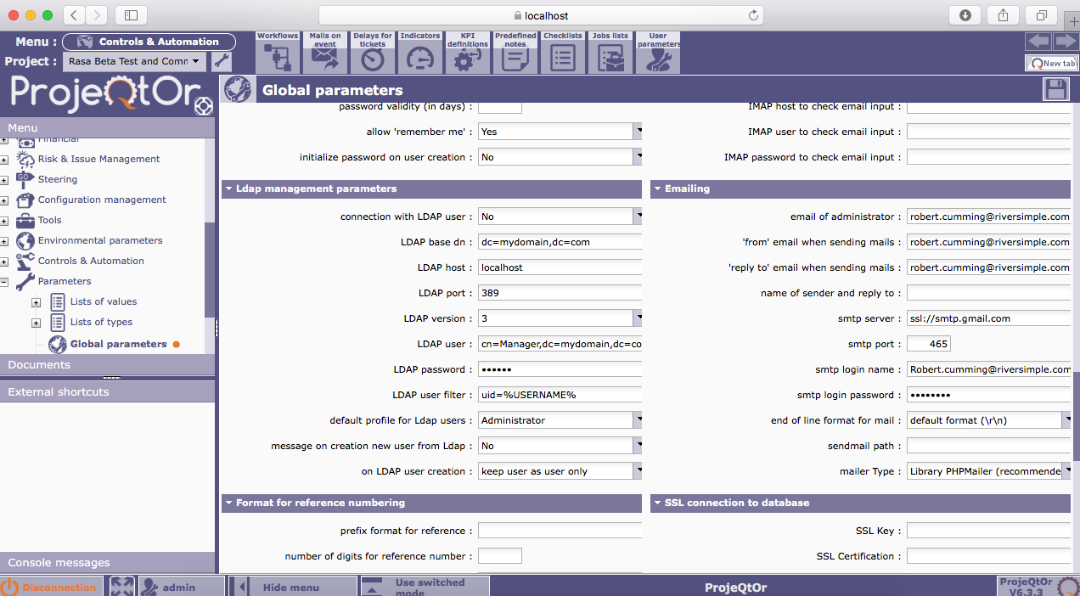
smtp account must be a valid gmail account (something like yourname@gmail.com)

Hi Bob,
I had the same problem. I found the answer at:
https://github.com/PHPMailer/PHPMailer/wiki/Troubleshooting
The solution for me was to enable less secure apps in the google account settings.
hope this helps for you too,
Ruud.