
Welcome to ProjeQtOr new Forum. We migrated old forum to the new website.
You will find all your posts here, with your usual account.
Just one point : you’ll have to reinitialize your password. Use “Lost password” feature.

I had one user report this following the upgrade, it has now gone up to 3 users reporting the issue.
Users report that if you change the project view to a single project, it will work fine, but if you change to "PROJECT" containing many sub projects it will cause this error.
These users all use Chrome, but we have also tested Firefox on users that are affected, and this issue continues to show on there. It seems that once this issue has appeared for their user, it will then persist.
Additional info:
- Clicking the ... records will load the bottom pane correct
- This makes searching impossible for these users
- Many things tried, clearing cache, trying virtual machines but the issue persists on what looks to be a user by user basis.
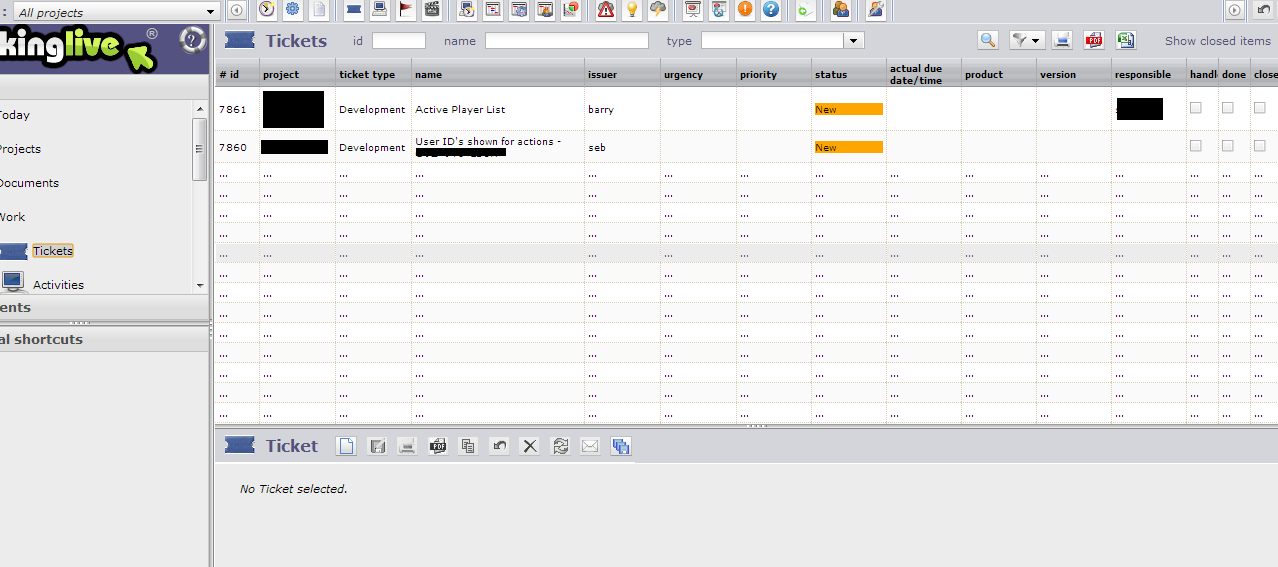

Hi Babynus,
it's the same issue I just reported. We have the same display errors.
Regards,
Klaus
It is also worth noting, that after the initial login and seeing the 0% bar... subsequent logins this is not visible.
User also reported no switched mode buttons on first login, which then reappeared once the 0% bar had gone.
The culmination of these issues would suggest an issue with that JS file that is causing all of this?

I have the same issue 🙁
More information regarding this.
Users OS differ, some using Firefox, some using Chrome on both Linux and Windows 7.
The recorded errors are:
1. Uncaught TypeError: Cannot call method 'getHours' of NULL projectorDojo.js?version=V3.4.0:15
2. _bcc is null

Hi,
Could you try to change /model/Ticket.php to remove line 63
${actualDueDateTime}
Does is fix the issue ?
NB : it is not a final fix as it removs a columns in the display, just a hint for me to find a fix.
Do you mean line 62?
This is the line number my end. I can confirm removing this fixes it for the clients involved.
Yes, that's right, line 62.
Happy it fixes the issue. So I can now find a definitive fixing.
It is a dojo regression in V1.9.0.
I'll try V1.9.1, maybe it fixes this issue.
I'll also look for a workaround.
Brilliant, thanks for the help!
Unfortunately, I cannot reproduce issue to fix it definitively.
Could you give some precisions:
- the locale (language) used by users facing the issue
- the defaut date format in the locale (MM-DD-YYYY for instance)
- one exemple of the "inital due date" and "actual due date" for the first ticket in the list appering with ...
Thanks.
Hi all,
what helped in our team, was to change language to English UK. It's a workaround, not a solution, but it helps.
Klaus
Hi all,
what helped in our team, was to change language to English UK. It's a workaround, not a solution, but it helps.
Klaus
Am I missing something here? There is only
English
French
German
Spanish
Portuguese
Russian
Chinese
In our list... there is no ENGLISH US and ENGLISH UK variants?
If you mean the OS Locale then all set to English (United Kingdom)
SD: dd/MM/yyyy
LD: dd MMMM yyyy
ST: HH:mm
LT: HH:mm:ss
Sorry, have not been as exact: You have to change this in your browsers paramenters, not in Projectorria. 😳
Ok, looks like that does indeed work.
There is of course only one proper English, and that is English UK 😛
That is a very strange error, not seen that before.
I will consider this one fixed... but certainly just a workaround until light and be shed on why this happens.
Great find climb4fun
Hi,
I found the cause of the issue : it is a Dojo regression in V1.9.
The dojo.date.locale.parse fails when time format in 12 hours based (with AM/PM).
Every locale with 24 hours locale works fine.
I so could think of a workaround :
In /view/js/projectorFormatter.js, replace function dateTimeFormatter() with this one :
function dateTimeFormatter(value) {
  if (value && value.length==19) {
  	vDate=dojo.date.locale.parse(value, {datePattern: "yyyy-MM-dd", timePattern: "HH:mm:ss", selector: 'date'});
  	if (! vDate) {
  	  return dateFormatter(value.substr(0,10))+" "+value.substr(11);
  	}
    return dojo.date.locale.format(vDate, {formatLength: "short", fullYear: true});
  } else {
  	return value;
  }
}
Hi Babynus,
congratulation, bug is fixed. It works. :woohoo:
Btw. I dismissed all previous bugfix suggestions and made only your suggested workaround (see below).
Thanks,
Klaus
I tested with Dojo 1.9.1 : issue persist.
I opend a Ticket in Dojo bug Tracker : #17342.
I found another fix which is still better than previous, as it preserves expected timle format:
function dateTimeFormatter(value) {
  if (value && value.length==19) {
  	vDate=dojo.date.locale.parse(value, {datePattern: "yyyy-MM-dd", timePattern: "HH:mm:ss", selector: 'date and time'});
  	if (! vDate) {
  	  vDate=new Date(value.substr(0,4),value.substr(5,2),value.substr(8,2),value.substr(11,2),value.substr(14,2),value.substr(17,2),0);
  	  if (! vDate) {
  	    return dateFormatter(value.substr(0,10))+":"+value.substr(11,5);
  	  }
  	}
    return dojo.date.locale.format(vDate, {formatLength: "short", fullYear: true});
  } else {
  	return value;
  }
}
function timeFormatter(value) {
  if (value.length==19) {
  	vDate=dojo.date.locale.parse(value, {datePattern: "yyyy-MM-dd", timePattern: "HH:mm:ss", selector: 'date and time'});
  	if (! vDate) {
  		vDate=new Date(value.substr(0,4),value.substr(5,2),value.substr(8,2),value.substr(11,2),value.substr(14,2),value.substr(17,2),0);
    	if (! vDate) {
    	  return value.substr(11,5);
    	}
    }
    return dojo.date.locale.format(vDate, {formatLength: "time"});
  } else {
  	return value;
  }
}
This fix will be included in V3.4.1