
Welcome to ProjeQtOr new Forum. We migrated old forum to the new website.
You will find all your posts here, with your usual account.
Just one point : you’ll have to reinitialize your password. Use “Lost password” feature.

Hello,
I'm setting an indicator to raise warning and alert when the consumption of an activity has reached 80%.
I'm in the section "Indicator" (not "Indicator per project"):
I set up an alert with:
Element = activity
Type = empty
Project = empty
Indicator = "real work compared to validated work"
Reminder = 80%
Alert = 90%
Recording the indicator works fine.
However, I can not retrieve it and modify it. (It does not show in the list of indicator)

Hello,
Does the list is fully empty ?
Have you tried with another indicator ? This one is it shown on the list ?
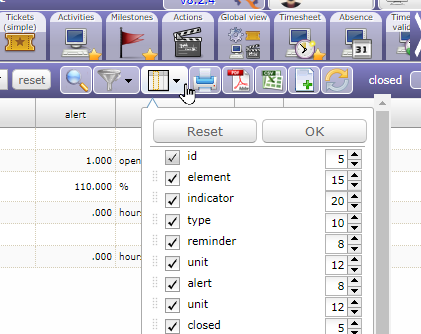
Please, reset the display of the columns organization, (see below)
Regards.
Dear Alain,
I created an other indicator with same configuration, saving is successfull, but I still cannot see it in the list of indicators.
I reset the columns (which I didn't edit), but same result. the indicator created doesn't appear in the list.
The problem is when there is no project selected, it does not display.
I should be able to see it even when no project is selected. Especially as I'm in the section "Indicator" and not "Indicator per project"

Hello Martin,
we cannot reproduce your issue, because we need more information about this issue.
send screenshot of indicator definition,
check your log file and console log,
check if you dont have filter actived on indicator and if your indicator is not closed.
what is your Projeqtor version ?

This issue may happen if you deleted the allocation to the project of a resource assigned to an activity of the project with a "recurrent" planning mode.
Quick workaround is to re-create the allocation.
Issue recorded as Ticket #4348.
Fix is to replace line 1040 in model/plannedWork.php from
$rateProj=Resource::findAffectationRate($ress[$projectKey]['rate'],$currentDate) / 100;
to
$rateProj=(isset($ress[$projectKey]))?Resource::findAffectationRate($ress[$projectKey]['rate'],$currentDate) / 100:0;
Fix will be incuded in V8.3.0